TickTick Alternatives for Mac in 2026: 7 Apps Compared
The best TickTick alternatives for Mac in 2026: NotchOwl ($12 once) in the notch, Things 3 to pay once, Todoist for sharing, and Apple Reminders for free.
By Aditya Jaiswal, founder of NotchOwl · Updated · 13 min read
The best TickTick alternatives for Mac are NotchOwl ($12 once), which keeps today’s tasks and a focus timer in the MacBook notch, Things 3, Todoist and Apple Reminders. NotchOwl suits you if your list keeps disappearing behind other windows. If you want a calmer, Mac-first app you pay for once, Things 3 ($49.99 for the Mac) is the most polished. If you want better capture and sharing, Todoist is the cross-platform swap. And if you don’t want to pay at all, Apple Reminders is already on your Mac.
A note on bias: NotchOwl is my own app. Each app below, mine included, is described by what its maker says it does, with its weak spots next to its strengths, and there’s a section on when to stay with TickTick. Facts come from each app’s website, help center or App Store listing as checked on November 12, 2026, at US prices.
Quick picks
Best for keeping today’s list and a timer in view on a Mac: NotchOwl, $12 once
Best Mac-first list you buy once: Things 3, $49.99 for the Mac
Best for fast capture and shared projects: Todoist, free or Pro at $5 a month billed yearly
Best for more structure than TickTick: OmniFocus 4, from $74.99 once
Best free app on Apple devices: Apple Reminders
Best free app for Windows and Outlook users: Microsoft To Do
Best visual timeline for the day: Structured, free to start
What TickTick does well on a Mac
TickTick is a lot of app for the money, and its Mac version does more outside its window than most to-do apps. It’s worth knowing what you’d give up before you switch.
Capture from anywhere. Command–Shift–A adds a task without leaving the app you’re in, and TickTick reads dates and times typed into the title.
The menu bar. Command–Shift–O opens your tasks from the menu bar and can start a focus session there, according to TickTick’s Mac page.
Desktop sticky notes. Pin a task to your screen so it stays visible.
Calendar beside the list. Your task list and calendar sit side by side, and a daily wrap-up summarizes what you finished.
Modules built in. A Pomodoro timer and stopwatch, a habit tracker, an Eisenhower Matrix and countdowns, in one app.
Price. The free plan allows 9 lists of 99 tasks, 2 reminders per task and 5 habits. Premium costs $49.99 a year and raises those limits to 299 lists, 999 tasks per list, 5 reminders per task and 299 habits, adding multiple calendar views and task durations, per TickTick’s Premium page. The Mac App Store listing also sells Premium at $4.99 a month and needs macOS 12 or later.
Why people look for a TickTick alternative
Too much in one app. Timer, habits, matrix, countdowns, calendar and AI all compete for space. TickTick lets you switch modules off, but some people would rather use an app built around one job.
It doesn’t feel like a Mac app. TickTick runs on Mac, Windows, Linux, iPhone, iPad, Android and the web from one design. People who only use Apple devices often prefer an app made for them.
Premium is a subscription. Calendar views beyond the basic one, task durations and AI features need Premium, and there is no one-time purchase.
The free plan’s caps. Nine lists and one attachment a day, per TickTick’s Free vs Premium table, are tight once a list becomes a system.
Your data lives in TickTick’s cloud. Some people want tasks stored on their own Mac or in iCloud.
The list is still a window. The menu bar window helps, but your day is out of sight until you open it.
TickTick alternatives compared
TickTick and seven Mac alternatives compared on price, timer, habits, calendar and platforms (US prices, November 2026)
App
Price
Focus timer
Habits
Calendar
Runs on
TickTick
Free; Premium $49.99/year
Pomodoro and stopwatch
Yes, 5 free, 299 Premium
Basic free; more views with Premium
Mac (macOS 12+), Windows, Linux, iOS, Android, web
NotchOwl
$12 once for up to 3 Macs
Countdown or stopwatch beside the notch; no break timer
No
Reads events two weeks ahead; can’t edit
Apple silicon Macs (macOS 14+); iPhone and Watch through Reminders sync
Things 3
$49.99 once for the Mac; $9.99 iPhone
None
No
Shows events in Today and Upcoming
Mac (macOS 13.3+), iPhone, iPad, Apple Watch, Vision Pro
Todoist
Free; Pro $5/mo yearly or $7 monthly
None
No
Google and Outlook events; calendar layout on Pro
Mac, Windows, Linux, iOS, Android, web
OmniFocus 4
$74.99 or $149.99 once; or $99.99/year
None
No
Forecast shows events beside tasks
Mac, iPhone, iPad, Apple Watch, Vision Pro; web with subscription or add-on
Apple Reminders
Free, built in
None
No
Scheduled reminders show in Calendar
Mac, iPhone, iPad, Apple Watch, Vision Pro; icloud.com
Microsoft To Do
Free
None
No
Tasks sync with Outlook
Mac (macOS 13+), Windows, iOS, Android, web
Structured
Free; Pro monthly, yearly or $99.99 lifetime (US App Store)
Pomodoro, free
No
Timeline; calendar import with Pro
Apple devices (Mac on macOS 15+), Android, web
The best TickTick alternatives for Mac in 2026 are NotchOwl ($12 once) to keep today’s tasks and a focus timer in the MacBook notch, Things 3 ($49.99 once) for a calm Mac-first list, Todoist for capture and sharing, OmniFocus 4 for structure, and Apple Reminders or Microsoft To Do for free.
The best TickTick alternatives for Mac
NotchOwl: today’s tasks and a focus timer in the notch
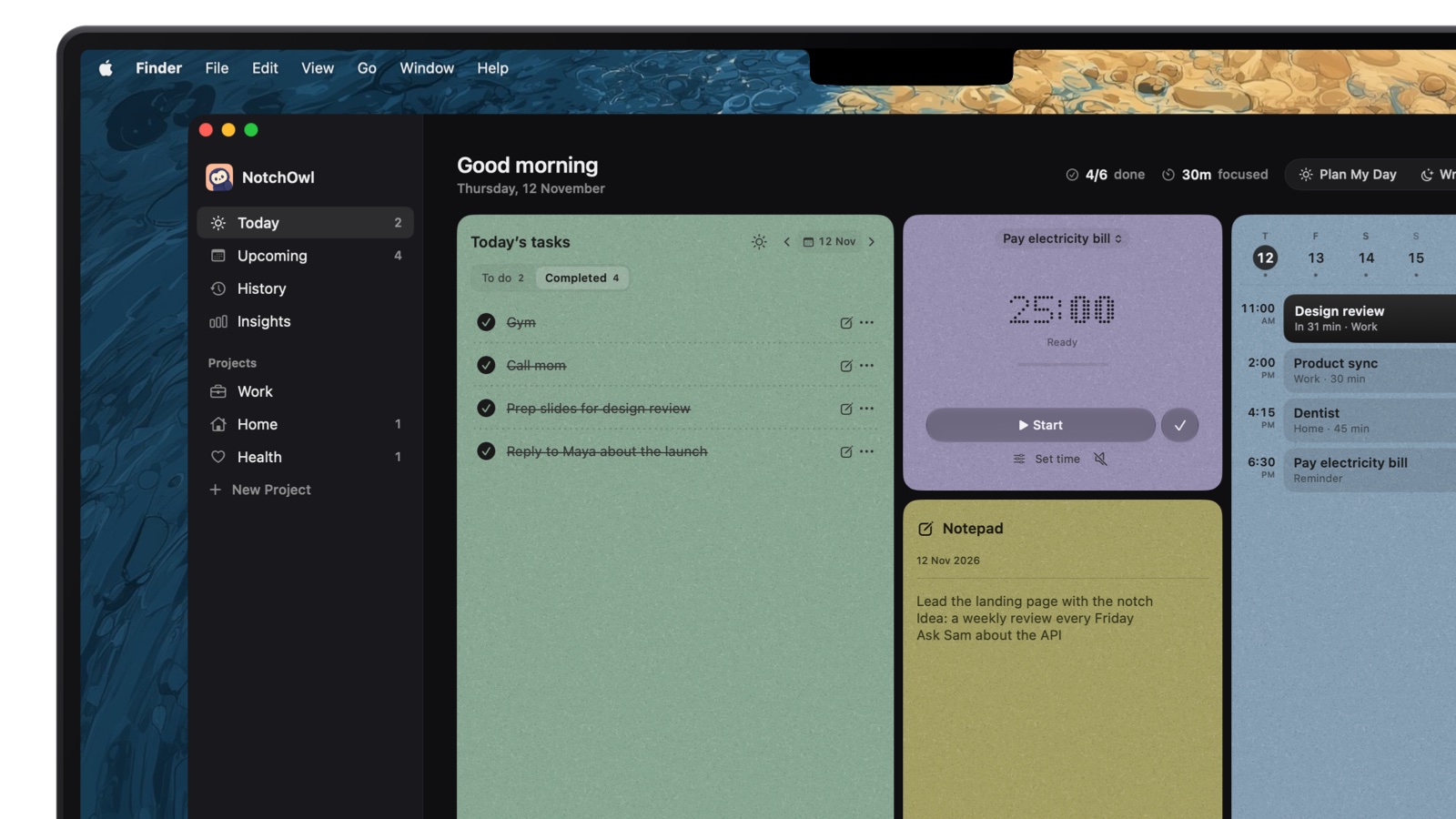
NotchOwl takes TickTick’s menu bar idea further: your day lives in the MacBook notch. Move the pointer to the notch or press Option–N, and today’s tasks, a focus timer, a daily notepad and the next two weeks of calendar events open over the app you’re using.
The app window shows today as cards: tasks, the focus timer, the notepad and your events.
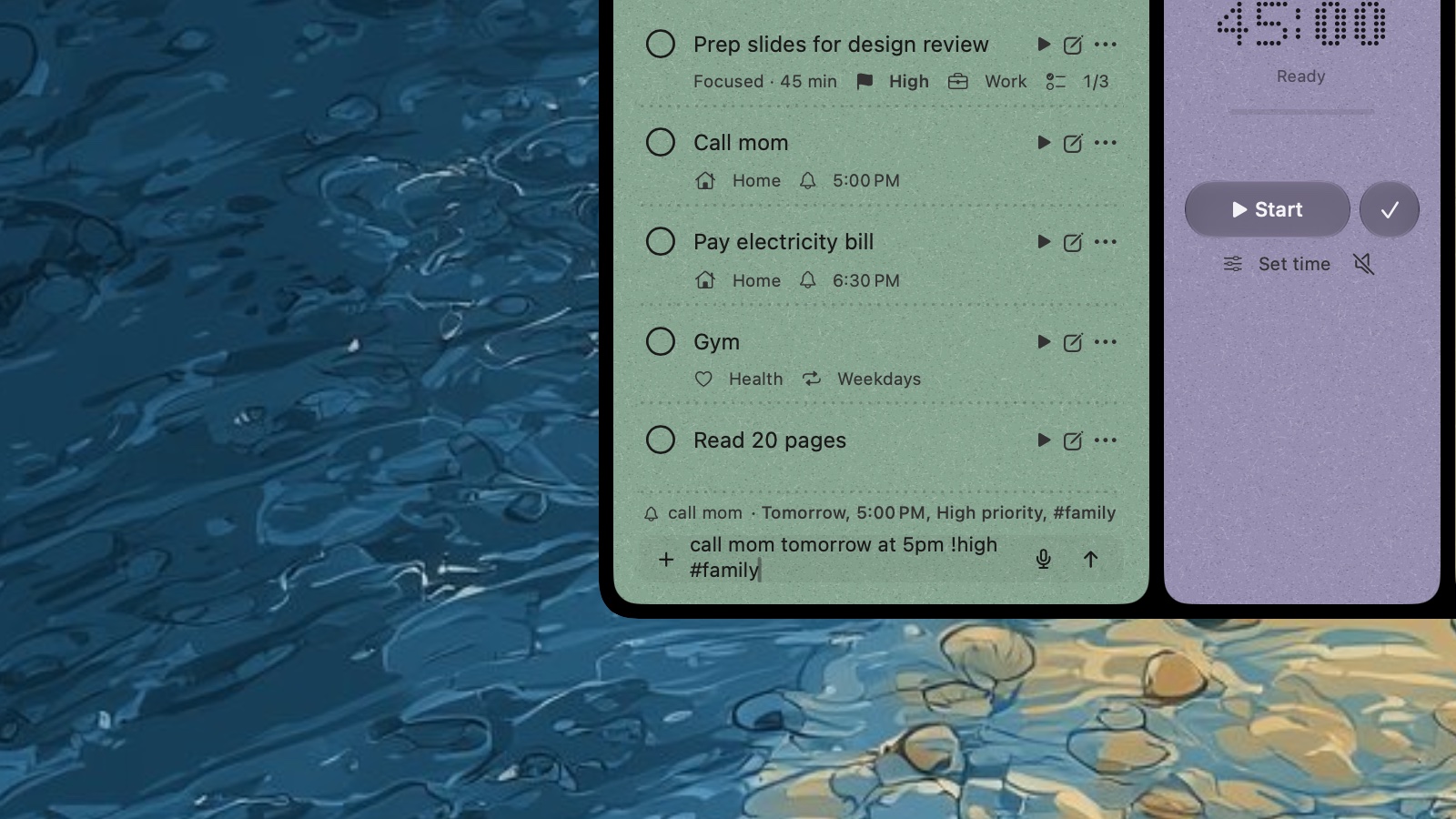
Capture like TickTick. Type a task the way you’d say it, and NotchOwl reads the day, time, priority and project before you add it. Dictation is recognized on the Mac, and several tasks can go on one line, separated by semicolons.
A timer tied to tasks. Start a countdown (15, 25, 45 or 60 minutes, or your own length) or a stopwatch on a task or on its own. It runs beside the closed notch, with optional brown noise, pink noise, rain or ocean sounds.
Reminders you can’t miss. When a task’s time comes, the notch opens with a chime and Snooze or Done.
A planned day. Plan your day fits today’s untimed tasks into the free time around your events, each with a reminder; unfinished tasks wait on an Overdue tab with Reschedule, and Wrap up moves what’s left to tomorrow.
Around the Mac. Desktop widgets for Today and Focus, Shortcuts and Siri actions, a menu bar menu, and a local MCP server so Claude and Cursor can manage tasks.
Type naturally: NotchOwl shows the day, time, priority and project it read before you add the task.
With the notch closed, the focus timer stays in view:
The countdown stays beside the closed notch while you work.
One person wrote on X:
the focus timer sitting beside the notch fits way too well
NotchOwl costs $12 once for up to 3 Macs (an early-bird price, normally $39), with lifetime updates and a 7-day money-back guarantee; there is no free tier or trial. It runs on Apple silicon Macs with macOS 14 Sonoma or later, keeps tasks on your Mac, and reaches iPhone and Apple Watch through optional two-way Apple Reminders sync.
Better than TickTick: today’s list one hover away over any app, reminders that open the notch, tasks that stay on your Mac, and one payment.
Worse than TickTick: no habit tracker, no Eisenhower Matrix, no shared lists, and no iPhone, Windows or web app. The calendar is read-only, and the timer doesn’t time breaks or count Pomodoro rounds. NotchOwl is young; its first release was September 15, 2026.
Things 3 by Cultured Code is the opposite of TickTick’s everything-in-one approach: a quiet list built around Today, with a This Evening section, areas, projects with headings and checklists inside to-dos. Calendar events show at the top of Today and in Upcoming, and Quick Entry (Control–Space) adds a to-do from any app.
Price: $49.99 once for the Mac on the Mac App Store (version 3.24.2, macOS 13.3 or later) and $9.99 for iPhone and Apple Watch, with the iPad app sold separately. Cultured Code offers a 15-day Mac trial; there are no trials on iPhone or iPad.
Better than TickTick: design, Mac-native feel and no subscription.
Worse than TickTick: no timer, habits, shared lists or calendar view, and no Windows, Android or web app.
Todoist: better capture and sharing on every platform
Todoist runs everywhere TickTick does, plus Wear OS watches, according to Todoist’s downloads page, and is built for typing a whole task in one line and for sharing projects (see Todoist vs TickTick). The free Beginner plan allows 5 personal projects and 3 filter views; Pro costs $5 a month billed yearly ($60) or $7 monthly and adds the calendar layout, task durations, deadlines, custom reminders and unlimited Ramble voice capture, per Todoist’s pricing page. Business costs $8 per user a month billed yearly.
Better than TickTick: one-line capture with symbols for project, label and priority, shared projects on every plan, a real team plan and many integrations.
Worse than TickTick: no Pomodoro timer or habit tracker, and calendar views need Pro.
Moving from TickTick: Todoist imports a CSV into one project at a time, in its own template with TYPE and CONTENT columns, UTF-8 encoding and up to 300 tasks per project, per Todoist’s CSV guide, so a TickTick backup needs reshaping first.
OmniFocus 4 by The Omni Group suits people who outgrew TickTick’s lists and want defer dates, a Forecast view beside calendar events and a weekly Review of every project. Standard costs $74.99 and Pro $149.99 once, or $99.99 a year by subscription with web access included, per Omni’s pricing page, which also lists a 30-day money-back guarantee. One purchase covers Mac, iPhone, iPad, Apple Watch and Vision Pro.
Better than TickTick: depth, custom perspectives in Pro, and no subscription required.
Worse than TickTick: the highest price here, a steep learning curve, and no Windows or Android app.
Apple Reminders has grown into a capable task app: smart lists, tags, sections, subtasks, time and location reminders, and shared lists where you can assign a reminder to someone. It syncs through iCloud to iPhone, iPad, Apple Watch and Vision Pro. On macOS 15 Sequoia and later, Calendar can show scheduled reminders at their time, and you can create, edit and complete them there.
Better than TickTick: free, no account to create, and works with many Mac apps. Apple Reminders in the menu bar shows ways to keep it in view.
Worse than TickTick: no timer, habits or Windows and Android apps.
Microsoft To Do: free, with Outlook
Microsoft To Do is free with no paid tier and runs on Mac (macOS 13 or later), Windows, iOS, Android and the web. Its My Day list starts empty each morning, and tasks sync with Outlook, including flagged emails.
Better than TickTick: everything free, including shared lists.
Worse than TickTick:Microsoft’s help page lists smart date recognition for the Windows and iOS apps only, and the Mac app’s last update, version 2.177, came out on July 6, according to its Mac App Store listing.
Structured: the day as a timeline
If you used TickTick’s calendar and timeline views more than its lists, Structured shows tasks and events on one vertical timeline. The timeline, an inbox and a Pomodoro focus timer are free; Pro adds an AI that drafts your day, calendar and Reminders import, and Replan for missed tasks, per its App Store listing, where the US price includes a $99.99 lifetime option.
Better than TickTick: a clearer picture of how the day’s hours fill up.
Worse than TickTick: weaker for long lists and projects; the Mac app needs macOS 15 or later.
Replacing TickTick’s Pomodoro timer and habit tracker
Most TickTick alternatives drop the timer and the habits, so plan for them.
Timer: NotchOwl’s focus timer sits beside the notch and ties sessions to tasks, and Structured includes a Pomodoro timer. For strict Pomodoro rounds with long breaks, a dedicated app such as Be Focused or Session works next to any list; the best Pomodoro timer apps for Mac compares them.
Habits: Streaks by Crunchy Bagel costs $5.99 once on the App Store, tracks up to 24 habits and runs on Mac (macOS 14.6 or later), iPhone, iPad, Apple Watch and Vision Pro. A repeating task in any to-do app also works for one or two habits.
Focus statistics: NotchOwl’s Insights shows completed tasks, focus time, your streak and your peak hours.
How to move your tasks out of TickTick
Back up. In TickTick’s web app, generate a backup of your data so nothing is lost.
Use an importer where there is one. Todoist imports CSV files in its own template, one per project, so expect to reshape the backup.
Re-add active tasks elsewhere. Things 3, Apple Reminders, OmniFocus and NotchOwl have no TickTick importer. Copy the tasks you’ll actually do; in NotchOwl, paste them into the notepad and press Command–Return on each line to turn it into a task.
Or let an AI do the copying. TickTick’s MCP guide gives its official server address, https://mcp.ticktick.com, which signs in with OAuth or a token, and several apps here have MCP servers too; to-do apps you can connect to Claude explains how Claude can read from one and add to another.
Rebuild repeats and habits. Recreate repeating tasks, reminders and habits by hand, then run both apps for a week before deleting anything.
When to stay with TickTick
You use the timer, habits and calendar together. No single app here replaces all three for $49.99 a year.
You work on Windows, Linux or Android too. TickTick runs on all of them; NotchOwl, Things 3 and OmniFocus don’t.
You share lists. TickTick’s plan table allows 29 members on a shared list with Premium and 2 on the free plan.
The free plan is enough. If you’ve never hit the 9-list cap, there’s little reason to switch.
When NotchOwl is the wrong choice
You need habits or Pomodoro rounds. NotchOwl has no habit tracker and doesn’t time breaks; Take a break simply ends the session.
You plan on a calendar. NotchOwl reads your calendar but can’t create or move events.
You use Windows, Android or an Intel Mac. NotchOwl is Mac-only and needs Apple silicon.
You share lists. NotchOwl has no shared or team lists.
You want a trial. NotchOwl has none, only a 7-day refund; TickTick, Todoist, Apple Reminders and Microsoft To Do are free to try.
For most Mac users, the strongest picks are NotchOwl, Things 3, Todoist and Apple Reminders. NotchOwl ($12 once) keeps today’s tasks and a focus timer in the MacBook notch, Things 3 ($49.99 once for the Mac) is the most polished Mac-first list, Todoist is better for capture and sharing, and Apple Reminders is free on every Mac.
Is there a TickTick alternative without a subscription?
Yes. NotchOwl costs $12 once for up to 3 Macs, Things 3 costs $49.99 once for the Mac and $9.99 for iPhone, and OmniFocus 4 Standard costs $74.99 once, as of November 2026. Apple Reminders and Microsoft To Do are free, while TickTick Premium is sold only as a subscription, at $49.99 a year.
Which TickTick alternative has a Pomodoro timer?
NotchOwl has a focus timer (15, 25, 45 or 60 minutes, your own length, or a stopwatch) beside the notch, but it doesn’t time breaks or count rounds. Structured includes a free Pomodoro timer. Things 3, Todoist, OmniFocus, Apple Reminders and Microsoft To Do have none, so pair them with a timer app.
What can replace TickTick’s habit tracker on a Mac?
A dedicated habit app such as Streaks ($5.99 once on the App Store, up to 24 habits, Mac with macOS 14.6 or later) or a repeating task in any to-do app. None of the to-do apps in this comparison has a habit tracker like TickTick’s.
What does TickTick for Mac need, and what does it cost?
TickTick’s Mac App Store version needs macOS 12 or later. The app is free, with 9 lists of 99 tasks and 5 habits; Premium costs $49.99 a year, or $4.99 a month through the App Store, and adds more calendar views, task durations and AI features, as of November 2026.
Can I move my tasks from TickTick to another app?
Yes, with some work. TickTick’s web app can generate a backup of your data, and Todoist imports a CSV into one project at a time in its own template, so the file needs reshaping. Things 3, Apple Reminders and NotchOwl have no TickTick importer, so most people re-add active tasks and rebuild repeats by hand.