Todoist MCP and More: To-Do Apps You Can Connect to Claude
Todoist MCP is official and hosted by Doist. See which other to-do apps connect to Claude and Cursor in 2026: TickTick, Notion, Things 3, Reminders, NotchOwl.
By Aditya Jaiswal, founder of NotchOwl · Updated · 12 min read
Yes, there is an official Todoist MCP server. Doist hosts it at https://ai.todoist.net/mcp, it signs in to your account with OAuth, and it works on every Todoist plan, including the free one. The quickest way to connect it is to find Todoist in Claude’s connector directory; Todoist’s help center has step-by-step guides in Connect Todoist to an AI assistant. Other to-do apps vary a lot: TickTick, Notion, Linear and Sunsama also run official servers, Things 3 and Apple Reminders only have community servers, and NotchOwl has a server built into the Mac app.
I make NotchOwl, so it appears here; everything about the other apps comes from their own documentation, GitHub repositories and help centers, checked in November 2026.
What MCP is, in two sentences
MCP, the Model Context Protocol, is an open standard that lets AI apps such as Claude, ChatGPT and Cursor use tools and data outside the chat. A to-do app with an MCP server lets the assistant read your list and add, change or complete tasks when you ask, instead of you copying things back and forth.
There are two kinds of server. Remote servers run in the app maker’s cloud and you sign in to them, usually with OAuth. Local servers run as a program on your own computer and talk to an app or database there.
In this video from Anthropic, the people who created MCP explain what it is and why apps connect to Claude this way:
The Model Context Protocol (MCP)Anthropic
Which to-do apps have an MCP server
MCP servers for to-do and task apps, as of November 2026
App
Server
Made by
Where it runs
Sign-in
Plan needed
Todoist
Official
Doist
Cloud: ai.todoist.net/mcp; also a local npm package
OAuth, or an API token locally
Any, including free
TickTick
Official
Appest (TickTick)
Cloud: mcp.ticktick.com
OAuth or an API token
Not stated in the setup guide
Notion
Official
Notion
Cloud: mcp.notion.com/mcp
OAuth
Any, including free
Linear
Official
Linear
Cloud: mcp.linear.app/mcp
OAuth, or an API key
Not stated
Sunsama
Official
Sunsama
Cloud: api.sunsama.com/mcp
OAuth
Paid (no free plan)
Akiflow
Official MCP connector
Akiflow
Cloud
Your Akiflow account
Pro
NotchOwl
Built into the app
NotchOwl
On your Mac
None
The $12 license
Things 3
Community (things-mcp)
Independent developer
On your Mac
None; reads local Things data
—
Apple Reminders
Community (mcp-server-apple-events and others)
Independent developers
On your Mac
macOS Reminders permission
—
OmniFocus
Community (OmniFocus-MCP)
A GitHub community project
On your Mac
macOS automation
—
Todoist, TickTick, Notion, Linear and Sunsama run official MCP servers in the cloud that you sign in to with OAuth; Things 3, Apple Reminders and OmniFocus only have community servers that run on your Mac; and NotchOwl has an MCP server built into the Mac app.
Todoist MCP: the official server from Doist
Todoist’s server is published by Doist as open source (MIT license) at github.com/todoist/todoist-mcp. It covers far more than adding tasks: tools include finding tasks by date, adding, updating, completing and rescheduling tasks, projects, sections, labels, filters, comments, reminders, completed tasks and productivity stats. The connection asks for read and write access, so the assistant can create and edit tasks and projects and mark tasks complete.
In Claude (web and desktop). Todoist is in Claude’s connector directory. Todoist’s Claude guide says to click the plus button in a chat, choose Connectors, then Add connector and Browse connectors, search for Todoist and click Connect. Sign in to Todoist, approve access, and start a new chat, because tools load when a conversation begins. On Claude Team and Enterprise, an owner has to enable connectors first.
In Claude Code. The plugin from Todoist’s README sets everything up, and sign-in runs in your browser the first time you use a Todoist tool:
In ChatGPT. Todoist’s ChatGPT guide says to select Plugins in the sidebar, search for Todoist, choose the official plugin, click the plus icon and sign in. Todoist’s help center also has guides for Codex and Gemini Spark.
Locally. Doist publishes the same tools as the npm package @todoist/mcp. Run with npx -p @todoist/mcp todoist-mcp and your Todoist API token in TODOIST_API_KEY, it works with clients that only launch local servers. Your tasks still live in Todoist’s cloud either way.
To disconnect, remove the integration in Todoist under Settings › Integrations; Todoist says revoking the token takes effect immediately.
Things 3 MCP: community servers only
Cultured Code doesn’t publish an MCP server for Things 3. The most established community option is things-mcp by GitHub user hald, an MIT-licensed project that runs on your Mac. It reads your Things data through the open-source Things.py library and adds or updates to-dos through the official Things URL scheme, so it can see Inbox, Today, Upcoming, Anytime, Someday and the Logbook, plus projects, areas and tags.
In Things, open Settings › General and turn on Enable Things URLs.
Install uv, the Python tool the server runs with: brew install uv.
Connect it:
Claude desktop app: download the .mcpb file from the project’s releases page and double-click it, or add uvx with the argument things-mcp to Claude’s config.
Claude Code:claude mcp add-json -s user things '{"command":"uvx","args":["things-mcp"]}'
ChatGPT desktop and Codex:codex mcp add things -- uvx things-mcp
Because it runs on the Mac where Things is installed, the server only works on a Mac, and changes reach your iPhone through Things Cloud like any other edit. Other community servers connect through Things Cloud instead, using an unofficial API, and some ask for your Things Cloud email and password; be wary of those. If you are weighing a different app altogether, see the best Things 3 alternatives for Mac.
Apple Reminders MCP: community servers, or a Reminders sync
Apple doesn’t publish an MCP server for Reminders. Community servers fill the gap by using EventKit, Apple’s framework for reminders and calendars, on your Mac.
mcp-server-apple-events (MIT license) is one of the more active ones. It can create, read, update and delete reminders, lists and subtasks, and also calendar events. It needs Node.js 20 or later, and you add it to Claude’s config or ~/.cursor/mcp.json with the command npx and the arguments -y mcp-server-apple-events. The first time it runs, macOS asks whether the app that launched it, such as Claude or Cursor, may access Reminders; each app needs its own approval in System Settings › Privacy & Security › Reminders. Since it reaches your calendars too, grant Calendar access only if you want the assistant to have it.
Changes made this way are ordinary reminders, so they sync to your iPhone and Apple Watch through iCloud.
There is another route if you’d rather not install a community server: NotchOwl’s optional two-way Apple Reminders sync keeps a NotchOwl list in Reminders in step with your tasks. Tasks Claude adds through NotchOwl’s built-in server land in that list and reach your iPhone. It only covers the NotchOwl list, not your other Reminders lists. For more on Reminders on a Mac, see Apple Reminders in the Mac menu bar.
TickTick MCP: official, in Claude’s directory
TickTick runs an official server at https://mcp.ticktick.com, documented in its help center article TickTick MCP. Claude’s connector directory lists it as made by Appest Inc, the company behind TickTick, with an “Anthropic verified” label. It covers tasks, lists, habits, focus records and countdowns.
Claude: find TickTick in the connector directory, click Connect and sign in.
Claude Code:claude mcp add --transport http ticktick https://mcp.ticktick.com, then /mcp to sign in.
Cursor: add a ticktick entry with "url": "https://mcp.ticktick.com" to .cursor/mcp.json, then click Connect under Tools & MCP.
ChatGPT: install the TickTick plugin from Plugins.
You can also authenticate with an API token from Settings › Account & Security › API Token in TickTick on the web. TickTick’s setup guide doesn’t say a Premium plan is required.
Notion and Linear: official servers for team task lists
Notion MCP is hosted at https://mcp.notion.com/mcp and works on every Notion plan, including free, according to Notion’s getting-started guide. In Claude Code, run claude mcp add --transport http notion https://mcp.notion.com/mcp, then /mcp to sign in. Notion says MCP tools act with your full Notion permissions, so the assistant can reach anything you can. Its older open-source server is no longer actively maintained.
Linear MCP is hosted at https://mcp.linear.app/mcp and signs in with OAuth or a Linear API key, per Linear’s docs. In Claude Code, run claude mcp add --transport http linear-server https://mcp.linear.app/mcp. Linear also offers a read-only endpoint, https://mcp.linear.app/mcp/readonly, a good default if you only want the assistant to look.
NotchOwl: a to-do app with a built-in local MCP server
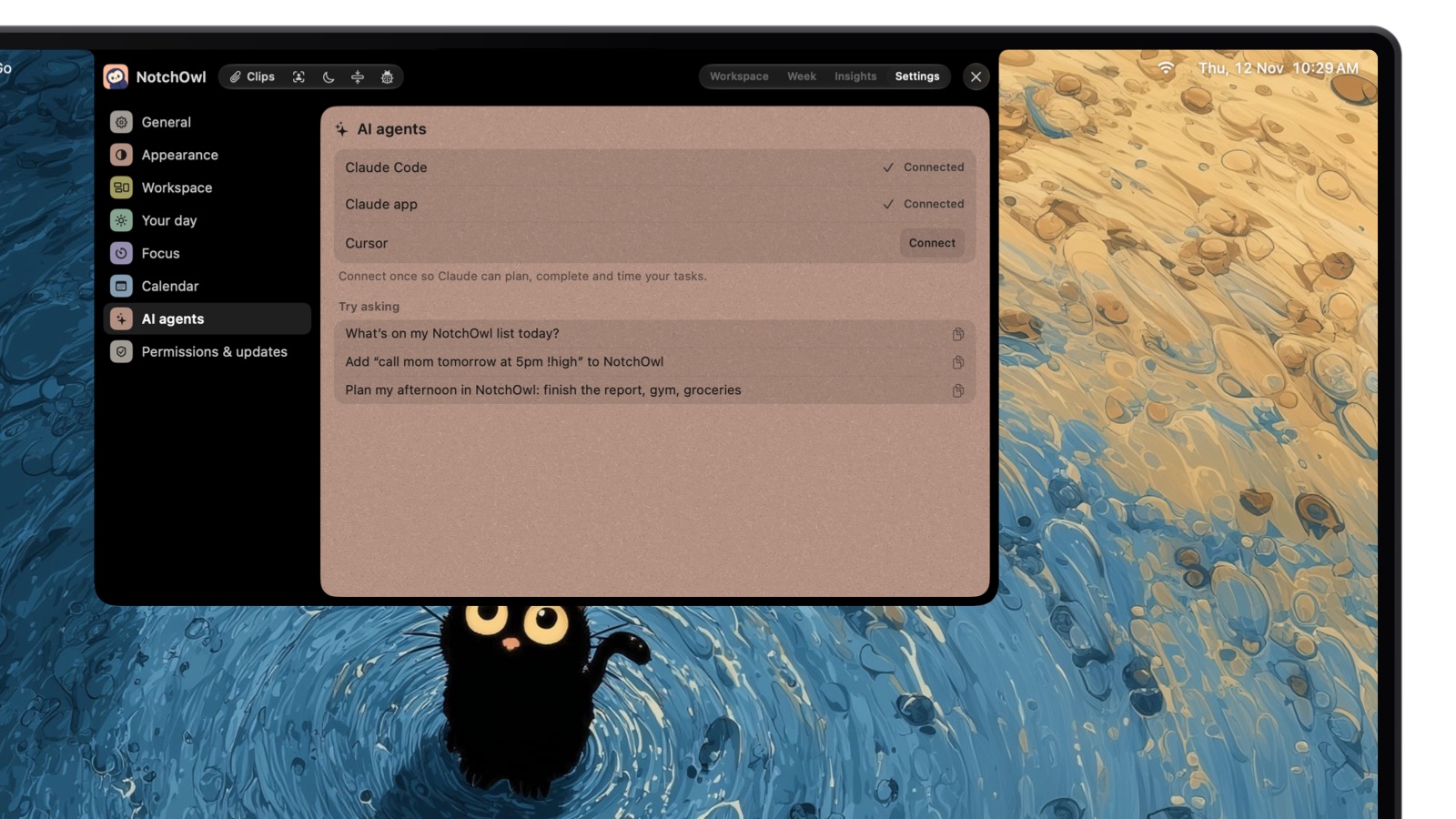
NotchOwl, the planner I make for the MacBook notch, ships its MCP server inside the app rather than as a separate download. In NotchOwl, open Settings › AI agents and click Connect next to Claude Code, the Claude app or Cursor. NotchOwl writes the configuration for you, offers a Restart button for the Claude app or Cursor, and shows example prompts once something is connected. There is no account, API key or Terminal step.
Connected: Claude Code and the Claude app can read and plan your NotchOwl tasks; try a prompt.
Once connected, an agent can add, rename, move and delete tasks, complete or reopen today’s, change a task’s reminder, priority, project, notes, repeat, deadline, time limit or steps, snooze it, read and write the daily notepad, read Insights, and start, pause or stop the focus timer. New tasks are read the way NotchOwl reads what you type, so “call mom tomorrow at 5pm !high #family” gets its day, reminder, priority and project.
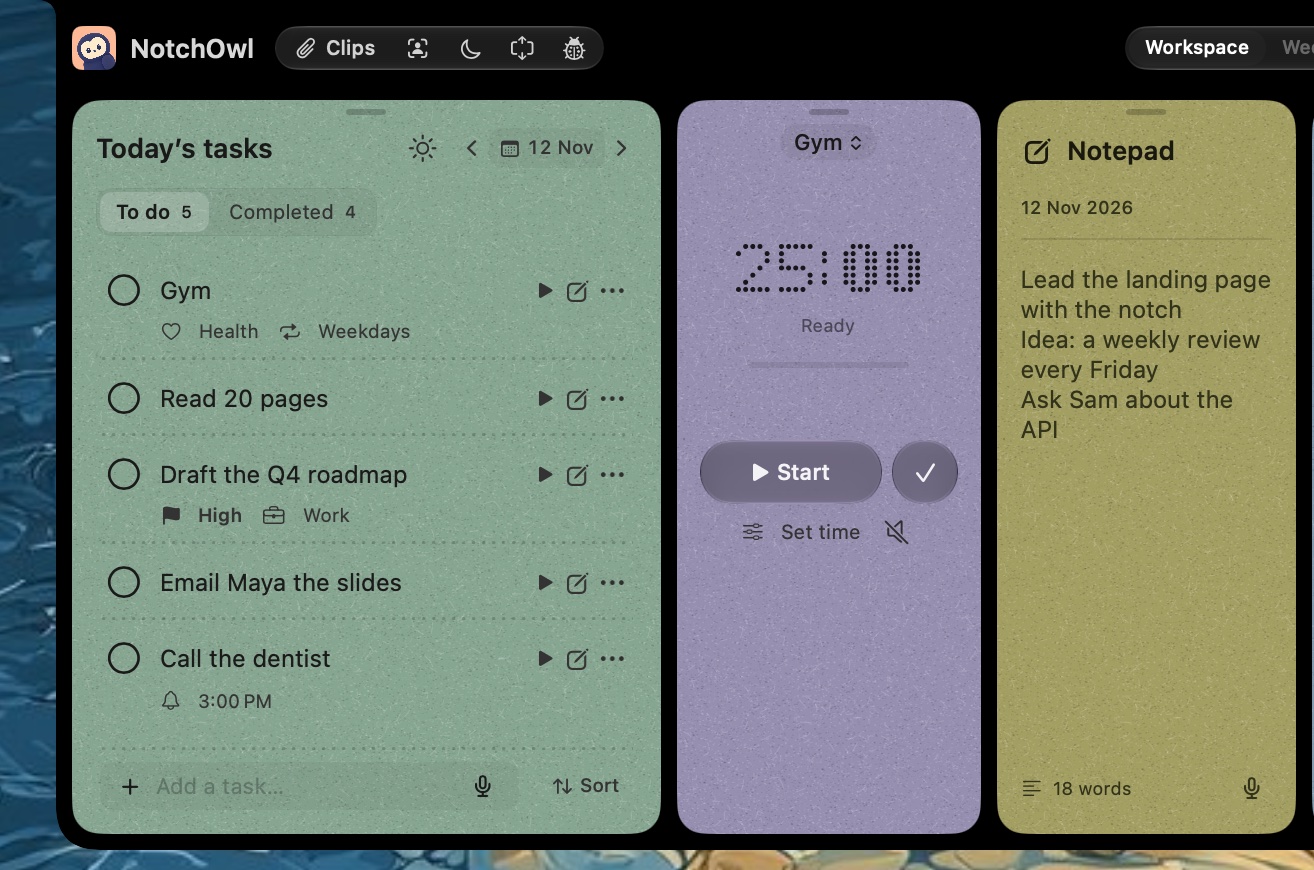
Tasks an AI agent adds through NotchOwl’s MCP server land on today’s list, priorities and times included.
Where it runs: on your Mac, over standard input and output. NotchOwl doesn’t upload your planner anywhere; only what the AI app sends to its own model leaves the Mac.
Limits on reach: agents can’t read your Calendar events or change NotchOwl’s settings, and their changes can be undone in NotchOwl.
Other clients: any MCP client that launches local servers can use /Applications/NotchOwl.app/Contents/MacOS/NotchOwl --mcp.
Limits: NotchOwl runs only on Apple silicon Macs with macOS 14 or later, has no iPhone app (it reaches iPhone through Apple Reminders sync), and costs $12 once for up to 3 Macs with no trial, only a 7-day refund. Download NotchOwl or see what the license includes.
The full setup, prompts worth trying and the manual commands are in how to connect Claude to your Mac to-do list. You can also connect NotchOwl and Todoist at the same time and ask Claude to copy today’s Todoist tasks into the notch; NotchOwl vs Todoist covers how the two apps differ.
Claude adds tasks through NotchOwl’s MCP server, and they land in the notch.
Others: Sunsama, Akiflow and OmniFocus
Sunsama hosts an official OAuth server at https://api.sunsama.com/mcp; its MCP help page gives the Claude Code command claude mcp add --transport http Sunsama https://api.sunsama.com/mcp. Sunsama has no free plan.
Akiflow includes an MCP connector with its Pro plan, alongside its Aki AI assistant.
OmniFocus has no server from The Omni Group that I could find; community projects such as OmniFocus-MCP (MIT license) control OmniFocus on your Mac through automation scripts, and macOS asks once for automation access.
How to add an MCP server to Claude, Claude Code or Cursor
For a remote server (a URL):
Claude: connectors in the directory connect with one click. For any other URL, open Customize › Connectors, click Add, then Add custom connector, and paste the URL. Anthropic’s custom connector guide says they work on every Claude plan, Free accounts can add one, and on Team and Enterprise an owner adds them in Organization settings.
Claude Code:claude mcp add --transport http <name> <url>, then /mcp to sign in.
Cursor: add an entry with "url" to ~/.cursor/mcp.json (all projects) or .cursor/mcp.json (one project).
For a local server (a command):
Claude desktop app: double-click a .mcpb extension file if the project offers one. Otherwise, choose Claude › Settings › Developer › Edit Config and add the command to claude_desktop_config.json under mcpServers, then quit and reopen Claude.
Claude Code:claude mcp add --scope user <name> -- <command> <arguments>.
Cursor: add an entry with "command" and "args" to mcp.json.
Security: official vs community servers
An MCP server can change your tasks, and a local one runs on your Mac with your permissions, so treat installing one like installing an app.
Install only from sources you trust. Anthropic’s custom connector guide says to connect Claude only to servers built and hosted by organizations you trust, and warns that malicious servers may include hidden instructions that try to make Claude do things you didn’t ask for.
Know what a local server can do. The MCP project’s security best practices warn that a local server runs with the same privileges as the app that launches it, so a malicious one can run commands and read files as you.
Prefer OAuth to passwords. Official servers from Todoist, TickTick, Notion, Linear and Sunsama sign in with OAuth, so the assistant gets a token you can revoke and never sees your password. Some unofficial servers for Sunsama and Things ask for your account email and password; skip them.
Check a community project before running it. Look at who maintains it, its license, how recently it was updated and its open issues. Commands like npx -y fetch the newest version each time; pinning a version (the package name followed by @ and a version number) means an update can’t change what runs without you noticing.
Give the least access that works. Use read-only options where they exist, like Linear’s readonly endpoint, and don’t grant Calendar access to a Reminders server unless you want it used.
Keep approvals on for destructive actions. Todoist’s and NotchOwl’s servers both include a delete tool. Let the assistant ask before it deletes or completes tasks in bulk.
Revoke what you no longer use. Disconnect connectors in Claude, revoke tokens in the app (Todoist: Settings › Integrations), and remove old entries from config files.
Which to-do app to connect
Your tasks already live in Todoist or TickTick: use their official servers. They’re in Claude’s directory and work across all your devices.
You use Things 3 or Apple Reminders: a community server works well on your Mac; read its code and permissions first.
Your team plans in Notion or Linear: connect their official servers, starting read-only.
You want a planner whose MCP server is built in and stays on your Mac: NotchOwl, connected in one click.
Yes. Doist hosts Todoist’s official MCP server at https://ai.todoist.net/mcp. You sign in with OAuth, it works on the free Beginner plan as well as Pro and Business, and Todoist is listed in Claude’s connector directory, so you can connect it without typing the URL.
Is there an official MCP server for Things 3?
No. Cultured Code doesn’t publish one as of November 2026. Community servers such as things-mcp by hald run on your Mac, read your Things data and add or update to-dos through the Things URL scheme, which you turn on in Things › Settings › General.
Is there an Apple Reminders MCP server?
Not from Apple. Community servers such as mcp-server-apple-events use Apple’s EventKit framework on your Mac to read and change reminders, and macOS asks you to allow Reminders access for the app that runs the server, such as Claude or Cursor.
Do I need Todoist Pro to connect Todoist to Claude?
No. Todoist’s help center lists the AI assistant connection for the Beginner, Pro and Business plans. Some data depends on your plan; for example, activity history goes back 7 days on Beginner.
Are community MCP servers safe to install?
Only if you trust the source. A local MCP server runs with the same privileges as the app that launches it, and Anthropic warns that malicious servers can include hidden instructions. Prefer official servers that sign in with OAuth, check who maintains a community server, and never give one your account password.
Which to-do apps have an MCP server that runs on your Mac?
NotchOwl has one built in, with one-click setup in Settings › AI agents. Things 3, Apple Reminders and OmniFocus have community servers that run on your Mac, and Doist’s @todoist/mcp package runs Todoist’s official server locally, though your tasks still live in Todoist’s cloud.