Todoist Alternatives for Mac in 2026: 8 Apps Compared
The best Todoist alternatives for Mac in 2026: NotchOwl ($12) in the notch, TickTick for timers and habits, Things 3 or OmniFocus 4 to buy once, Reminders free.
Which of the Todoist alternatives is best depends on why you’re leaving. If your list keeps disappearing behind other windows on a Mac, NotchOwl ($12 once) is best for keeping today’s list in view: it holds today’s tasks in the MacBook notch. If Todoist Pro’s $60 a year feels like too much for what you use, TickTick does more for $49.99 a year, and Apple Reminders and Microsoft To Do cost nothing. If you’d rather pay once, Things 3 ($49.99 for the Mac) and OmniFocus 4 (from $74.99) are the polished Apple-only picks. And if you want your day planned on a calendar, Sunsama timeboxes it.
I’m the developer behind NotchOwl, the first of the eight apps; where Todoist or another app is the better choice, I say so. Every app was compared from its own website, help center and App Store listing in November 2026, at US prices; nothing here comes from benchmarks or surveys.
Quick picks
- Best for keeping today’s list in view on a Mac: NotchOwl, $12 once
- Best for paying less and getting more features: TickTick, free or $49.99 a year
- Best one-time purchase for Apple devices: Things 3, $49.99 for the Mac
- Best for more structure than Todoist, bought once: OmniFocus 4, from $74.99
- Best free app on Apple devices: Apple Reminders
- Best free app for Windows and Outlook users: Microsoft To Do
- Best for family lists: Any.do, free or Premium from $4.99 a month billed yearly
- Best for time-blocking with a daily routine: Sunsama, $17 a month billed yearly
Why people leave Todoist
Todoist is a very good task manager, and for many people its free plan is enough. The reasons to switch are usually specific.
- The price. Todoist Pro costs $5 a month billed yearly ($60) or $7 billed monthly, according to Todoist’s pricing page. The free Beginner plan stops at 5 personal projects, 3 filter views, one week of activity history and 5 MB file uploads, and the calendar layout, task durations, deadlines and custom reminders are Pro features. Three years of Pro billed yearly come to $180.
- Ramble and AI limits. Ramble, Todoist’s AI voice capture, gets 10 sessions a month on the free plan, ignores dictated deadlines and durations until you upgrade, and only works with an internet connection. Task Assist and Email Assist need Pro. Some people want more AI than that; others want none in their task list.
- Time-blocking costs extra and stays inside Todoist. On Pro, the calendar layout lets you drag tasks onto times. Time-blocked tasks can sync to a separate “Todoist” calendar in Google or Outlook, but that calendar doesn’t change your main calendar’s free or busy status, and iCloud Calendar can’t be connected directly. There is no guided routine for planning the day.
- No one-time purchase. Pro and Business are sold only as monthly or yearly subscriptions.
- It doesn’t feel like a Mac app. Todoist is a cross-platform app first. On the Mac, it’s a window plus Quick Add (Option–Space) and Ramble, with no focus timer, and Todoist’s help pages don’t describe a task list in the menu bar. People who only use Apple devices often want something made for them.
Todoist alternatives compared
| App | Price | Runs on | Better than Todoist at | Worse than Todoist at |
|---|---|---|---|---|
| Todoist | Free; Pro $5/month yearly or $7 monthly | Mac, Windows, Linux, iPhone, iPad, Apple Watch, Android, Wear OS, web | (baseline) | (baseline) |
| NotchOwl | $12 once, up to 3 Macs | Apple silicon Macs; iPhone and Watch through Reminders sync | Today in the notch, focus timer, local data, one-time price | Mac only; no sharing, labels, sections or filters |
| TickTick | Free; Premium $49.99/year | Mac, Windows, Linux, iPhone, iPad, Apple Watch, Android, web | Pomodoro timer, habits, calendar views, price | Team plan, one-line capture syntax; integrations need Premium |
| Things 3 | $49.99 Mac; $9.99 iPhone and Watch; $19.99 iPad; once | Mac, iPhone, iPad, Apple Watch, Vision Pro | Design, one-time price, areas and headings | No shared lists; no Windows, Android or web |
| OmniFocus 4 | $74.99 or $149.99 once; or $99.99/year | Mac, iPhone, iPad, Apple Watch, Vision Pro; web with subscription or add-on | Defer dates, weekly Review, custom perspectives | Price, learning curve, no Windows or Android app |
| Apple Reminders | Free, built in | Mac, iPhone, iPad, Apple Watch, Vision Pro; icloud.com | Free, location reminders, no new account | No Windows or Android app; fewer integrations |
| Microsoft To Do | Free | Mac, Windows, iOS, Android, web | Free everywhere; Outlook flagged emails | Typed dates recognized only on Windows and iOS |
| Any.do | Free; Premium $4.99/month yearly or $7.99 monthly | Mac, Windows, iPhone, iPad, Android, Apple Watch, Wear OS, web | Family plan, WhatsApp reminders | Recurring tasks need Premium |
| Sunsama | $17/month yearly or $22 monthly | Mac, Windows, Linux, iOS, iPadOS, Android, web | Daily planning, two-way calendar timeboxing | Price; no free plan |
The best Todoist alternatives, by reason for leaving
NotchOwl: today’s list in view on your Mac
Instead of a window, NotchOwl uses the MacBook notch: move the pointer onto it or press Option–N, and today’s tasks, a focus timer, a daily notepad and the next two weeks of calendar events appear on top of the app you’re in. It costs $12 once for up to 3 Macs (an early-bird price, normally $39), with lifetime updates and a 7-day money-back guarantee; there is no free tier or trial. It runs on Apple silicon Macs with macOS 14 Sonoma or later; a notch is optional, since NotchOwl draws one on external monitors.
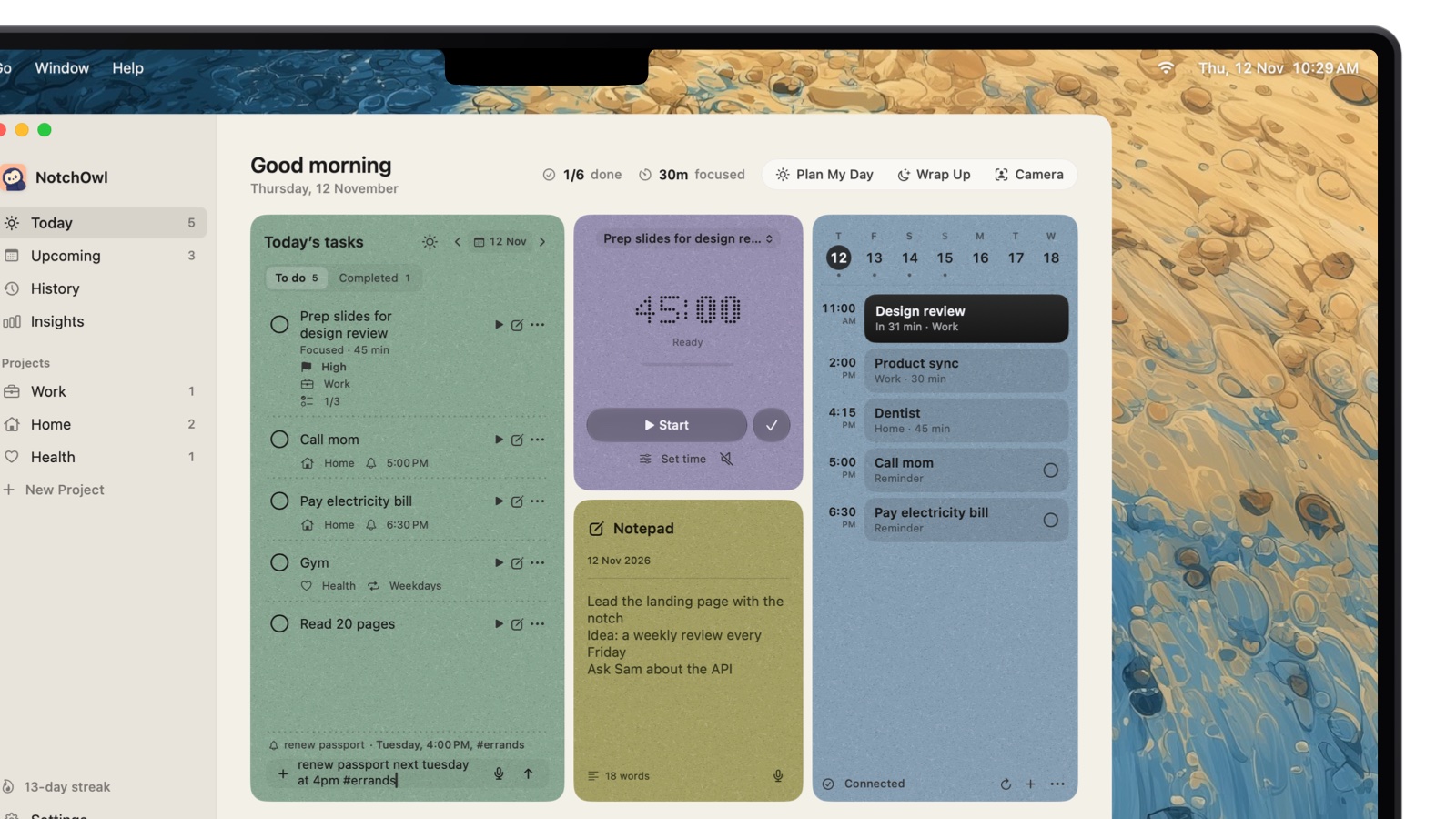
Type the day, time and project in plain words; NotchOwl shows how it reads them before you add.
- Better than Todoist: your day stays one hover away instead of in a window, and reminders open the notch with Snooze and Done buttons. A focus timer (15, 25, 45 or 60 minutes, or your own length) runs beside the closed notch, dictation is recognized on your Mac rather than online, and Plan your day fits today’s untimed tasks into the free time around your events, each with a reminder. Tasks stay on your Mac with no account, Apple Reminders sync reaches iPhone and Apple Watch, and a built-in MCP server lets Claude and Cursor manage tasks locally.
- Worse than Todoist: Mac only and Apple silicon only, with no shared lists, sections, labels or filters. The calendar is read-only, and Plan your day sets reminder times rather than calendar blocks. NotchOwl is young; its first release was September 15, 2026.
- Moving from Todoist: NotchOwl has no Todoist importer. Paste a project’s tasks into the notepad and press Command–Return on each line, or connect both apps’ MCP servers to Claude and ask it to copy them over.
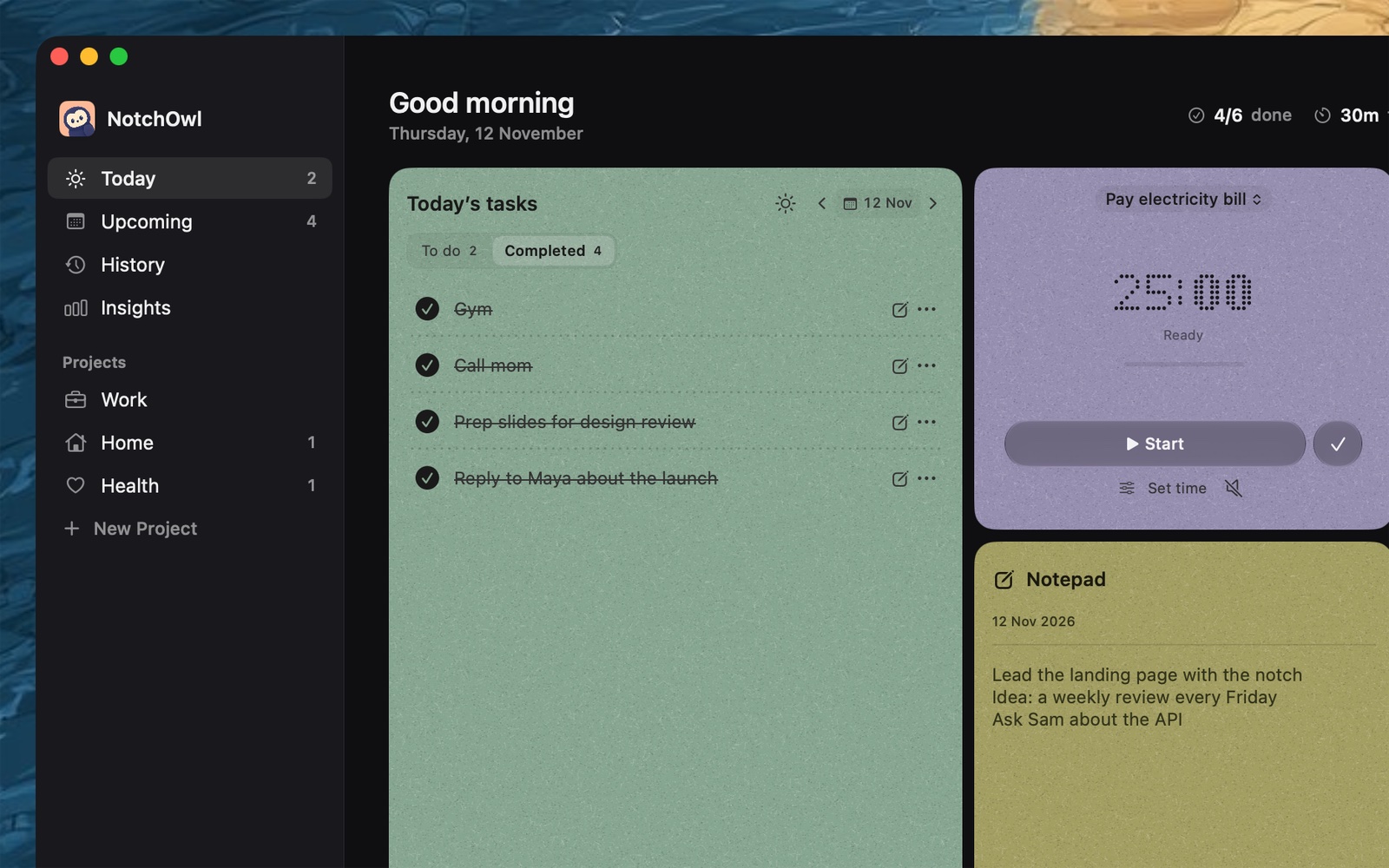
In the app window, the Completed tab keeps what you finished today.
The detailed trade-offs are in NotchOwl vs Todoist, and the $12 license covers 3 Macs.
When a reminder comes due, the notch opens with the task, ready to snooze or mark done:
One early user wrote on X:
I love this product !! And it’s been just a day I have started using it.
TickTick: pay less, get a timer and habits
TickTick is the closest swap if you like Todoist’s reach but want more in the box. Its free plan allows 9 lists of 99 tasks, 2 reminders per task and 5 habits, and Premium costs $49.99 a year (the App Store also sells it at $4.99 a month), according to TickTick’s Premium page. TickTick runs on Mac, Windows, Linux, iPhone, iPad, Apple Watch, Android and the web.
- Better than Todoist: a Pomodoro timer and stopwatch tied to tasks, a habit tracker, an Eisenhower Matrix and a basic calendar view on the free plan, and task durations and a timeline view on Premium. On the Mac, Command–Shift–O opens your tasks from the menu bar and can start a focus session, Command–Shift–A captures a task from any app, and Desktop Sticky Notes pin tasks to the screen. TickTick’s official MCP server is marked as available on free and Premium.
- Worse than Todoist: no team plan with roles or billing, and a free shared list includes only one other person (29 members on Premium). Integrations, AI Voice Capture and the AI Assistant need Premium, and the AI features share a monthly quota. Todoist’s Quick Add is still faster for typing a whole task, with its project, section and labels, in one line.
- Moving from Todoist: TickTick’s iPhone and Android apps import Todoist directly, and its web app imports a Todoist backup file.
The full head-to-head is in Todoist vs TickTick.
Things 3: pay once for the best-designed Apple app
Things 3 by Cultured Code is the pick for someone leaving Todoist because they only use Apple devices and want a calm, beautifully made app without a subscription. It costs $49.99 for the Mac, $9.99 for iPhone and Apple Watch, and $19.99 for iPad, each bought once, as of November 2026. The Mac app needs macOS 13.3 or later, version 3.24.2 came out on November 5, 2026, and Cultured Code offers a 15-day trial of the Mac app.
- Better than Todoist: design, and a Today list with a This Evening section. Areas, projects with headings, and checklists inside to-dos give long projects more shape than Todoist’s sections. Quick Entry (Control–Space) with Autofill saves a link to the page, email or file you’re viewing. No subscription.
- Worse than Todoist: no shared lists, no Windows, Android or web app, and three separate purchases for Mac, iPhone and iPad. Dates go in the When and Deadline fields rather than being read from the task title. Things has no official MCP server; a community one, things-mcp, runs on your Mac.
- Moving from Todoist: Things 3 has a built-in Todoist importer. On a Mac with macOS 14.4 or later, choose File › Import › Import From Todoist and sign in. Cultured Code’s import guide says projects and boards become projects, labels become tags and comments go into notes, while repeating tasks lose their schedule, subtasks are flattened, and priorities and image attachments are left behind.
If Things 3 is on your shortlist, Things 3 alternatives for Mac covers what it leaves out.
OmniFocus 4: pay once for more structure than Todoist
OmniFocus 4 by The Omni Group suits people who leave Todoist because they want more control, not less. It costs $74.99 for Standard or $149.99 for Pro as a one-time license, or $99.99 a year by subscription with web access included, according to Omni’s pricing page in November 2026. Owners of a one-time license can add OmniFocus for the Web for $4.99 a month or $49.99 a year, and the same page offers a 30-day money-back guarantee. The OmniFocus page lists a 14-day trial, says one purchase covers Mac, iPhone, iPad, Apple Watch and Apple Vision Pro, and gives macOS 15.2 as the Mac requirement.
- Better than Todoist: defer dates that hide a task until you can act on it, a Forecast view that shows tasks beside calendar events, a Review that walks you through every project on a schedule, and, in Pro, custom perspectives that filter and group projects and tags your way.
- Worse than Todoist: the highest price here and a steep learning curve. There is no Windows or Android app, only the web version, and Omni’s pages don’t list shared projects. Future major upgrades are discounted, not free, on a one-time license. AI agents reach OmniFocus only through community MCP servers.
- Moving from Todoist: Omni’s feature pages don’t mention a Todoist importer, so plan on re-adding active projects.
Apple Reminders: free, and already on your Mac
Apple Reminders is the answer if Todoist’s free plan feels cramped and you only use Apple devices. It’s free, built into macOS, and syncs through iCloud to iPhone, iPad, Apple Watch and Apple Vision Pro, and it opens in any browser at icloud.com/reminders. It supports Smart Lists, tags, sections, subtasks, time and location reminders, and shared lists where you can assign a reminder to someone.
- Better than Todoist: no cost, no new account, and location reminders. Many Mac apps build on it, and Apple Reminders in the menu bar shows a few ways to keep it in view.
- Worse than Todoist: no Windows or Android app, no team workspace, and nothing like Todoist’s directory of 90+ integrations.
- Moving from Todoist: there is no importer, so re-add active tasks from a Todoist CSV export.
Microsoft To Do: free, for Windows and Outlook users
Microsoft To Do is free with no paid tier and runs on Mac (macOS 13 or later), Windows, iOS, Android and the web. It is built around My Day, a daily list that starts empty every morning, with unfinished tasks offered back as Suggestions.
- Better than Todoist: everything is free, including shared lists with assigned tasks; files can be up to 25 MB, against 5 MB on Todoist’s free plan; and tasks sync with Outlook, including emails you flag there.
- Worse than Todoist: Microsoft’s help page lists smart date recognition for the Windows and iOS apps only, so don’t count on typed dates being read on a Mac. The Mac app’s last update, version 2.177, came out on July 6, 2026, according to its Mac App Store listing, and there is no focus timer.
Any.do: shared family lists and WhatsApp reminders
Any.do is a list and calendar app with a My Day planner, Smart Type for typed dates like “tomorrow 9am”, and email-to-task forwarding to do@any.do. The Personal plan is free; Premium costs $4.99 a month billed yearly or $7.99 monthly; Family costs $8.33 a month billed yearly or $9.99 monthly for 4 members, according to Any.do’s pricing page. Any.do runs on Mac, Windows, iPhone, iPad, Android, Apple Watch, Wear OS and the web.
- Better than Todoist: a Family plan with a shared grocery list, WhatsApp reminders, and your calendar beside the list.
- Worse than Todoist: recurring tasks, location reminders, WhatsApp reminders and color tags need Premium, while Todoist’s free plan includes repeating tasks. The Family plan is fixed at 4 members.
Sunsama: time-blocking with a daily planning ritual
Sunsama is for people who leave Todoist because a list isn’t a plan. Its morning ritual pulls tasks from your backlog, calendar and connected tools, and you timebox them on a calendar that syncs two ways with Google, Outlook and Apple calendars. Sunsama costs $17 a month billed yearly ($204) or $22 monthly, with a 14-day trial and no card needed, and its pricing page says it has no free plan and doesn’t plan to add one. It runs on macOS, Windows, Linux, iOS, iPadOS, Android and the web.
- Better than Todoist: guided daily planning and a shutdown routine, timeboxing that lands on your real calendar, weekly objectives, and focus mode with Pomodoro timers. Sunsama integrates with Todoist, so you can keep Todoist as the list and plan each day in Sunsama. Sunsama also has an official MCP server.
- Worse than Todoist: $204 a year billed yearly, more than three times Todoist Pro, with no free plan.
More calendar-first planners are in the best time blocking apps for Mac.
The best Todoist alternative depends on the reason you’re leaving: NotchOwl ($12 once) to keep today’s tasks in the MacBook notch, TickTick ($49.99 a year) for a Pomodoro timer and habits, Things 3 ($49.99 once) or OmniFocus 4 (from $74.99 once) to stop subscribing, Apple Reminders or Microsoft To Do for free, and Sunsama for time-blocking.
If you left over Ramble or AI
If you liked Ramble but not the 10-session cap, TickTick Premium’s AI Voice Capture also splits a spoken brain dump into separate tasks with dates, lists, tags and priority, and its AI Assistant can plan your schedule from your tasks and habits; both draw on a monthly AI quota. If you’d rather your voice notes didn’t go to a cloud AI, NotchOwl recognizes dictation on the Mac.
To bring your own AI instead, use an MCP server: Todoist’s, TickTick’s and Sunsama’s official servers sign in to your cloud account, Things 3 and OmniFocus 4 have only community servers, and NotchOwl’s runs inside the Mac app with no account. To-do apps you can connect to Claude compares each app’s server, and the setup for Claude is in how to connect Claude to your Mac to-do list.
How to take your tasks out of Todoist
- Export what you have. In Todoist, open a project, click the three-dots menu, choose Import & export, then Export to CSV. Repeat for each project you want to keep.
- Use an importer where there is one. TickTick imports Todoist directly from its phone apps or from a backup file on the web. Things 3 imports straight from your Todoist account on Mac, iPhone and iPad. Sunsama connects to Todoist instead of replacing it.
- Re-add active tasks elsewhere. Apple Reminders and NotchOwl have no Todoist importer, and Omni’s feature pages don’t mention one for OmniFocus 4. Copy active tasks from the CSV, and drop the ones you’ll never do.
- Rebuild repeats and reminders. Imports often lose repeat schedules; Things 3’s does, for example. Recreate them in the new app.
- Run both for a week. Keep Todoist until the new app has held a week of real work.
When to stay with Todoist
- You share projects or run a team. Shared projects on every plan and a Business plan at $8 per user a month billed yearly, with roles and permissions, make Todoist the strongest team option here.
- You need the best capture on every platform. TickTick covers most of Todoist’s devices, but not Wear OS, and Todoist’s Quick Add and 90+ integrations are still the strongest.
- Five projects are enough. If you never hit the free plan’s limits, there is little reason to switch, or to pay.
Todoist is at todoist.com, and TickTick at ticktick.com.
Frequently asked questions
What is the best Todoist alternative for Mac?
It depends on why you’re leaving Todoist. NotchOwl ($12 once) keeps today’s tasks in the MacBook notch, TickTick is the closest cross-platform swap and adds a Pomodoro timer and habits, Things 3 is the most polished Apple-only app you buy once, Apple Reminders is free, and Sunsama suits planning on a calendar.
Is there a free alternative to Todoist?
Yes. Apple Reminders is free on Apple devices, with shared lists and location reminders. Microsoft To Do is free with no paid tier and runs on Windows and Android, and TickTick and Any.do have free plans. Todoist’s own free Beginner plan allows 5 personal projects.
Which Todoist alternatives are a one-time purchase?
Things 3 ($49.99 for the Mac, with iPhone and iPad sold separately), OmniFocus 4 (Standard $74.99 or Pro $149.99 for every Apple device) and NotchOwl ($12 for up to 3 Macs) are bought once, as of November 2026. Todoist Pro is sold only as a subscription, at $60 a year billed yearly.
Can Things 3 import my tasks from Todoist?
Yes. On a Mac with macOS 14.4 or later, choose File › Import › Import From Todoist and sign in to Todoist. Projects, tasks, labels and comments come across, but repeating tasks lose their schedule, subtasks are flattened, and priorities and image attachments aren’t imported.
Which Todoist alternative is best for time blocking?
Sunsama is built for it: you timebox tasks on a calendar that syncs two ways with Google, Outlook and Apple calendars, for $17 a month billed yearly. TickTick Premium ($49.99 a year) adds task durations and a timeline view. Todoist itself time-blocks only on Pro, in its calendar layout.
Is TickTick a good Todoist alternative?
Yes, especially if you leave Todoist over price or missing features. TickTick runs on the same platforms, imports Todoist directly, and adds a Pomodoro timer, habits and calendar views for $49.99 a year. It is busier than Todoist, and its integrations and AI features need Premium.