Todoist vs TickTick in 2026: Which To-Do App to Pick
Todoist vs TickTick: Todoist wins on capture and sharing, TickTick ($49.99/year) adds a Pomodoro timer and habits, and NotchOwl is a pay-once option for Mac.
By Aditya Jaiswal, founder of NotchOwl · Updated · 15 min read
Todoist vs TickTick comes down to what you want besides a list. If you’d rather pay once and keep today’s list in view on a Mac, a third option is NotchOwl, which I develop, covered near the end. Todoist is the cleaner, faster task manager: the best natural-language capture of the two, shared projects, a Business plan for teams and more than 90 integrations. TickTick is the all-in-one: a Pomodoro timer, a habit tracker, an Eisenhower Matrix and calendar views sit next to your tasks, and Premium costs $49.99 a year against $60 for Todoist Pro billed yearly. Both run on Mac, Windows, Linux, iPhone, iPad, Android and the web, both have real free plans, and both read “tomorrow at 5pm” typed into a task.
Everything below was compared from Todoist’s and TickTick’s pricing pages, help centers and App Store listings in November 2026. Prices are US prices as of November 2026. Nothing here comes from benchmarks or user surveys.
The short verdict
Pick Todoist if capture speed, sharing with other people or connecting other tools matters most, or if your list needs to grow into a team workspace. Pick TickTick if you want one app for tasks, focus sessions and habits, want calendar views and time-blocking for less money, or like a busier app with a module for everything. On a Mac, TickTick gives you more on screen outside the main window; Todoist stays out of the way until you press Option–Space.
Todoist (free, or Pro at $5 a month billed yearly) is the better task manager for fast capture, shared projects and integrations, while TickTick (free, or Premium at $49.99 a year) is the better all-in-one, adding a Pomodoro timer, habit tracker and calendar views.
Todoist vs TickTick at a glance
Todoist and TickTick compared on price, free plan, platforms and features (US prices, November 2026)
Todoist
TickTick
Free plan
5 personal projects, 3 filter views, 1 week of activity history, 5 MB uploads, 10 Ramble sessions a month
9 lists, 99 tasks per list, 2 reminders per task, 5 habits, 1 attachment a day
Paid plan
Pro: $5/month billed yearly ($60) or $7 monthly
Premium: $49.99/year; $4.99 monthly in the App Store
Team plan
Business: $8 per user/month billed yearly or $10 monthly
None; Premium lists hold up to 29 members
Platforms
Mac, Windows, Linux, iPhone, iPad, Apple Watch, Android, Wear OS, web
Mac, Windows, Linux, iPhone, iPad, Apple Watch, Android, web
Mac App Store version
macOS 12 or later
macOS 12 or later
Natural-language dates
Yes, in Quick Add, plus symbols for project, section, label, priority, reminder and deadline
Yes, Smart Date Parsing sets the date, time and reminder
Voice capture
Ramble, AI, online only
Voice input; AI Voice Capture on Premium
Views
List and board; calendar and table layouts on Pro
List and Kanban; basic calendar free; more calendar views and timeline on Premium
Time-blocking
Calendar layout and task durations on Pro
Task durations and timeline on Premium
External calendars
Google Calendar and Outlook on every plan (1 account free, 3 on Pro)
Subscribe to Google, Outlook, iCloud, Exchange, CalDAV or a URL
Focus timer
None
Pomodoro and stopwatch
Habits
None
Habit tracker: 5 free, 299 on Premium
Sharing
Up to 5 people per personal project; team workspace on Business
1 other person free; up to 29 members on Premium
Integrations
90+ on every plan
Marked Premium in TickTick’s plan table
AI
Ramble and Filter Assist free; Task Assist and Email Assist on Pro
AI Assistant, AI Voice Capture and Recording Summary on Premium
MCP server
Official, hosted by Doist
Official, at mcp.ticktick.com, on free and Premium
Outside the main Mac window
Quick Add (Option–Space), menu bar icon for Ramble
Menu bar window (Command–Shift–O), quick add (Command–Shift–A), desktop sticky notes
To see both apps in use, Efficient App’s review compares them side by side with Superlist, Notion and Motion; its prices may have changed since it was made:
Best To Do Apps 2026? Todoist vs TickTick vs Superlist vs Notion vs MotionEfficient App (Alex & Andra)
Pricing and free-plan limits
Both free plans are usable for a single person with a modest list, but they run out in different places.
Todoist’s free Beginner plan gives you 5 personal projects, 3 filter views, one week of activity history, 5 MB file uploads and 10 Ramble voice sessions a month, according to Todoist’s pricing page. Repeating tasks and basic reminders are included. Todoist Pro costs $5 a month billed yearly ($60) or $7 billed monthly, and adds 300 personal projects, 150 filter views, the calendar and table layouts, task durations, deadlines, custom reminders, unlimited Ramble, Task Assist, Email Assist and automatic backups. Todoist Business costs $8 per user a month billed yearly ($96) or $10 monthly, and adds a team workspace with up to 500 team projects, roles and permissions, and shared templates.
TickTick’s free plan allows 9 lists with 99 tasks each, 19 checklist items per task, 2 reminders per task, 5 habits, 5 countdowns and one attachment upload a day, according to TickTick’s Premium page. TickTick Premium costs $49.99 a year (the Mac App Store listing also sells it at $4.99 a month) and raises those limits to 299 lists, 999 tasks per list, 5 reminders per task and 299 habits. Premium also unlocks task durations, constant reminders, filters, the timeline view, the full calendar and Eisenhower Matrix, integrations and TickTick’s AI features.
Over three years, Todoist Pro billed yearly costs $180 and TickTick Premium costs about $150. The bigger difference is where each free plan pinches: Todoist caps projects and AI voice sessions but leaves the list itself unlimited, while TickTick caps lists and tasks per list but gives you the Pomodoro timer, habits and a basic calendar for free.
Platforms and sync
Todoist runs on Mac, Windows, Linux, iPhone, iPad, Apple Watch, Android, Wear OS and the web, with browser extensions and email add-ons. TickTick runs on Mac, Windows, Linux, iPhone, iPad, Apple Watch (watchOS 9 or later), Android and the web, with a browser extension. Both sync through their own cloud accounts, so a task added on an Android phone appears on a Windows PC a moment later.
If you own a Wear OS watch, Todoist lists a Wear OS app and TickTick’s download page doesn’t. Otherwise, platform coverage is close to identical, and neither choice locks you out of a device.
Capture: natural language and voice
Both apps read dates typed into the task. In Todoist’s Quick Add, “Submit report every Friday at 4pm #Work” sets the date, the repeat and the project, and symbols set the rest: / for a section, % for a label (Todoist’s labels guide says @ still works but is planned to be retired by the end of 2026), p1 to p4 for priority, ! for a reminder and curly braces for a deadline. Typing a whole task in one line, without touching a menu, is where Todoist is strongest.
TickTick’s Smart Date Parsing reads a date and time in the title, so “Meeting at 9 tomorrow” gets a due date and a reminder, and you can press Delete to cancel a date it picked up by mistake. Priority, tags and the list are set from the add bar, and Task Defaults can pre-fill a date, list and priority for every new task.
For voice, Todoist has Ramble: you talk, and it turns the ramble into separate tasks with dates, projects and priorities. Ramble works on the web, Mac, Windows, iPhone, Android and Wear OS, understands dozens of languages, and only works with an internet connection. The free plan gets 10 sessions a month, and dictated deadlines and durations are ignored until you upgrade. TickTick’s phone apps take plain voice input, and Premium adds AI Voice Capture, which splits several spoken items into separate tasks and recognizes dates, lists, tags and priority. TickTick’s AI features share a monthly quota.
Views: lists, boards and calendars
Todoist shows every project as a list or a board on the free plan. Pro adds calendar and table layouts, and the calendar layout is how Todoist does time-blocking: in Today or Upcoming, switch to the calendar layout and drag a task onto a time, then pull its bottom edge to set how long it takes. Google Calendar and Outlook events appear read-only in Today and Upcoming on every plan. Turn on task sync, and time-blocked tasks appear as events in a separate “Todoist” calendar in Google or Outlook. Todoist can’t connect iCloud Calendar directly; its help center suggests subscribing to it through Google or Outlook.
TickTick is more of a calendar app to begin with. Lists and Kanban boards are free, the free plan includes a basic calendar view, and Premium unlocks the full calendar, including grid and timeline layouts, plus task durations so a task fills a block of time. TickTick can subscribe to Google, Outlook, iCloud and Exchange calendars, CalDAV accounts or any calendar URL, and a separate Google Calendar integration shows your TickTick tasks inside Google Calendar. The Eisenhower Matrix sorts tasks into four quadrants by urgency and importance, with a basic version on the free plan.
If you want to plan your week on a calendar grid without paying, TickTick’s free plan gets you closer. For a wider look at the category, see the best time blocking apps for Mac.
Focus timer and habits
This is TickTick’s clearest win. Its Pomodoro mode runs 25 minutes of focus followed by a 5-minute break, a stopwatch mode counts up instead, and you can start focus from a task so the time is recorded against it. Saved timers start a focus session for things you do often, such as language practice, and Focus Statistics show where your time went. The habit tracker records daily check-ins and shows your progress, with 5 habits free or 299 with Premium.
Todoist has neither. Its Productivity view counts completed tasks against daily and weekly goals, with streaks and Karma points, and a repeating task can stand in for a habit. If you want timed sessions with Todoist, you need a second app; the best Pomodoro timer apps for Mac compares several.
If TickTick’s extra modules feel like clutter, you can switch them off: Pomodoro, habits and AI are each turned on or off in TickTick’s settings on the desktop, and in the tab bar settings on phones.
Collaboration
Todoist is built for sharing. Every plan lets you share a personal project with up to 5 people, assign tasks and keep the discussion in task comments, and Todoist Business adds a team workspace for up to 1,000 members and guests, with roles, permissions, shared templates and centralized billing.
TickTick shares lists too: invite people by email or link, assign tasks with @, comment, and get notified when tasks change. On the free plan, a shared list can include one other person; with Premium, up to 29 members, and only the list owner needs Premium. TickTick has no separate team plan, and its FAQ suggests buying gift cards to give team members Premium.
For a couple or a small household, either app works. For a team that needs admin controls and billing in one place, Todoist Business is the only real option of the two.
Integrations and AI
Todoist lists more than 90 integrations on every plan, including Google Calendar and Outlook, email add-ons and browser extensions, and a public API that other apps build on. TickTick’s Free vs Premium table marks integrations as a Premium feature without listing which ones; its help center covers two-way Notion sync, Spark mail, Telegram, Siri, Shortcuts and an API.
On AI, Todoist offers Ramble and Filter Assist (describe a filter in plain words) on every plan, and Task Assist and Email Assist on Pro. Task Assist breaks big tasks into sub-tasks and rewrites vague ones, and Email Assist turns forwarded emails into tasks with dates. TickTick Premium includes an AI Assistant that can plan your schedule and review progress from your tasks, habits and focus records, AI Voice Capture, and transcripts with summaries of recordings.
Both have official MCP servers, so Claude, ChatGPT and other AI tools can read and change your tasks. Todoist’s is hosted by Doist and signs in with OAuth. TickTick’s lives at https://mcp.ticktick.com and accepts OAuth or an API token, according to TickTick’s MCP guide, and TickTick’s plan table includes it on the free plan as well as Premium. To-do apps you can connect to Claude compares them with the servers for other to-do apps, and how to connect Claude to your Mac to-do list covers a server that runs on your Mac.
The Mac apps, specifically
The Todoist Mac app, “Todoist: To-Do List & Calendar” in the Mac App Store, needs macOS 12 or later. It’s a window with a sidebar, plus two ways to capture from anywhere: Quick Add on Option–Space and Ramble on Option–Shift–R, which also starts from Todoist’s menu bar icon. Todoist’s help pages don’t describe a task list in the menu bar, so you open the window to see your day.
The TickTick Mac app also needs macOS 12 or later, and does more outside its window. Command–Shift–O opens your tasks from the menu bar and can start a focus session there, Command–Shift–A captures a task without leaving the app you’re in, and Desktop Sticky Notes pin a task, or a quick note, to your screen. Inside the window, the task list and calendar can sit side by side, a daily wrap-up summarizes what you finished, and the latest version adds an AI Assistant you can open from the desktop.
On a Mac, then, TickTick is the more Mac-present of the two, and Todoist is the calmer one. Both are cross-platform apps rather than Mac-first ones: neither looks or behaves quite like an app built only for macOS.
Which should you pick?
Pick Todoist if…
You capture a lot, fast. Quick Add’s one-line syntax and Ramble’s voice capture are the quickest way to get tasks out of your head.
You share projects or run a team. Shared projects on every plan, and a Business plan with roles, permissions and team billing.
You connect other tools. 90+ integrations on every plan, Google Calendar and Outlook built in, and a well-used public API.
You want a simpler app. No timer, habits or matrix to ignore; just projects, labels, filters and views.
You wear a Wear OS watch.
Pick TickTick if…
You want a focus timer in your task app. Pomodoro and stopwatch modes with statistics, tied to tasks.
You track habits. A habit tracker with check-ins and monthly reviews, free for up to 5 habits.
You plan on a calendar. A basic calendar on the free plan, and timeline views and task durations with Premium for $49.99 a year.
You want more on your Mac screen. A menu bar window, global quick add and desktop sticky notes.
You want to pay less. Premium costs about $10 a year less than Todoist Pro billed yearly, and the free plan includes more modules.
Switching between them
From Todoist to TickTick is the easy direction. TickTick’s iPhone and Android apps import Todoist directly from Settings › Import & Integration, and TickTick’s import guide says its web app imports a backup file from Todoist and several other apps under Settings › Integrations & Import.
From TickTick to Todoist takes more work. TickTick’s web app can generate a backup of your data, and Todoist imports one CSV file per project from the project’s menu, under Import & export, then Import from CSV. Todoist’s CSV guide says the file follows its own template, with TYPE and CONTENT columns, must be UTF-8, and can hold up to 300 tasks per project, so a TickTick backup needs reshaping before it fits.
Whichever way you move, run both apps for a week before deleting anything, and recreate repeating tasks and reminders by hand where the import misses them.
If what you really need is your list always visible on a Mac
As the maker of NotchOwl, I’m not neutral here, so read this section as the maker’s view. Todoist and TickTick both keep your list in a window, with TickTick’s menu bar window coming closest to an exception. If you keep switching to-do apps because the list disappears behind your browser, the problem may be where the list lives rather than which app holds it.
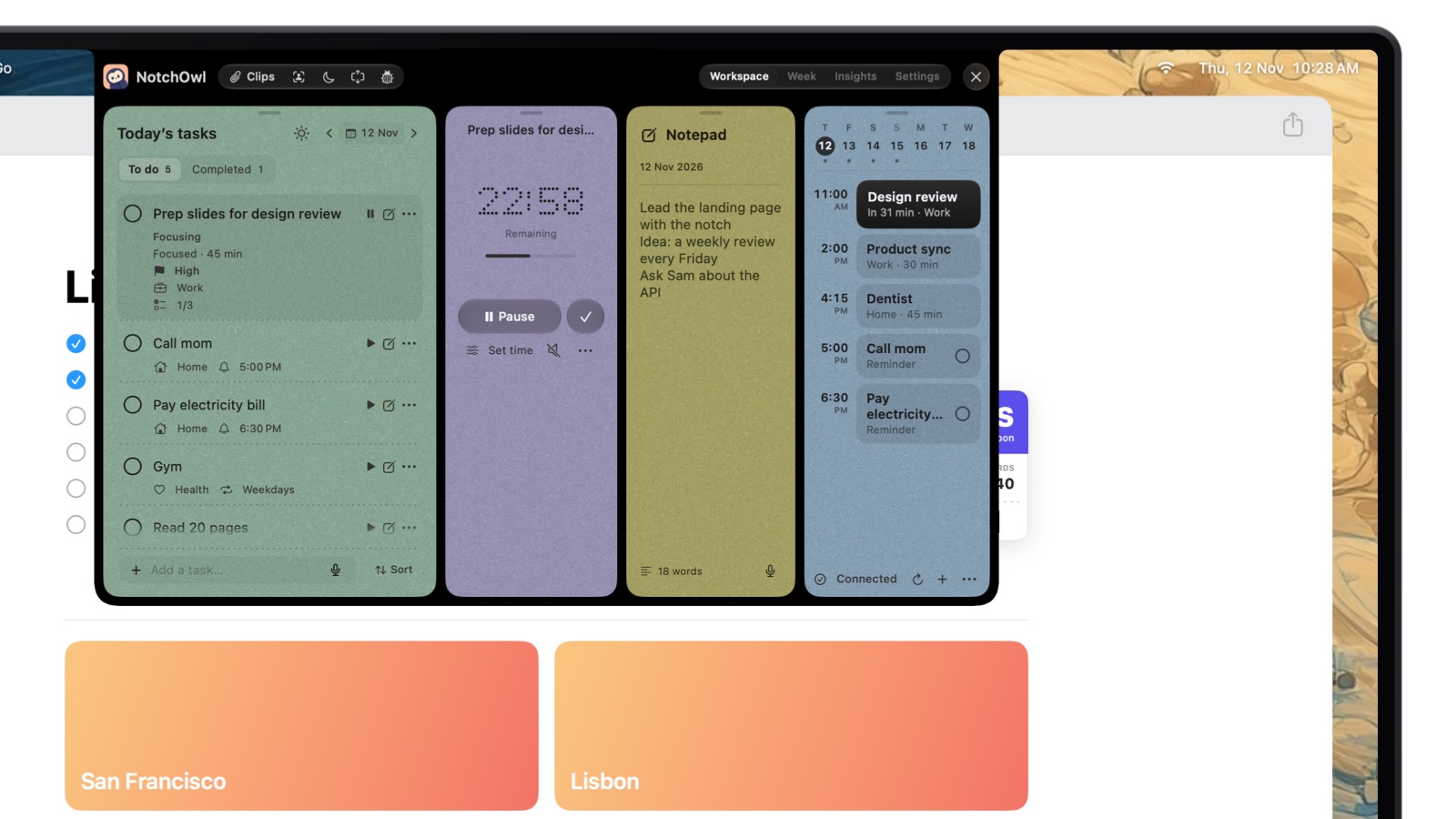
The notch workspace opens over whatever you’re doing, here a browser window, with a focus session running.
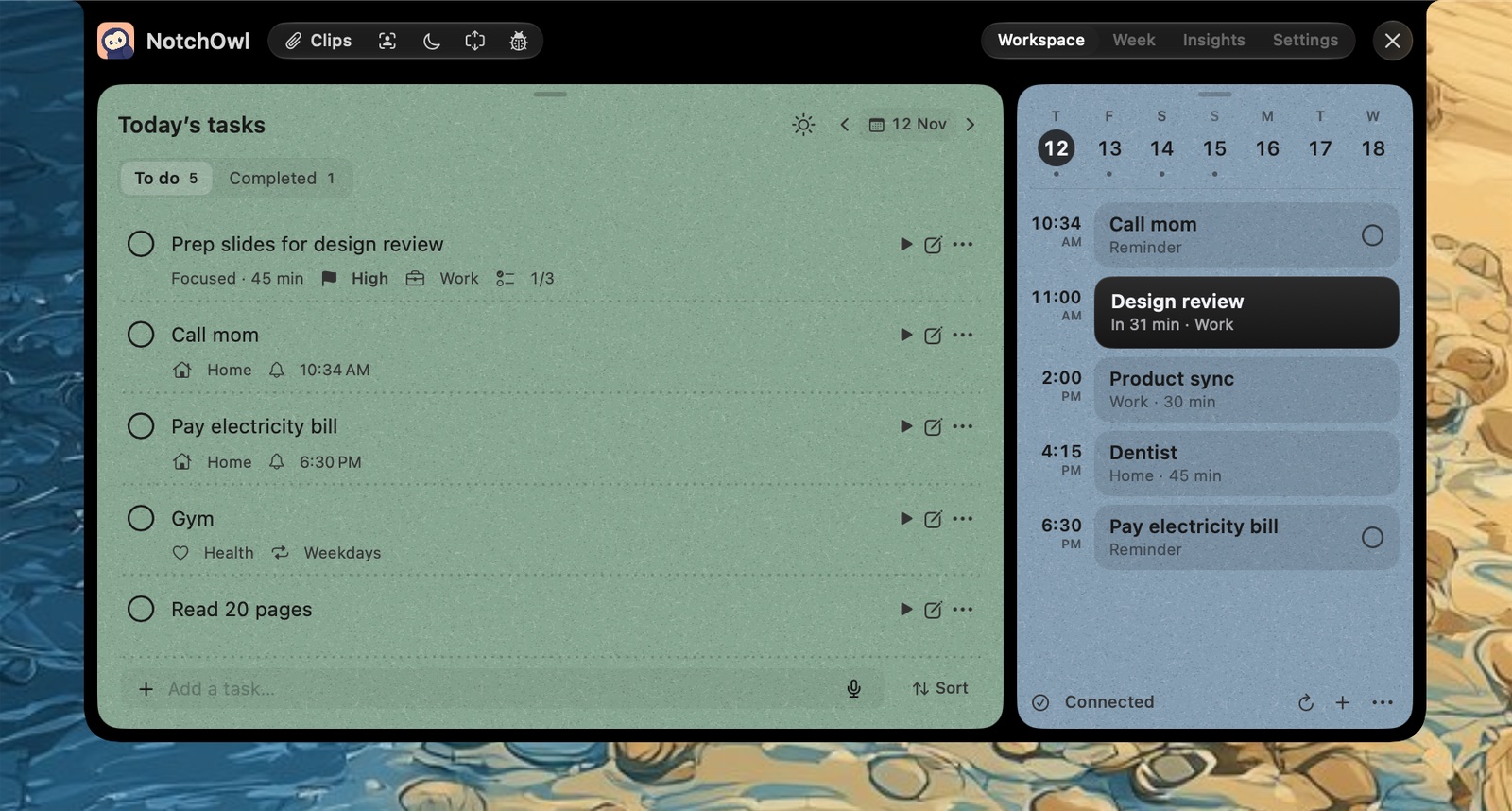
With NotchOwl, today’s list lives in the MacBook notch. Moving the pointer to the notch, or pressing Option–N, brings down today’s tasks, a focus timer (15, 25, 45 or 60 minutes, or your own length), a daily notepad and the next two weeks of calendar events over the app you’re using; when a reminder comes due, the notch opens with a chime and Snooze and Done buttons. You type tasks the way you’d say them (“call mom tomorrow at 5pm !high #family”), and it costs $12 once for up to 3 Macs, an early-bird price that is normally $39.
Snooze a reminder for 5 minutes and it moves to its new time, on the list and the day’s agenda.
The limits matter here. NotchOwl runs only on Apple silicon Macs with macOS 14 Sonoma or later, has no iPhone, Windows or Android app (tasks reach iPhone and Apple Watch through optional Apple Reminders sync), has no shared lists, and doesn’t connect to Todoist or TickTick. There is no trial, only a 7-day money-back guarantee; you can download NotchOwl or see what the license includes. NotchOwl vs Todoist covers the trade-offs in detail.
If neither fits: other Todoist and TickTick alternatives
If you want a one-time purchase, NotchOwl ($12 for up to 3 Macs, above), Things 3 ($49.99 for the Mac) and OmniFocus 4 (from $74.99) are the Apple-only options, and Apple Reminders and Microsoft To Do are free. If you want your day planned on a calendar with a guided routine, Sunsama does that at a higher price. Todoist alternatives for Mac compares eight apps by the reason you might leave Todoist, and Things 3 alternatives for Mac starts from the Apple-only side. Todoist is at todoist.com and TickTick at ticktick.com.
Frequently asked questions
Is TickTick better than Todoist?
Neither is better for everyone. TickTick is the better pick if you want a Pomodoro timer, a habit tracker and calendar views in the same app for $49.99 a year. Todoist is the better pick for fast natural-language capture, shared projects, a real team plan and 90+ integrations, with Pro at $5 a month billed yearly.
Which is cheaper, Todoist or TickTick?
TickTick. As of November 2026, TickTick Premium costs $49.99 a year, while Todoist Pro costs $60 a year billed yearly or $7 a month. Both have free plans: TickTick’s allows 9 lists of 99 tasks, and Todoist’s allows 5 personal projects.
Does Todoist have habits or a Pomodoro timer like TickTick?
No. Todoist has neither a habit tracker nor a focus timer; its Productivity view tracks completed tasks with Karma, goals and streaks. TickTick includes a Pomodoro timer, a stopwatch and a habit tracker, with 5 habits on its free plan and 299 on Premium.
Can I move my tasks from Todoist to TickTick?
Yes. TickTick’s iPhone and Android apps import Todoist directly from Settings › Import & Integration, and TickTick’s web app imports a Todoist backup file. Going the other way, Todoist imports one CSV file per project in its own template format, so TickTick data has to be reshaped first.
Is TickTick or Todoist better on a Mac?
TickTick has more Mac extras: a menu bar window on Command–Shift–O that can start a focus session, quick capture on Command–Shift–A and desktop sticky notes. Todoist’s Mac app is simpler, with Quick Add on Option–Space and Ramble voice capture from the menu bar. Both need macOS 12 or later.
Do Todoist and TickTick have AI features?
Yes. Todoist has Ramble voice capture (10 sessions a month on the free plan) and Filter Assist on every plan, plus Task Assist and Email Assist on Pro. TickTick Premium includes an AI Assistant, AI voice capture and recording summaries under a monthly quota, and both apps have official MCP servers for Claude and other AI tools.