Things 3 vs Todoist in 2026: Which To-Do App to Pick
Things 3 vs Todoist: Things 3 is $49.99 once for the Mac and Apple-only; Todoist is free or $60 a year everywhere. NotchOwl is a $12 option in the notch.
By Aditya Jaiswal, founder of NotchOwl · Updated · 14 min read
Things 3 vs Todoist comes down to where you work and how you like to pay. Things 3 is the calmer, Apple-only app you buy once, $49.99 for the Mac; Todoist runs on every major platform, shares projects with other people, and is free or $5 a month billed yearly for Pro. If what you really want is today’s list in view on a Mac, NotchOwl, the notch planner I make, is a third option, covered near the end with its limits.
Every fact below comes from Cultured Code’s and Doist’s own pages, help centers and App Store listings as of November 12, 2026, linked where it appears, and prices are in US dollars. Since I make a competing app, my opinions stay in the verdicts, where they’re labeled as opinions.
The short verdict
Pick Things 3 if every device you own is from Apple, you plan on your own, and you’d rather pay once than subscribe. Its areas, projects with headings, and the Today and This Evening lists suit people who like a tidy structure and a quiet screen. Pick Todoist if you need your list on Windows, Android, Linux or the web, if you share projects with a partner or a team, or if you want to type a whole task, with its date, project, label and priority, in one line. Neither has a focus timer, and neither keeps your list on screen while you work in another app.
Things 3 costs $49.99 once for the Mac and runs only on Apple devices, while Todoist runs everywhere, shares projects, and costs nothing or $60 a year for Pro; pick Things 3 for a calm Apple-only list you buy once, and Todoist for cross-platform capture and collaboration.
Things 3 vs Todoist at a glance
Things 3 and Todoist compared on price, platforms and features (US prices, November 12, 2026)
Things 3
Todoist
Price model
One purchase per platform, no subscription
Free plan; Pro and Business are subscriptions
Price
Mac $49.99; iPhone and Apple Watch $9.99; iPad $19.99
Beginner free; Pro $5/month billed yearly ($60) or $7 monthly; Business $8 per user/month yearly or $10 monthly
Free trial or plan
15-day trial, Mac only
Free Beginner plan: 5 personal projects, 3 filter views, 10 Ramble sessions a month
Platforms
Mac, iPhone, iPad, Apple Watch, Apple Vision Pro
Mac, Windows, Linux, iPhone, iPad, Apple Watch, Android, Wear OS, web
Mac requirement
macOS 13.3 or later
macOS 12 or later
Sync
Things Cloud, free, email sign-in
Todoist account
Structure
Areas, projects, headings, checklists, tags
Projects, sections, sub-tasks, labels, filters, four priority levels
Typed dates
In the When and Deadline fields (8 languages)
In the task text, plus symbols for project, section, label, priority, reminder and deadline
Voice capture
Siri
Ramble (AI, online only)
Sharing
None; plain-text copy or print
Up to 5 people per personal project on every plan; team workspace on Business
Calendar
Events from your Mac’s calendars in Today and Upcoming
Google and Outlook events in Today and Upcoming; calendar layout on Pro
Focus timer
None
None
AI
Siri and Spotlight integration
Ramble, Filter Assist; Task Assist and Email Assist on Pro
MCP server
Community (things-mcp), on your Mac
Official, at ai.todoist.net/mcp
Quick capture on Mac
Quick Entry, Control–Space
Quick Add, Option–Space
Bill McLean’s March 2026 review walks through Apple Reminders, Things 3, Todoist and TickTick on iPhone, iPad and Mac, if you’d like to see both apps in use before reading on (Things 3 starts at 5:27, Todoist at 7:43; the video’s description includes affiliate links, one of them for Todoist):
I Tested Every To-do App So You Don't Have ToBill McLean
Price: pay once or subscribe
Things 3 is sold per platform on the App Store, with no subscription and no tiers: $49.99 for the Mac, $9.99 for the iPhone app (which includes Apple Watch) and $19.99 for the iPad app, as of November 12, 2026. The Mac, iPhone and iPad apps together come to $79.97. Every feature is in that price. The Mac app has a 15-day free trial; Cultured Code says it can’t offer trials on iPhone or iPad.
Todoist’s Beginner plan is free, with 5 personal projects, 3 filter views, one week of activity history, 5 MB file uploads and 10 Ramble voice sessions a month. Pro costs $5 a month billed yearly ($60) or $7 billed monthly on Todoist’s pricing page; as an in-app purchase in the Mac App Store it’s $59.99 a year or $6.99 a month. Pro raises the limits to 300 personal projects and 150 filter views and adds the calendar and table layouts, task durations, deadlines, custom reminders, unlimited Ramble, Task Assist and Email Assist. Business costs $8 per user a month billed yearly or $10 monthly, on the same pricing page.
The arithmetic is simple. Things 3 for the Mac costs about what ten months of Todoist Pro billed yearly cost. Over three years, Pro billed yearly comes to $180, against $79.97 for every Things 3 app. But Todoist’s free plan is a real option for one person with a modest list, so the honest comparison is often $49.99 against $0.
Platforms and sync
Things 3 runs only on Apple devices: Mac, iPhone, iPad, Apple Watch and Apple Vision Pro. Sync goes through Things Cloud, a free account you create with an email address inside the app; you can’t sign in with an Apple Account or sync through iCloud or Dropbox, and calendar events aren’t synced, so each device reads its own calendars. There is no Windows, Android or web version, so a work PC or an Android phone can’t reach your list.
Todoist runs on Mac, Windows, Linux, iPhone, iPad, Apple Watch, Android, Wear OS and the web, with browser extensions and email add-ons, according to its downloads page. It syncs through your Todoist account, so a task added on an Android phone appears on a Windows PC moments later.
If even one device in your life isn’t from Apple, this section decides it: pick Todoist. If they all are, both apps sync reliably and the choice moves to the sections below.
Capture and natural language
Things 3.Quick Entry opens from any app with Control–Space, and you can file the new to-do straight into a list or under a heading. Quick Entry with Autofill (Control–Option–Space, once you turn it on in Settings) adds a link to the web page, email or file you’re looking at to the to-do’s notes. Dates are typed into the When field (Command–S on the Mac): Cultured Code’s natural language guide lists phrases such as “tod”, “tues 8am”, “17d” and “3rd wed jul”, in English, German, French, Italian, Spanish, Russian, Chinese and Japanese. A time after the date sets a reminder, and the Deadline field takes natural language too. The guide doesn’t describe reading a date typed into the to-do’s title, so you set the date in a second step.
Todoist. Quick Add opens with Option–Space on the Mac by default and reads everything from the line you type. “Submit report every Friday at 4pm #Work” sets the date, repeat and project; / adds a section, % a label, p1 to p3 a priority, ! a reminder and curly braces a deadline, according to Todoist’s Quick Add guide. The guide says @ still works for labels but is due to be retired by the end of 2026. Paste a list of lines into Quick Add and Todoist offers to add them as separate tasks. Ramble, opened from anywhere with Option–Shift–R, turns speech into separate tasks with dates and projects, but it only works online and the free plan gets 10 sessions a month.
For pure capture speed, Todoist wins: one line, no second step. Things 3 asks for a click or a shortcut to set the date, and many people like that it keeps the title clean.
Organizing: areas and headings, or labels and filters
Things 3 gives you a fixed, well-chosen shape. On Cultured Code’s features page, areas hold projects (Work, Home), projects hold headings that split them into stages, and to-dos hold checklists. Tags filter across everything. The built-in lists do the rest: Inbox, Today with a This Evening section, Upcoming, Anytime, Someday and the Logbook. Things has no priority levels; Cultured Code’s Todoist importer lists priority among the things Things doesn’t support. Many people find that freeing. Others miss it.
Todoist is more flexible and more manual. Projects split into sections, tasks can have sub-tasks, labels cut across projects, and four priority levels color the list. Filters build custom views, and Filter Assist writes one from a plain description, though the free plan stops at 3 filter views. Projects show as a list or a board on every plan, and as a calendar or table on Pro.
If you want an app that already knows how you should organize, Things 3. If you want to build your own system, Todoist.
Planning the day and your calendar
Both apps center the day on a Today list. In Things 3, Today shows your calendar events at the top, read from the calendars on your Apple devices, and This Evening holds what can only happen later. Upcoming shows scheduled and repeating to-dos, deadlines and events for the days ahead. Things doesn’t put to-dos on a timeline or give them durations.
Todoist shows Google Calendar and Outlook events in Today and Upcoming on every plan: one calendar account on Beginner, up to three on Pro and Business, according to Todoist’s calendar integration guide. Pro’s calendar layout is Todoist’s answer to time-blocking: drag a task onto a time to block it, and time-blocked tasks can appear as events in a new calendar named Todoist. The same guide says iCloud Calendar can’t be connected directly, only subscribed to. If time-blocking matters most, neither app is the best tool; see the best time blocking apps for Mac.
Sharing and teams
This is Todoist’s clearest win. Every plan lets up to 5 collaborators share a personal project and its tasks. Todoist Business adds a team workspace with up to 500 team projects, 250 people per team project, and 1,000 members and 1,000 guests, plus team activity logs, according to Todoist’s pricing page.
Things 3 has none of this. Cultured Code’s sharing page says Things does not support real-time sharing of to-dos or lists, and suggests sending a plain-text copy through the Share menu or printing a list to PDF. If anyone else needs to see or change your list, Things 3 is out.
AI features and MCP
Todoist has built AI into the app: Ramble for voice capture and Filter Assist on every plan, and Task Assist and Email Assist on Pro; Todoist’s AI page says Email Assist turns forwarded emails into tasks. The same page describes an official MCP server that connects Claude, ChatGPT, Copilot, VS Code and other MCP clients with an OAuth sign-in, and Todoist’s Claude Code guide gives its address, ai.todoist.net/mcp.
Things 3 has no AI assistant of its own. Version 3.24, released September 14, 2026, added macOS 27 support and deeper Siri and Spotlight integration, according to Cultured Code’s release notes, and Things has Shortcuts actions for automation. There is no official MCP server; community projects such as things-mcp run on your Mac and work through the Things URL scheme and AppleScript, with Enable Things URLs turned on. To-do apps you can connect to Claude compares the options.
On the Mac specifically
Things 3 feels like a Mac app because it was designed as one. Keyboard shortcuts cover nearly everything, Quick Entry with Autofill links back to the page, email or file you were on, widgets show your lists on the desktop (3.24 added an extra-tall size), and the latest Mac version, 3.24.2, came out on November 5, 2026, per the same release notes. It has no menu bar list.
Todoist’s Mac app, version 9.36.2 in the Mac App Store, is a cross-platform app with a sidebar, plus Quick Add on Option–Space, Ramble on Option–Shift–R and a desktop widget (macOS 14 or later) that opens the app when you click it. It works well, but it looks and behaves much like Todoist on Windows or the web.
In both, your list lives in a window. Seeing it means switching to the app or glancing at a widget behind your other windows, and neither has a timer for focused work. If you want those on your Mac, the last section covers one option, and the best menu bar to-do apps for Mac covers others.
Which should you pick?
Pick Things 3 if…
You only use Apple devices, and plan to keep it that way.
You want to pay once. $49.99 for the Mac, $79.97 for Mac, iPhone and iPad, no renewals.
You like a ready-made structure. Areas, projects with headings, This Evening and Someday, without building a system first.
You want a quiet, Mac-native app with excellent keyboard shortcuts and Quick Entry with Autofill.
You don’t want priorities, labels or AI in your task list.
Pick Todoist if…
You use Windows, Android, Linux or a browser for any part of your day.
You share projects with a partner, family or a team, or need a Business workspace.
You capture in one line. Dates, repeats, projects, labels, priority and reminders, typed or rambled.
You want a free plan, and can live with 5 projects.
You want official AI and MCP support, or the 90+ integrations every plan includes.
Switching between them
From Todoist to Things 3 is the easy direction. On a Mac with macOS 14.4 or later, choose File › Import › Import From Todoist in Things and sign in to Todoist. Cultured Code’s import guide says projects and boards become projects, labels become tags, comments go into each to-do’s notes, and due dates become When dates. Repeating tasks lose their schedule, sub-tasks are flattened, and priorities and image attachments aren’t imported. Your Todoist account isn’t changed.
From Things 3 to Todoist takes more work. Things has no CSV export. For an active list, select to-dos in Things, press Command–C, then paste into Todoist’s Quick Add or task field: Todoist’s multiple-tasks guide says it asks “Add X tasks?” and creates one task per line. Set the project, date or label before pasting and they apply to every task. Notes, tags and checklists don’t come across in plain text, so expect to add those again.
Whichever way you go, recreate repeating tasks by hand and check them against the old app before you uninstall it.
Where NotchOwl fits: the Mac-notch option
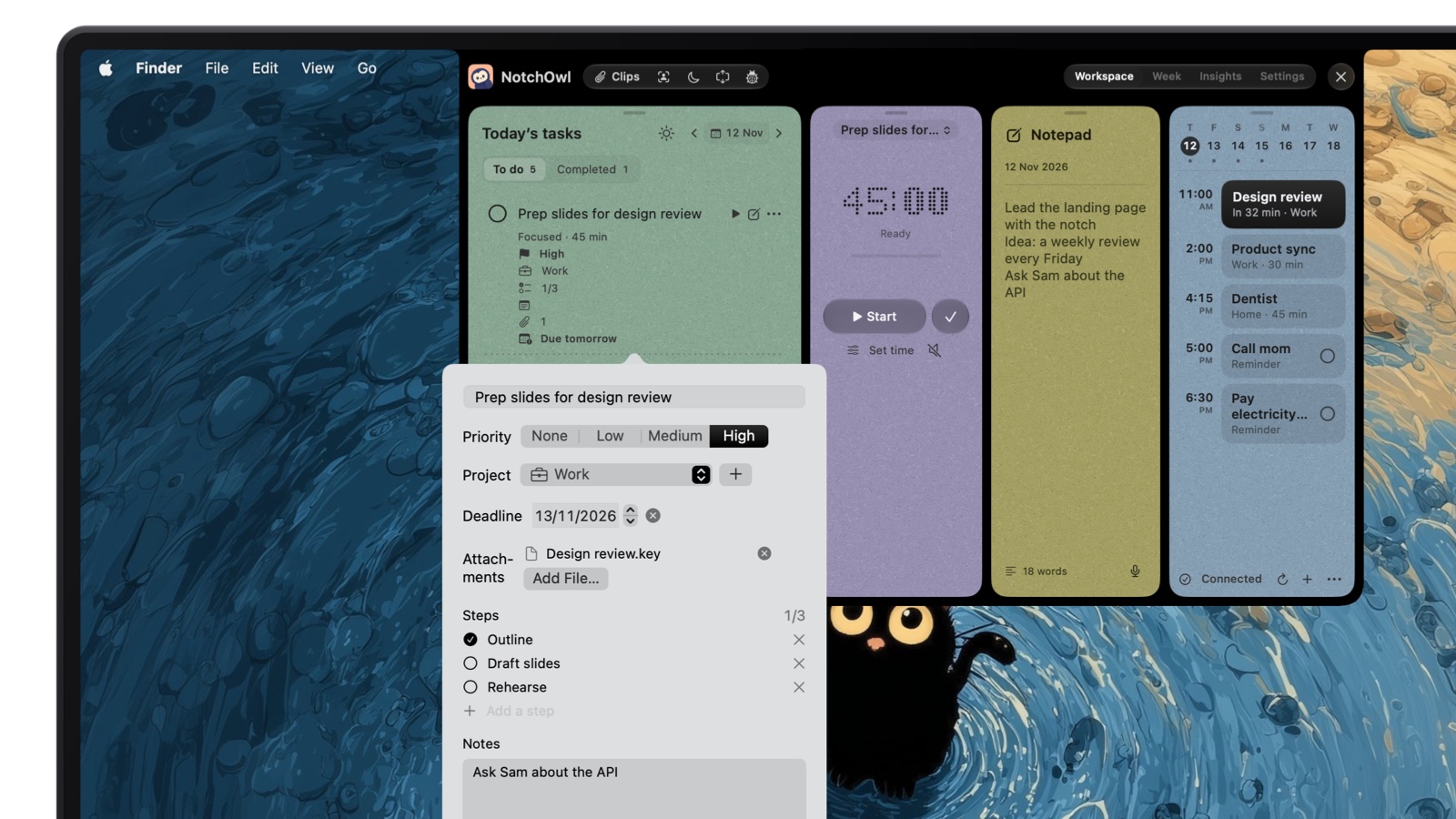
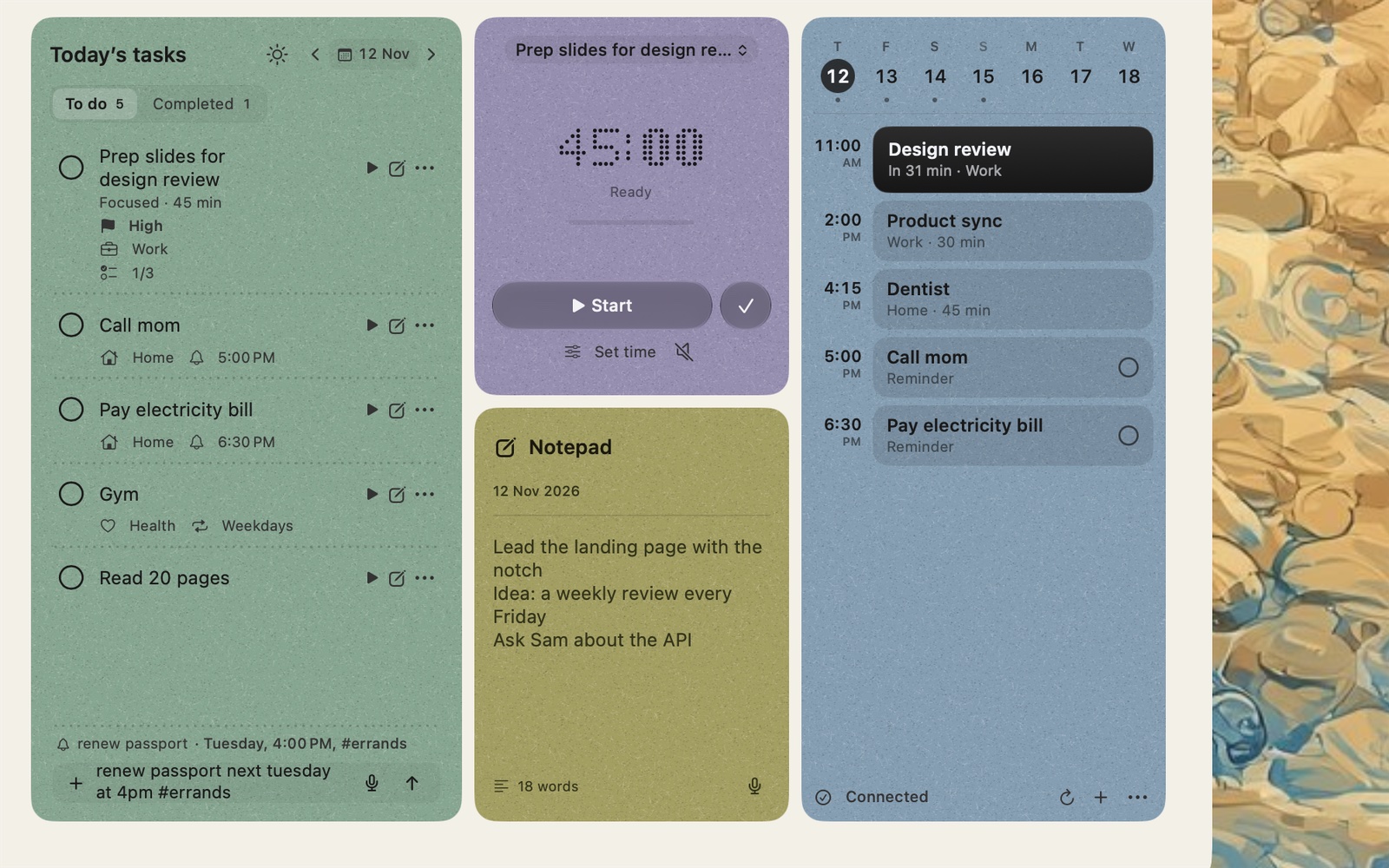
As the developer of NotchOwl, I’m not neutral here, so read this as the maker’s view. If you’re choosing between Things 3 and Todoist because your list keeps disappearing behind other windows, the problem may be where the list lives rather than which app holds it. NotchOwl keeps today’s list in the MacBook notch: hover over the notch or press Option–N, and today’s tasks, a focus timer, a daily notepad and the next two weeks of calendar events drop down over the app you’re in.
A task’s details in the notch: priority, project, deadline, an attached file, steps and a note.
It sits between the two apps above. Like Things 3, it’s bought once: $12 for up to 3 Macs (an early-bird price, normally $39), with lifetime updates and a 7-day money-back guarantee, though there is no free tier or trial. Like Todoist, it reads a task the way you type it: “call mom tomorrow at 5pm !high #family” gets a day, a 5 PM reminder, a priority and a project, and it shows how it read the line before you add it. Dictation is recognized on your Mac rather than online.
Type the day, time and project in plain words; NotchOwl shows how it reads them before you add.
It also does three things neither app does. A focus timer, as a countdown (15, 25, 45 or 60 minutes, or your own length) or a stopwatch, runs beside the closed notch. When a reminder comes due, the notch opens with a chime and Snooze and Done buttons. And Plan your day fits today’s untimed tasks into the free time around your events, giving each a reminder, with nothing changed until you apply it. Tasks stay on your Mac; optional two-way Apple Reminders sync reaches iPhone and Apple Watch, and a built-in MCP server lets Claude Code, the Claude app and Cursor manage your tasks locally.
The limits matter, and some are exactly where Things 3 and Todoist are strong:
Mac only. Apple silicon and macOS 14 Sonoma or later; no iPhone, iPad, Windows or Android app.
No sharing. No shared or team lists.
Less structure. Projects, priorities, steps and deadlines, but no areas, headings, tags, sections, labels or filters.
No importer. It doesn’t connect to Things 3 or Todoist. To move a list, paste it into the daily notepad and press Command–Return on each line, or ask Claude to copy it over with both apps connected.
Read-only calendar. It shows events and Join buttons but never creates or edits them.
Neither is better for everyone. Things 3 is the better pick if you only use Apple devices and want a calm app you buy once ($49.99 for the Mac). Todoist is the better pick if you need Windows, Android or the web, share projects with other people, or want typed dates, labels and priorities in one line.
Which is cheaper over time, Things 3 or Todoist?
Things 3, if you would otherwise pay for Todoist Pro. As of November 2026, Things 3 costs $49.99 once for the Mac and $79.97 for the Mac, iPhone and iPad apps together, while Todoist Pro costs $60 a year billed yearly, or $180 over three years. Todoist’s free Beginner plan costs nothing but stops at 5 personal projects.
Can Things 3 and Todoist share lists with other people?
Todoist can: every plan lets up to 5 people share a personal project, and Todoist Business adds team projects with up to 250 people each. Cultured Code says Things does not support real-time sharing of to-dos or lists; you can only send a plain-text copy or print a list.
Does Things 3 understand natural language like Todoist?
Partly. Things 3 reads phrases such as “tues 8am” or “17d” typed into its When and Deadline fields, in eight languages, but Cultured Code doesn’t describe it reading dates typed into the title. Todoist’s Quick Add reads the date, repeat, project, label, priority and reminder from the task’s own text.
How do I move from Todoist to Things 3?
On a Mac with macOS 14.4 or later, choose File › Import › Import From Todoist in Things and sign in to Todoist. Projects, tasks, labels, comments and due dates come across, but repeating tasks lose their schedule, subtasks are flattened, and priorities and image attachments aren’t imported.
Do Things 3 or Todoist work with Claude and other AI agents?
Todoist has an official MCP server at ai.todoist.net/mcp, so Claude, ChatGPT and other AI apps can read and change your tasks after an OAuth sign-in. Things 3 has no official MCP server; community servers such as things-mcp run on your Mac and use Things’ URL scheme and AppleScript.