Microsoft To Do Alternatives for Mac in 2026: 6 Apps
The best Microsoft To Do alternatives for Mac in 2026: NotchOwl ($12 once) in the notch, Apple Reminders for free, TickTick, Todoist, Things 3 and Any.do.
By Aditya Jaiswal, founder of NotchOwl · Updated · 14 min read
The best Microsoft To Do alternatives for Mac in 2026 are NotchOwl ($12 once) for keeping today’s tasks, reminders and a focus timer in view in the MacBook notch; Apple Reminders, a free swap if you only use Apple devices; TickTick and Todoist, if Windows and Android are still part of your day; Things 3, the polished Apple-only app you buy once; and Any.do, for a My Day planner like To Do’s.
I build NotchOwl, so weigh its place at the top with that in mind; where another app suits you better, I say so, and if Microsoft To Do still fits you, a later section says that too. I checked Microsoft’s help pages and each alternative’s own pricing, help and download pages on November 12, 2026, and linked them where the facts appear; prices are in US dollars.
Quick picks
Best for keeping today’s tasks and reminders in view on a Mac: NotchOwl, $12 once
Best free swap on Apple devices: Apple Reminders
Best free plan with a Pomodoro timer and habits, on every platform: TickTick
Best for fast typed capture and shared projects, on every platform: Todoist
Best Apple-only app you buy once: Things 3, $49.99 for the Mac
Best My Day–style daily planner: Any.do
What Microsoft To Do does well
It’s worth being fair to To Do first, because for many people it’s the right app. Microsoft To Do is free, with no paid tier, and runs on Mac, Windows, iPhone, iPad, Android and the web; its iPhone App Store listing also lists Apple Watch, with watchOS 10.6 or later. My Day is a daily list that resets every night: unfinished tasks go back to their lists and come back as Suggestions the next morning, next to tasks that are due or overdue.
Lists can be shared with family, friends or colleagues, tasks can have steps and one-time or recurring due dates and reminders, according to the Mac App Store listing, and file uploads are limited to 25 MB per task. Its biggest strength is Outlook. Tasks sync between Outlook and To Do, and if you sign in with the same Microsoft-hosted account you use for email, flagged Outlook emails appear as tasks, starting with the 100 most recently flagged in the last 30 days.
If your work runs on Windows and Outlook, those are good reasons to stay.
Why Mac users look for a Microsoft To Do alternative
The Mac app is where To Do falls behind. These are the reasons that come up, each checked against Microsoft’s own pages:
Typed dates don’t work on the Mac.Microsoft’s help page lists smart due date and reminder recognition for the Windows app (version 2.66 and later) and the iOS app, and says other platforms are being worked on. On a Mac, “call mom tomorrow at 5pm” stays a title; you pick the date and time by hand.
No Mac widget. The Mac App Store listing doesn’t mention one, and Microsoft’s widget help covers iOS only. The iPhone widget can show on a Mac desktop through Use iPhone widgets, but Microsoft says “it’s not currently possible to mark tasks as complete in a widget.”
Fewer features on the Mac.Printing a list, with or without steps and notes, is documented for the Windows app and To Do on the web, not the Mac.
Slow Mac updates. As of November 12, 2026, the Mac app has had two updates this year, 2.169 on March 9 and 2.177 on July 6, and the App Store notes for both describe only bug fixes.
It works best with a Microsoft account you already use. Flagged email and Outlook sync need the same Microsoft account you use for mail; if you don’t use Outlook, that’s one more account for a to-do list.
Nothing outside the window. No menu bar list and no focus timer; to see your day, you open the app.
My Day starts blank every morning. Some people love the fresh start; others would rather unfinished tasks simply carry forward.
Microsoft To Do alternatives compared
Microsoft To Do and six alternatives for Mac compared (US prices, November 12, 2026)
App
Price
Runs on
Typed dates on Mac
Shared lists
Daily list
Outside the Mac app window
Microsoft To Do
Free, no paid tier
Mac (macOS 13+), Windows, iPhone, iPad, Apple Watch (watchOS 10.6+), Android, web
No (Windows and iOS only)
Yes, with assigned tasks
My Day, clears nightly
iPhone widget only, via Use iPhone widgets
NotchOwl
$12 once, up to 3 Macs
Apple silicon Macs; iPhone and Watch through Reminders sync
Yes, in English
No
Today in the notch; carry forward, ask or leave in History
Notch, menu bar and desktop widgets
Apple Reminders
Free, built in
Mac, iPhone, iPad, Apple Watch; icloud.com in a browser
Yes, as suggested dates
Yes, with assignment
Today Smart List
Widgets
TickTick
Free; Premium $49.99/year
Mac, Windows, Linux, iPhone, iPad, Android, web
Yes
Yes; 1 other person free, 29 on Premium
Today list
Menu bar access, quick capture, sticky notes
Todoist
Free; Pro $5/month yearly or $7 monthly
Mac, Windows, Linux, iPhone, iPad, Watch, Android, Wear OS, web
Yes, in Quick Add
Yes, up to 5 people per project
Today list
Quick Add, Ramble shortcut, widget
Things 3
$49.99 Mac; $9.99 iPhone and Watch; $19.99 iPad; once
Mac, iPhone, iPad, Watch, Vision Pro
In the When field
No
Today and This Evening
Quick Entry and widgets
Any.do
Free; Premium $4.99/month yearly or $7.99 monthly
Mac, Windows, iPhone, iPad, Android, Watch, Wear OS, web
Not listed
Yes; Family and Teams plans
My Day
Not listed
The best Microsoft To Do alternatives for Mac
NotchOwl: best for keeping today’s tasks and reminders in view
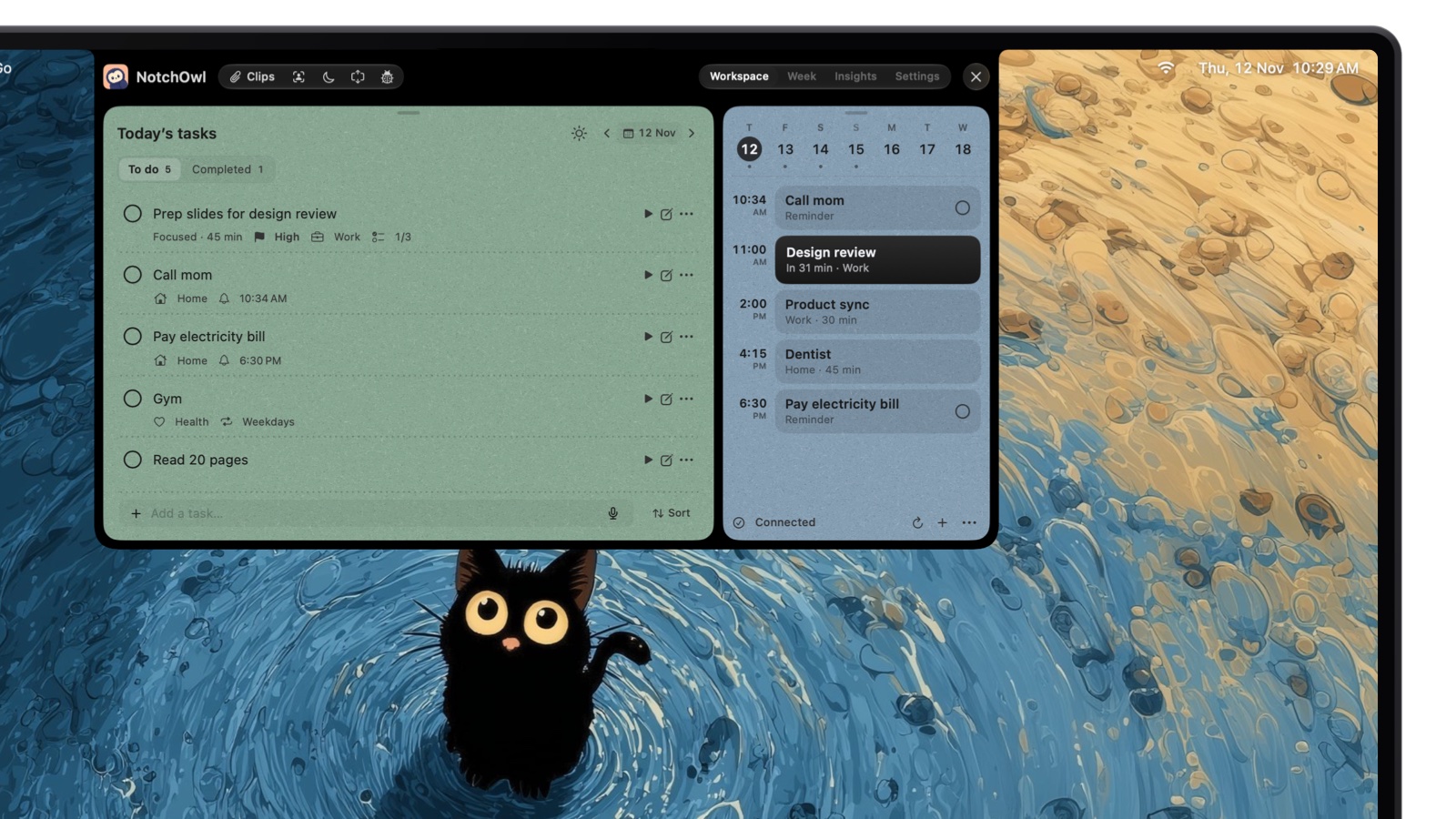
Where To Do waits in a window, NotchOwl lives in the MacBook notch. Hover over the notch or press Option–N, and today’s tasks, a focus timer, a daily notepad and the next two weeks of calendar events drop down over the app you’re in. When a reminder comes due, the notch opens with a chime, the task and Snooze and Done buttons, so a reminder is hard to miss.
Snooze a reminder for 5 minutes and it moves to its new time, on the list and on the day’s agenda.
Why switch: you liked My Day but lost track of it behind other windows, or you want typed dates that work on the Mac.
Better than To Do at: type tasks the way you’d say them (“call mom tomorrow at 5pm !high #family” gets a day, a 5 PM reminder, a priority and a project) or dictate them, with speech recognized on the Mac. Unfinished tasks can carry forward automatically, wait for you to decide each morning, or stay in History, and Wrap up at the end of the day shows what you finished and sends the rest to tomorrow or the Inbox. Tasks have steps, notes, deadlines, repeats and attachments. A focus timer runs beside the closed notch, Outlook and Google calendars added to your Mac show up with Join buttons for video calls, and desktop widgets show today’s tasks and the timer. It costs $12 once for up to 3 Macs, an early-bird price that is normally $39, with lifetime updates and a 7-day money-back guarantee.
Worse than To Do at: reach. It’s Mac only and Apple silicon only (macOS 14 Sonoma or later), with no Windows, Android or iPhone app, no shared lists and no Outlook flagged-email list. It reads calendars but never edits them, the typing parser is English-only, and there is no free tier or trial. It’s young: its first release was September 15, 2026.
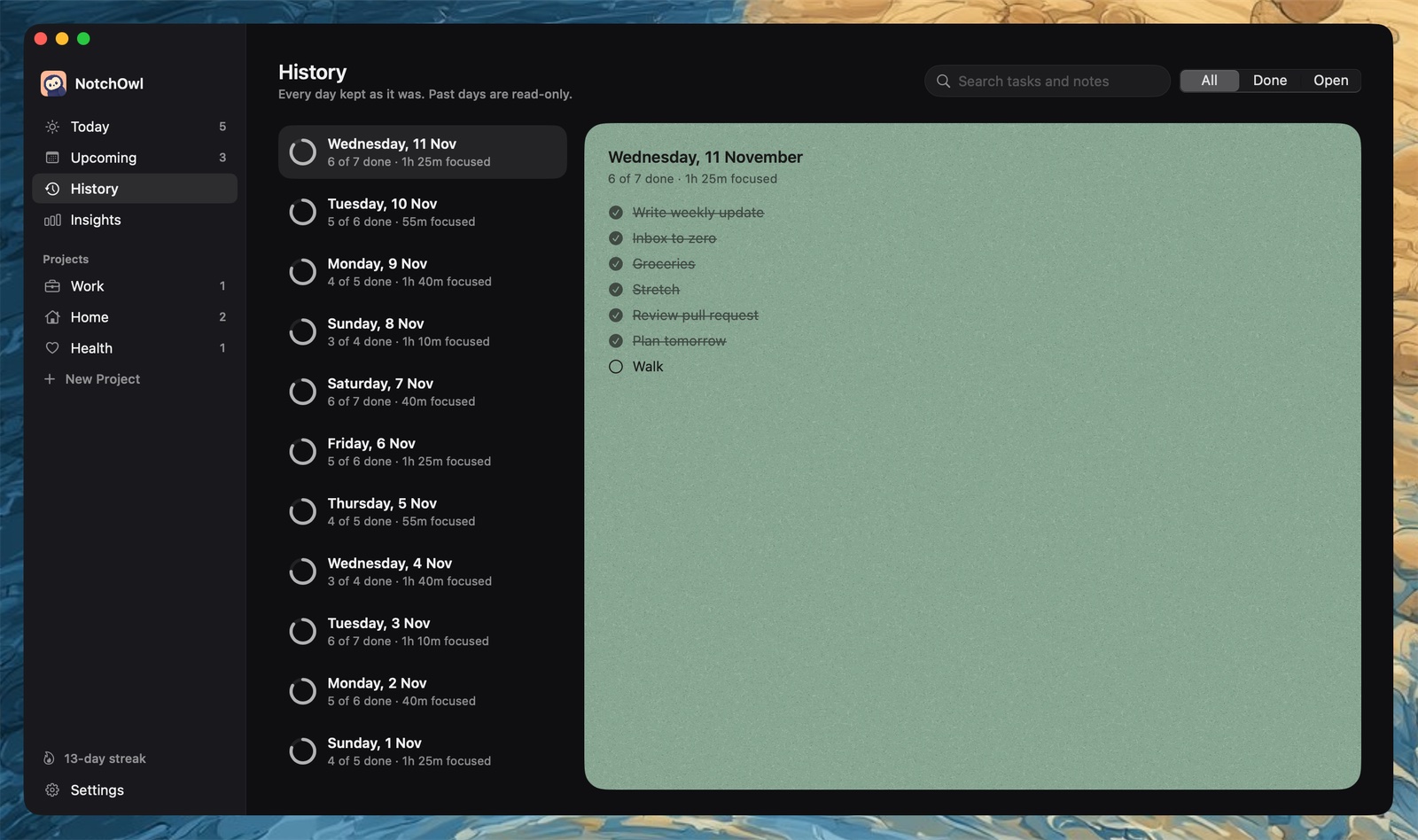
Unlike My Day, past days don’t vanish: History keeps what got done and how long you focused.
To Do’s iPhone app is a real reason to hesitate, since NotchOwl has none. Its optional two-way Apple Reminders sync is the bridge: tasks land in a NotchOwl list in Reminders, so they appear on iPhone and Apple Watch through iCloud, and timed reminders ring there too.
Through Apple Reminders, a NotchOwl task reaches iPhone and Apple Watch.
Apple Reminders: best free swap on Apple devices
Apple Reminders is free, built into macOS, and syncs through iCloud to your other Apple devices; on a PC, it opens in a browser at icloud.com/reminders. It covers nearly everything To Do does: the Reminders User Guide lists shared lists you can assign reminders in, subtasks, tags, custom Smart Lists, sections, and date and location reminders. Type “Pay bills on Saturday” and Reminders suggests the date for you to click, according to Apple’s Reminders guide.
If you only use Apple devices and liked To Do for its simplicity, this is the closest free swap. It needs no new account, and scheduled reminders show in Apple Calendar on macOS Sequoia and later. Many Mac apps build on it, including NotchOwl and Things 3. What you lose is reach and extras: there’s no Windows or Android app, no flagged-email list, no focus timer and no menu bar list. For ways to keep Reminders in view, see Apple Reminders in the Mac menu bar.
TickTick: best free plan with a timer and habits, on every platform
TickTick offers downloads for Mac, Windows, Linux, iPhone, iPad and Android, plus a web app and a browser extension, so it suits people who leave To Do but keep a Windows PC at work. Its free plan allows 9 lists with 99 tasks each, 2 reminders per task, 5 habits and one other person on a shared list. Premium costs $49.99 a year and raises those limits to 299 lists, 999 tasks per list and 29 members, according to TickTick’s Premium page.
Why switch: more features without giving up cross-platform sync.
Better than To Do at: dates and times recognized as you type, Pomodoro focus sessions, a habit tracker and an Eisenhower Matrix, according to TickTick’s homepage. On the Mac, TickTick’s Mac page says Command–Shift–O opens your tasks and starts focus from the menu bar, Command–Shift–A captures a task without leaving your current app, and Desktop Sticky Notes pin tasks to your screen.
Worse than To Do at: staying simple, and staying free: multiple calendar views, task duration and AI features are Premium-only.
Todoist: best for fast typed capture and shared projects
Todoist runs on Mac, Windows, Linux, iPhone, iPad, Apple Watch, Android, Wear OS and the web, per its downloads page. Its free Beginner plan allows 5 personal projects; Pro costs $5 a month billed yearly ($60) or $7 billed monthly, according to Todoist’s pricing page.
Why switch: To Do’s reach across platforms, with much faster capture.
Better than To Do at:Quick Add reads the date, repeat, project, label and priority from one typed line, on the Mac too. Up to 5 collaborators can share each personal project on any plan, and Outlook and Google Calendar events show in Today and Upcoming, per Todoist’s calendar guide. Every plan includes 90+ integrations, Ramble turns speech into tasks, and Todoist’s AI page describes an official MCP server for Claude and other AI apps.
Worse than To Do at: price, past a point. The free plan stops at 5 projects and 10 Ramble sessions a month, the calendar layout, deadlines and custom reminders need Pro, and there is no one-time purchase.
Any.do is the closest in spirit to To Do. Its daily planner is even called My Day, and its free Personal plan includes tasks, lists, reminders, the calendar and My Day, according to Any.do’s pricing page. Premium costs $4.99 a month billed yearly or $7.99 monthly, Family costs $8.33 a month billed yearly for 4 members, and Teams costs $4.99 per member a month billed yearly.
It suits people who like To Do’s My Day ritual and share lists with a household. Any.do’s homepage lists apps for Mac, Windows, iPhone, iPad, Android, Apple Watch, Wear OS and the web. Premium adds recurring tasks, WhatsApp reminders, location reminders, color tags and AI features; the catch is that recurring tasks, free in To Do, cost money here.
Microsoft To Do is free, but its Mac app doesn’t read typed dates or offer a widget, so the main alternatives for Mac in 2026 are Apple Reminders for free, TickTick and Todoist for Windows and Android, Things 3 to buy once, Any.do for a My Day planner, and NotchOwl ($12 once) for today’s tasks and reminders in the MacBook notch.
How to move your tasks out of Microsoft To Do
To Do has no export button on the Mac, but there are two practical routes.
Through Apple Reminders. Add your Microsoft account to your Apple device with Reminders turned on; Microsoft says your To Do tasks then sync to Reminders. On a Mac, Cultured Code’s guide adds the account as Microsoft Exchange in System Settings › Internet Accounts. Your To Do lists then appear in Reminders under that account, and apps that import from Reminders can take them from there. Things 3, for example, has File › Import › Import From Reminders, which copies lists as projects but drops repeat schedules and can’t import lists inside groups.
As text. Open To Do on the web or in the Windows app, open the list’s menu, switch Print steps and Print notes on or off, and print the list to PDF. Copy the text and paste it into the new app:
Todoist: paste the lines into Quick Add and choose Add X tasks to create one task per line.
NotchOwl: paste the list into the daily notepad and press Command–Return on each line to turn it into a task, or type several tasks on one line separated by semicolons. With NotchOwl’s MCP server connected, you can also paste the list into Claude and ask it to add the tasks.
Any other app: paste, then set dates and lists again.
Repeating tasks and reminders rarely survive a move, so recreate them by hand. Your To Do lists stay in your Microsoft account in the meantime, so nothing is lost while you try the new app.
Who should stay with Microsoft To Do
You live in Outlook. Flagged emails as tasks and tasks shared with Outlook are hard to match elsewhere.
You use Windows at work. To Do is free on every platform you’ll touch.
You share free lists across platforms. Apple Reminders has no Android app, and some alternatives limit sharing on their free plans.
You like a blank My Day each morning. That’s a design choice, and To Do does it well.
If you stay but want the list in view on the Mac, adding To Do’s iPhone widget to your desktop, or the Reminders route above with a Reminders-based menu bar app, gets you part of the way. The best menu bar to-do apps for Mac compares those options.
Skip NotchOwl if you rely on these To Do habits
Some of what To Do users depend on every day simply isn’t in NotchOwl:
Assigning tasks to someone else. NotchOwl has no shared lists, so a household or team list stays in To Do, Reminders or Todoist.
Turning flagged emails into tasks. NotchOwl doesn’t read Outlook mail or connect to Microsoft To Do.
Checking your list on a work PC or an Android phone. NotchOwl runs only on Apple silicon Macs, reaching iPhone and Apple Watch through Apple Reminders.
Paying nothing. To Do is free; NotchOwl costs $12 once for 3 Macs, with a 7-day refund instead of a trial.
What is the best Microsoft To Do alternative for Mac?
NotchOwl ($12 once) is best for keeping today’s tasks and reminders in view in the MacBook notch, Apple Reminders is the best free swap on Apple devices, TickTick and Todoist keep Windows and Android in the picture, Things 3 is a polished Apple-only app you buy once, and Any.do has a My Day planner like To Do’s.
Does Microsoft To Do recognize typed dates on a Mac?
Not according to Microsoft. Its help page lists smart due date and reminder recognition for the To Do apps on Windows (version 2.66 and later) and iOS only, and says support for other platforms is being worked on. On a Mac, you set dates with the date pickers.
Is there a free alternative to Microsoft To Do on Mac?
Yes. Apple Reminders is free and built into macOS, with shared lists, tags, subtasks and location reminders, and it syncs to your other Apple devices through iCloud. TickTick, Todoist and Any.do also have free plans that run on Mac, Windows and Android.
How do I move my tasks from Microsoft To Do to Apple Reminders?
Add your Microsoft account to your Apple device with Reminders turned on: Microsoft says your To Do tasks then sync to Reminders. On a Mac, Cultured Code’s guide adds the account as Microsoft Exchange in System Settings › Internet Accounts. The tasks stay in your Microsoft account, so other Reminders-based apps can import them from there.
Does Microsoft To Do have a Mac widget?
No. As of November 2026, the Mac App Store listing for Microsoft To Do doesn’t mention a widget, and Microsoft’s widget help covers iPhone only. With Use iPhone widgets turned on, the iPhone widget can appear on a Mac desktop; Microsoft says it shows and adds tasks but can’t mark them complete.
Which Microsoft To Do alternative has a My Day list?
Any.do has My Day, a daily planner on its free plan, and Todoist and Things 3 have Today lists. NotchOwl’s Today lives in the MacBook notch and can carry unfinished tasks forward, ask you each morning, or leave them in its History.