Akiflow Alternatives in 2026: Cheaper Daily Planners
The best Akiflow alternatives in 2026: NotchOwl ($12 once) for a planned day on a Mac, Morgen and Sunsama for less a month, and Reclaim or Structured for free.
The best Akiflow alternatives are NotchOwl ($12 once) for a planned day on a Mac, Sunsama and Morgen for the same kind of work planning at a lower price, and Reclaim.ai’s free plan for automatic scheduling. Akiflow Pro costs $19 a month billed yearly ($228 a year) or $34 monthly, with no free plan. NotchOwl fits today’s tasks around your meetings from the MacBook notch, Sunsama keeps a daily ritual for $17 a month billed yearly, Morgen ($15 a month billed yearly) pulls tasks from other tools and suggests time blocks, and Todoist, TickTick, Structured and Apple Calendar with Reminders cost little or nothing.
Disclosure: I’m NotchOwl’s developer. It’s listed first because it’s mine, and what it can’t do is spelled out below beside everyone else’s limits, including a section on when Akiflow is still worth $228 a year. All prices are US prices from each app’s pricing page, help center or App Store listing on November 12, 2026.
Quick picks
- Best for a planned day on a Mac without a subscription: NotchOwl, $12 once
- Closest daily planning ritual for less: Sunsama, $17 a month billed yearly
- Best for pulling tasks from other tools for less: Morgen, $15 a month billed yearly
- Best free automatic scheduling: Reclaim.ai, free Lite plan
- Best cheap list with a calendar layout: Todoist, Pro $5 a month billed yearly
- Best cheap all-in-one with a timer: TickTick, $49.99 a year
- Best free visual timeline: Structured
- Best free setup already on your Mac: Apple Calendar with Reminders
What Akiflow costs, and what you get
Akiflow describes itself as one app for tasks and calendars, powered by AI. It collects tasks from your other tools into one inbox, then you drag them onto your calendar as time blocks. Daily and weekly rituals walk you through planning and a shutdown, with a look back at how you spent your time.
- Price: Pro costs $19 a month billed yearly ($228, labeled a promo) or $34 billed monthly, per Akiflow’s pricing page in November 2026. The FAQ says there is no free plan.
- Trial: 7 days with full access, and a card is required; the subscription starts after the trial unless you cancel.
- Extras: an AI Meeting Assistant for recordings, transcripts and summaries costs $19 a month on top. Students and researchers get 40% off the yearly plan for life after verifying an academic email.
- Included in Pro: Aki, Akiflow’s AI assistant, a hosted MCP connector for AI apps, and a free onboarding call.
- Integrations: Slack, Gmail, Notion, Asana, ClickUp, Trello, Todoist, Jira, Linear, GitHub, Microsoft Teams, Microsoft To Do, Zoom, Outlook email and calendar, Google Calendar and two-way iCloud Calendar sync, plus Zapier and IFTTT, per Akiflow’s integrations page.
- Platforms: Mac, Windows and the browser. The download page asks you to install the desktop app before the iPhone or Android app.
Why people look for an Akiflow alternative
- The price. $228 a year on the yearly plan, or $408 a year paid monthly, is a lot for one person’s planner, and it’s more than Sunsama.
- No free plan, and a card for the trial. You can’t keep using Akiflow free after 7 days, and you have to remember to cancel.
- You still do the scheduling. Akiflow helps you place blocks, but you place them. If you wanted software to plan for you, you’re paying for the wrong thing.
- You don’t need the inbox. Akiflow’s value is pulling tasks from many tools. If your tasks come from your own head, a simpler list does the job.
- Desktop first. The phone apps need the desktop app installed first, which doesn’t suit people who plan mostly on a phone.
Akiflow alternatives compared
| App | Price | Cost for a year | Free plan or trial | Pulls tasks from | Calendars | Platforms |
|---|---|---|---|---|---|---|
| Akiflow | $19/mo yearly or $34 monthly | $228 | 7-day trial, card needed | Slack, Gmail, Jira, Notion and more | Google, Outlook, iCloud | Mac, Windows, web, iOS, Android |
| NotchOwl | $12 once for up to 3 Macs | $12, once | No trial; 7-day refund | You type or say tasks | Reads Apple Calendar (with Google and Outlook), Calendly, Cal.com | Mac only (Apple silicon, macOS 14+) |
| Sunsama | $17/mo yearly or $22 monthly | $204 | 14-day trial, no card | Slack, Gmail, Jira, Notion and more | Google, Outlook, Apple | Mac, Windows, Linux, iOS, Android, web |
| Morgen | $15/mo yearly or $30 monthly | $180 | 14-day trial, no card | Notion, Todoist, ClickUp, Linear, Reminders and more | Google, Outlook, Apple, iCloud, Fastmail, CalDAV | Mac, Windows, Linux, web, mobile |
| Reclaim.ai | Lite free; Starter $10/seat/mo yearly | $0, or $120 on Starter | Free plan; 14-day trial | Todoist, Asana, ClickUp, Jira, Linear, Google Tasks | Google and Outlook | Web; no native mobile apps |
| Todoist | Free; Pro $5/mo yearly or $7 monthly | $0, or $60 on Pro | Free plan | Its own list | Google and Outlook | Mac, Windows, Linux, iOS, Android, web |
| TickTick | Free; Premium $49.99/year | $0, or $49.99 | Free plan | Its own list | Subscribed calendars | Mac, Windows, Linux, iOS, Android, web |
| Structured | Free; Pro monthly, yearly or $99.99 lifetime | $0 to start | Free core app | Its own inbox; Reminders with Pro | Calendar import with Pro | Apple devices, Android, web |
| Apple Calendar + Reminders | Free, built in | $0 | Free | Reminders | iCloud and accounts on your Mac | Apple devices |
Akiflow costs $228 a year on its yearly plan with no free plan, so the cheaper alternatives in 2026 are NotchOwl ($12 once) for a planned day on a Mac, Sunsama ($204 a year) for the same kind of daily ritual, Morgen ($180 a year) for tasks from other tools, and Reclaim.ai, Structured and Apple Calendar for free.
The best cheaper Akiflow alternatives
NotchOwl: a planned day on your Mac for $12
NotchOwl puts your day in the MacBook notch. Hover over the notch or press Option–N, and today’s tasks, a focus timer, a daily notepad and the next two weeks of calendar events open over whatever app you’re using. It skips Akiflow’s universal inbox and keeps the daily routine:
- A morning plan. Plan your day fits today’s untimed tasks, most important first, into the free time around your events and gives each a reminder. Drag to reorder and the times follow; nothing changes until you press Apply.
- An evening shutdown. Wrap up shows what you got done, sends what’s left to tomorrow or the Inbox, and saves a line about the day.
- Your meetings. Events come from Apple Calendar, including Google and Outlook accounts added to your Mac or calendars subscribed by link, plus Calendly and Cal.com bookings. Video calls get a Join button, and five minutes before a meeting the notch offers Join.
- Focus. A countdown (15, 25, 45 or 60 minutes, or your own length) or a stopwatch runs beside the closed notch.
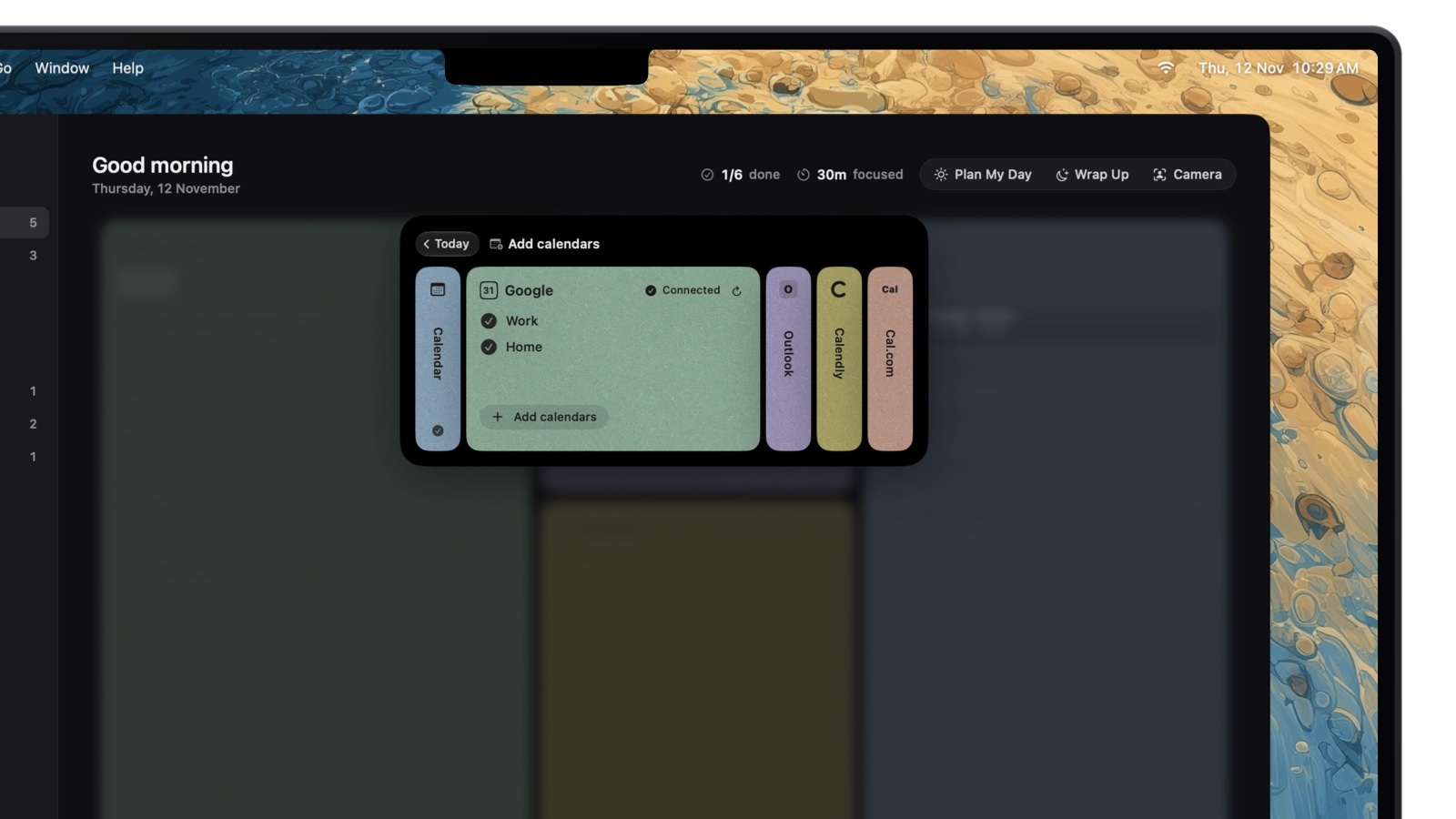
Once Google is connected on your Mac, Add calendars shows which of its calendars NotchOwl reads.
The next meeting waits in the notch with a Join button:
NotchOwl costs $12 once for up to 3 Macs (an early-bird price, normally $39), with lifetime updates and a 7-day money-back guarantee; there is no free tier or trial. It runs on Apple silicon Macs with macOS 14 Sonoma or later, and optional two-way Apple Reminders sync puts tasks on iPhone and Apple Watch. Like Akiflow, it has an MCP server, but it runs inside the Mac app, so Claude or Cursor can add tasks and set reminders on your Mac.
One user wrote on X:
I was looking for something to brain dump thoughts, track tasks, and focus on one thing at a time, without digging through windows.
Accidentally stumbled on NotchOwl and switched immediately.
- Best for: people who plan their own day on a Mac and paid for Akiflow mostly for its daily planning.
- Drawbacks: NotchOwl reads your calendar but never creates or edits events, so it sets reminder times, not time blocks. It doesn’t pull tasks from Slack, Gmail or Jira, has no iPhone, Windows or web app, and has no team lists. Its first release was September 15, 2026.
- Link: download NotchOwl or see what the $12 license includes.
Sunsama: the closest ritual, for a little less
Sunsama is the closest match to Akiflow’s daily routine. Each morning it walks you through choosing tasks from your calendar, backlog and connected tools, you timebox them on a calendar that syncs with Google, Outlook and Apple, and a daily shutdown closes the day. Pressing X on a task auto-schedules it into a free slot in your working hours, per Sunsama’s timeboxing guide.
- Price: $17 a month billed yearly ($204) or $22 monthly, after a 14-day trial with no card needed, per Sunsama’s pricing page, which says there is no free plan and none planned.
- Pulls tasks from: Asana, ClickUp, GitHub, Jira, Linear, Monday.com, Notion, Todoist, Trello, Google Tasks, Microsoft To Do, Microsoft Planner, Gmail, Outlook, Slack and Microsoft Teams, among others, per Sunsama’s homepage, which links a page for each integration.
- Platforms: Mac, Windows, Linux, iPhone, iPad, Android and the web.
- Best for: people who like Akiflow’s rituals and integrations and want to pay $24 a year less, or $12 a month less on monthly billing.
- Drawbacks: still a subscription with no free plan. Sunsama alternatives covers more options.
Morgen: tasks from other tools, with an AI Planner
Morgen brings calendars and tasks together like Akiflow, then adds an AI Planner that recommends time blocks in your calendar, re-prioritizes when something conflicts and flags tasks at risk of running late. You accept or adjust each suggestion.
- Price: $15 a month billed yearly ($180) or $30 monthly, with a 14-day trial and no card needed, per Morgen’s pricing page. Teams of two or more pay $10 a seat billed yearly.
- Pulls tasks from: Notion, Todoist, Obsidian, ClickUp, Linear, Apple Reminders, Google Tasks and Microsoft To Do, with more through Zapier; calendars from Google, Outlook, Apple, iCloud, Fastmail and CalDAV, per Morgen’s integrations page.
- Platforms: Windows, Mac, Linux, the web and mobile, per Morgen’s homepage.
- Best for: the cheapest of the integration planners on yearly billing, especially if you use Apple Reminders or Obsidian.
- Drawbacks: no Jira or Asana on its integrations page, and $30 billed monthly is close to Akiflow’s $34.
Reclaim.ai: free automatic scheduling
Reclaim.ai goes further than Akiflow in one direction: it schedules for you. It syncs your task lists and places tasks on your calendar by priority, defends Focus Time toward a weekly goal and moves recurring Habits to open slots.
- Price: the Lite plan is free for one user, with a one-week scheduling range, 2 connected calendars and integrations limited to Google Tasks, Slack, Zoom and Google Meet. Starter costs $10 a seat a month billed yearly or $12 monthly and schedules 8 weeks ahead, per Reclaim’s pricing page.
- Pulls tasks from: Todoist, Asana, ClickUp, Jira, Linear and Google Tasks.
- Platforms: works with Google Calendar and Outlook, in the browser; its help center says there are no native iOS or Android apps.
- Best for: people who want time blocks placed automatically and live in Google or Outlook calendars.
- Drawbacks: no iCloud calendar on Reclaim’s pages, no rituals, and the free plan’s task integrations stop at Google Tasks. Motion alternatives compares it with other auto-schedulers.
Todoist: a cheap list with a calendar layout
If Akiflow’s inbox mostly held tasks you typed yourself, Todoist is a fraction of the price. The free Beginner plan allows 5 personal projects; Pro costs $5 a month billed yearly ($60) or $7 monthly and adds the calendar layout, task durations and deadlines, so you can drag tasks onto times, per Todoist’s pricing page. Google Calendar and Outlook events show beside your tasks.
- Best for: one list on every device, with time blocking when you want it.
- Drawbacks: no daily ritual, no focus timer, and calendar time blocking needs Pro.
- Link: todoist.com
TickTick: tasks, calendar and a Pomodoro timer for $49.99 a year
TickTick’s free plan allows 9 lists of 99 tasks, 2 reminders per task and 5 habits; Premium costs $49.99 a year and adds multiple calendar views and task durations, per TickTick’s Premium page. A Pomodoro timer, habit tracker and Eisenhower Matrix are built in, and on a Mac, Command–Shift–A adds a task from any app.
- Best for: the most features for the least money.
- Drawbacks: it doesn’t gather tasks from Slack, Gmail or Jira the way Akiflow does, and there’s no daily planning ritual.
- Link: ticktick.com. TickTick alternatives for Mac covers its strengths and limits.
Structured: a free visual timeline
Structured shows tasks and events on one vertical timeline. The timeline, an inbox and a Pomodoro timer are free; Pro adds AI that drafts your day, calendar and Reminders import, and Replan for missed tasks, per its App Store listing, where the US price includes a $99.99 lifetime option.
- Platforms: iPhone, iPad, Mac (macOS 15 or later), Apple Watch, Vision Pro, Android and the web.
- Best for: personal planning that starts on a phone.
- Drawbacks: no work-tool integrations; calendar import needs Pro.
- Link: structured.app
Apple Calendar with Reminders: free time blocking
Keep tasks in Apple Reminders and drag blocks onto Apple Calendar in Day or Week view. On macOS 15 Sequoia and later, Calendar can show scheduled reminders at their time, and you can create, edit and complete them there, so timed tasks sit next to your meetings.
- Price: free on every Mac, iPhone, iPad and Apple Watch.
- Drawbacks: no ritual, no integrations with work tools and no timer; you supply the routine.
Keeping Akiflow’s rituals without Akiflow
Akiflow’s rituals don’t need Akiflow; the routine works in any app:
- Morning, five minutes. Look at today’s meetings, pick three to five tasks, and put the most important first.
- Give the top tasks a time. Fit them into the gaps between meetings, or let an app do it: Plan your day in NotchOwl, the AI Planner in Morgen, or X in Sunsama.
- Evening, two minutes. Mark what’s done and decide where each unfinished task goes: tomorrow, later this week or back to the inbox.
- Once a week. Clear the inbox and spread tasks across the coming days.
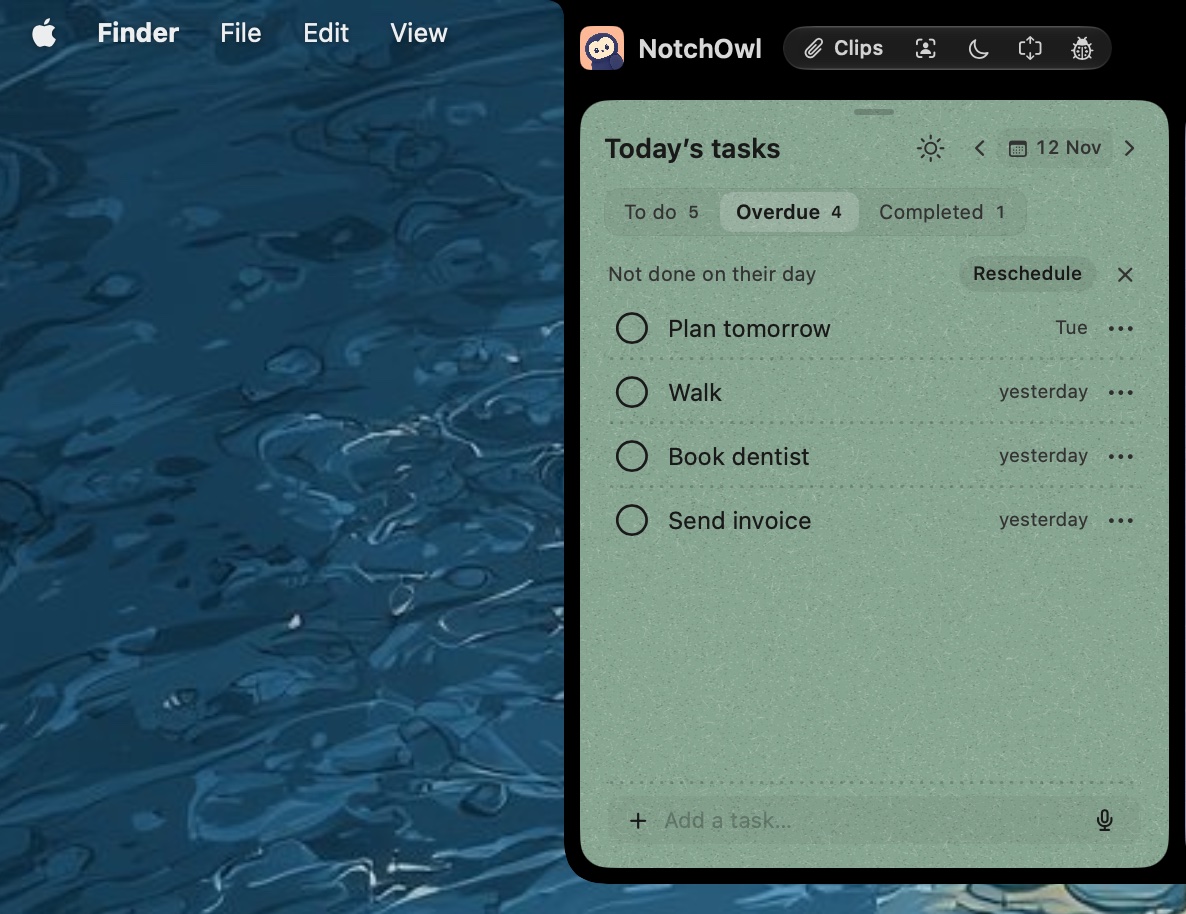
Tasks not done on their day wait on an Overdue tab, ready to reschedule.
In NotchOwl, Settings › Your day › Unfinished tasks offers Ask me, Carry forward or Leave in history, and an Overdue tab collects anything left behind with a Reschedule button. For more planners built around a routine, see the best daily planner apps for Mac and the best time blocking apps for Mac.
What about Motion?
Motion is the other name that comes up next to Akiflow, but it isn’t cheaper. On Motion’s pricing page, Pro AI for one person costs $29 a month billed yearly or $49 monthly, with no free plan, as of November 2026. It suits people who want software to schedule everything, plus projects, docs and meeting notes; if you only need the scheduling, Reclaim.ai’s free and Starter plans cost less.
When to stay with Akiflow
- Your tasks start in Slack, Gmail and Jira. Akiflow and Sunsama are the two built for that; Sunsama is $24 a year cheaper on yearly billing.
- You use iCloud Calendar with work tools. Akiflow syncs two ways with iCloud, Google and Outlook calendars.
- You rely on Aki or the MCP connector. Both come with Pro, so leaving means rebuilding that setup somewhere else.
- You’re a student or researcher. The 40% academic discount brings the yearly plan to about $11.40 a month.
When NotchOwl is the wrong choice
- You want time blocks on your calendar. NotchOwl can’t add or move events. Sunsama, Morgen, Reclaim or Apple Calendar can.
- Your tasks come from other tools. NotchOwl doesn’t import from Slack, Gmail, Jira or anything else.
- You plan on your phone, use Windows or have an Intel Mac. NotchOwl is Mac-only and needs Apple silicon.
- You plan with a team. NotchOwl has no shared lists.
- You want a free trial. NotchOwl has none, only a 7-day refund.
Before you cancel Akiflow
Run the new app beside Akiflow for a week; Sunsama’s and Morgen’s trials don’t need a card, and NotchOwl’s 7-day refund covers the same week. Tasks Akiflow shows from Todoist, Notion or Asana still live in those tools, so an alternative that reads the same source saves retyping. If price was the only problem, Mac productivity apps with no subscription lists more apps you pay for once, and Google Calendar on Mac covers getting your work calendar onto the desktop for free.
Frequently asked questions
What is the best Akiflow alternative?
The strongest Akiflow alternatives are NotchOwl, Sunsama, Morgen and Reclaim.ai. NotchOwl ($12 once) plans your own day on a Mac without a subscription, Sunsama ($17 a month billed yearly) has the closest daily planning and shutdown ritual, Morgen ($15 a month billed yearly) pulls tasks from other tools and suggests time blocks, and Reclaim.ai schedules tasks for free on its Lite plan.
How much does Akiflow cost in 2026?
Akiflow Pro costs $19 a month billed yearly ($228) or $34 billed monthly, as of November 2026. There is no free plan, the 7-day trial needs a card, an AI Meeting Assistant costs $19 a month extra, and students and researchers get 40% off the yearly plan.
Is there a free alternative to Akiflow?
Yes. Reclaim.ai’s Lite plan is free and schedules tasks on Google or Outlook calendars a week ahead, Structured’s core app is free, Todoist and TickTick have free plans, and Apple Calendar with Reminders is free on every Mac. None pulls tasks from as many tools as Akiflow does for free.
Which Akiflow alternative pulls tasks from Slack, Gmail and Jira?
Sunsama is the closest: it integrates with Slack, Gmail, Outlook, Jira, Linear, Asana, ClickUp, Notion, Todoist, Trello, GitHub and more, for $17 a month billed yearly. Morgen pulls tasks from Notion, Todoist, ClickUp, Linear, Apple Reminders and others, and Reclaim.ai syncs Todoist, Asana, ClickUp, Jira, Linear and Google Tasks.
Is there an Akiflow alternative with a one-time price?
Yes. NotchOwl costs $12 once for up to 3 Macs, and Structured sells a lifetime Pro purchase ($99.99 on the US App Store in November 2026). Neither pulls tasks in from other tools the way Akiflow does.
Does the Akiflow mobile app work without the desktop app?
Akiflow’s download page asks you to download the desktop app first for both iPhone and Android, and its guide calls the mobile app an extension of the desktop version. Structured, TickTick and Todoist work fully on a phone.