Motion Alternatives in 2026: 8 Planners Compared
The best Motion alternatives in 2026: NotchOwl ($12 once) plans your Mac day, Reclaim auto-schedules for free, and Morgen and Sunsama cost less a month.
The closest Motion alternative is Reclaim.ai, which schedules tasks onto your calendar automatically and has a free plan; for planning your own day on a Mac without a monthly bill, NotchOwl ($12 once) fits today’s tasks into the free time around your meetings, from the MacBook notch. Morgen suggests time blocks you approve for $15 a month billed yearly, Sunsama and Akiflow guide a daily plan you make yourself, and TickTick, Todoist and Structured cost far less if you used Motion mostly as a task list.
I make NotchOwl, which is why it’s on this list at all; its limits are listed as plainly as everyone else’s, and the sections below say when Motion itself is the better buy. Prices and features come from each app’s own pricing page, help center or App Store listing as of November 12, 2026, in US dollars, not from benchmarks or surveys.
Quick picks
- Best for planning your own day on a Mac without a subscription: NotchOwl, $12 once
- Closest to Motion’s auto-scheduling, with a free plan: Reclaim.ai, free or from $10 a seat a month billed yearly
- Best for AI suggestions you approve: Morgen, $15 a month billed yearly
- Best guided daily planning: Sunsama, $17 a month billed yearly
- Best for tasks that arrive from many tools: Akiflow, $19 a month billed yearly
- Best cheap all-in-one with a calendar and a timer: TickTick, $49.99 a year
- Best for fast capture and shared projects: Todoist, Pro $5 a month billed yearly
- Best free visual timeline: Structured
Why people look for a Motion alternative
Motion is an ambitious app. You give each task a duration, a deadline and a priority, and Motion places it in an open slot on your calendar, then recalculates when a meeting moves. Motion now calls itself a productivity platform and sells AI projects, docs, meeting notes, dashboards and workflows alongside the calendar. Common reasons to look elsewhere are cost and fit.
- The price. On Motion’s pricing page, Pro AI for one person costs $29 a month billed yearly or $49 billed monthly, and Business AI costs $39 or $69. Teams pay per seat: Pro AI $19 a month billed yearly or $29 monthly, Business AI $29 or $49. There is a free trial and no free plan, as of November 2026.
- AI credits. Motion’s AI features run on credits: 7,500 per seat a month on Pro AI and 15,000 on Business AI. The pricing page says a single workflow, such as summarizing a meeting, typically costs around 5 credits.
- More app than you need. If you came for the calendar, Gantt charts, docs, dashboards and a meeting notetaker are a lot to pay for and learn.
- Auto-scheduling needs good input. Motion’s auto-scheduling guide ranks ASAP tasks first, then hard deadlines, soft deadlines and priority, and a hard deadline can push a task outside your working hours, such as 6 PM. That works when every estimate is right. Some people would rather choose the order themselves than watch the calendar reshuffle.
- Desktop first. Motion’s desktop app runs on Apple silicon and Intel Macs with macOS 11 Big Sur or later and on Windows, but onboarding has to be finished in a desktop browser before the desktop and mobile apps work, and its help center describes the mobile app as an accompaniment to the web and desktop apps.
Motion alternatives compared
| App | Price | Free plan or trial | Who places tasks | Calendars | Platforms |
|---|---|---|---|---|---|
| Motion | Pro AI $29/mo yearly or $49 monthly (one person) | Free trial; no free plan | Motion schedules and reshuffles | Google, Outlook, iCloud | Mac (macOS 11+, Apple silicon and Intel), Windows, web, iOS, Android |
| NotchOwl | $12 once for up to 3 Macs | No trial; 7-day refund | Plan your day proposes times; you press Apply | Reads Apple Calendar (with Google and Outlook), Calendly, Cal.com; can’t edit | Mac only (Apple silicon, macOS 14+) |
| Reclaim.ai | Lite free; Starter $10/seat/mo yearly or $12 monthly | Free plan; 14-day trial | Reclaim schedules tasks, habits and focus time | Google and Outlook | Web, Google Calendar add-on; no native mobile apps |
| Morgen | $15/mo yearly or $30 monthly | 14-day trial, no card | AI Planner suggests; you accept or adjust | Google, Outlook, Apple, iCloud, Fastmail, CalDAV | Mac, Windows, Linux, web, mobile |
| Sunsama | $17/mo yearly or $22 monthly | 14-day trial, no card; no free plan | You plan; X auto-schedules one task | Google, Outlook, Apple | Mac, Windows, Linux, iOS, Android, web |
| Akiflow | $19/mo yearly ($228) or $34 monthly | 7-day trial, card needed; no free plan | You time-block from one inbox | Google, Outlook, iCloud | Mac, Windows, web, iOS, Android |
| TickTick | Free; Premium $49.99/year | Free plan | You; more calendar views with Premium | Subscribed calendars | Mac, Windows, Linux, iOS, Android, web |
| Todoist | Free; Pro $5/mo yearly or $7 monthly | Free plan | You; calendar layout with Pro | Google and Outlook | Mac, Windows, Linux, iOS, Android, web |
| Structured | Free; Pro monthly, yearly or $99.99 lifetime (US App Store) | Free core app | You, on a timeline; Pro AI drafts a day | Calendar import with Pro | Apple devices (Mac on macOS 15+), Android, web |
Motion costs $29 a month billed yearly for one person with no free plan, so the main alternatives in 2026 are NotchOwl ($12 once) to plan your own day on a Mac, Reclaim.ai for automatic scheduling with a free plan, Morgen ($15 a month billed yearly) for AI suggestions you approve, and Sunsama ($17 a month billed yearly) for a guided daily plan.
The best Motion alternatives
NotchOwl: plan your own day on a Mac, paid once
NotchOwl is a planner that lives in the MacBook notch. Hover over the notch or press Option–N, and today’s tasks, a focus timer, a daily notepad and your calendar events open over whatever app you’re using. It doesn’t run your calendar the way Motion does; it covers the daily part, on your own Mac:
- Plan your day. It takes today’s untimed tasks, most important first, and fits them into the free time left today, around your events, giving each one a reminder. Drag a task to change the order and the times follow, give a task its own length from 15 minutes to 2 hours, or choose Order only to sort the list without times. Nothing changes until you press Apply, which you can undo, and Plan Again re-plans the day after a meeting moves.
- Week. The days ahead sit beside an Inbox, each day’s meetings above its tasks, and you drag a task onto any day.
- Reminders that open the notch. When a task’s time comes, the notch opens with a chime and Snooze or Done.
- Focus. A countdown (15, 25, 45 or 60 minutes, or your own length) or a stopwatch runs beside the closed notch, with optional focus sounds.
- Wrap up. At the end of the day it shows what you finished and sends what’s left to tomorrow or the Inbox.
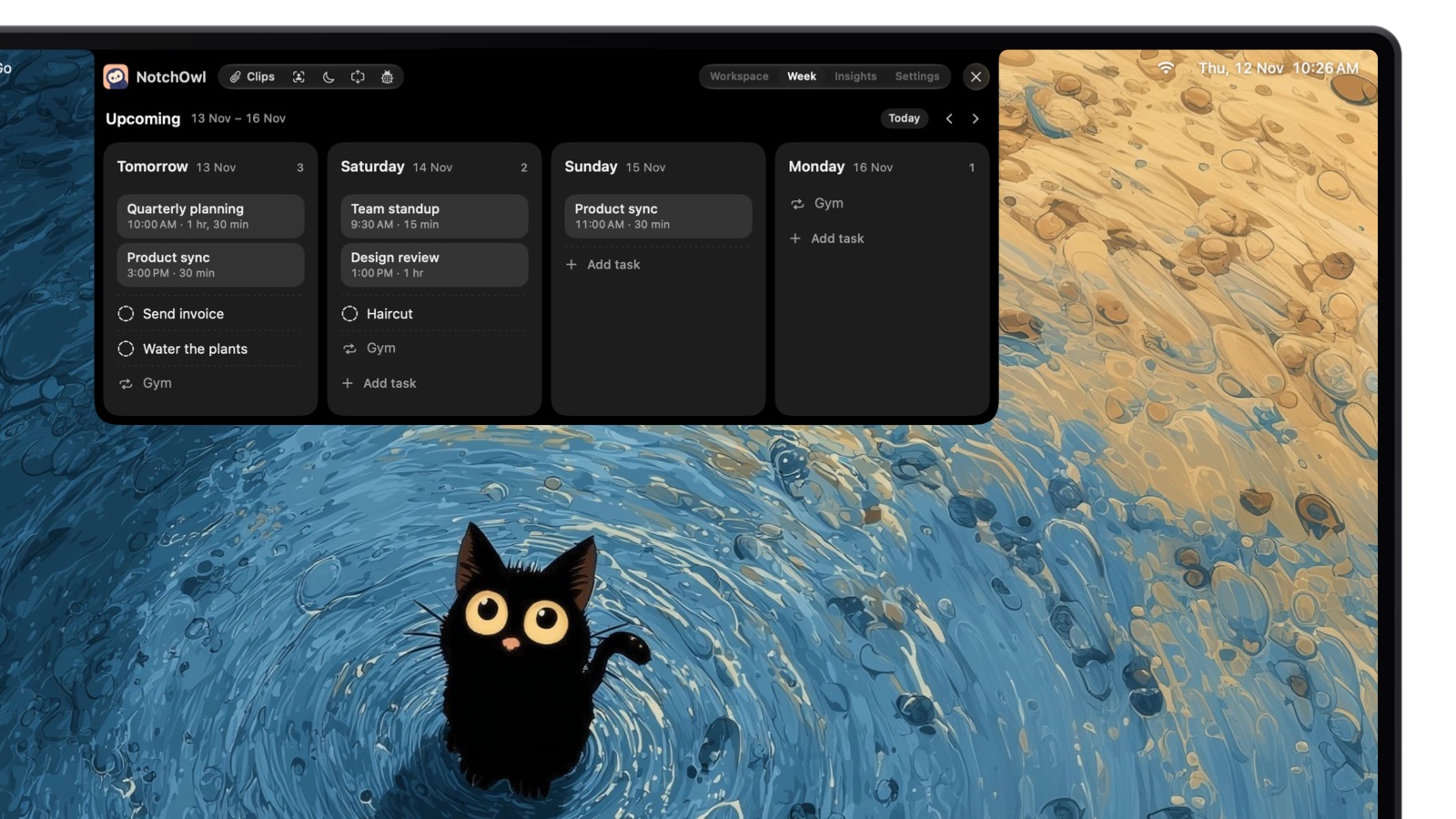
On the Week page, each day lists its meetings first, then its tasks.
NotchOwl reads two weeks of events from Apple Calendar, including Google and Outlook accounts added to your Mac or calendars subscribed by link, plus Calendly and Cal.com bookings, and video calls get a Join button. It costs $12 once for up to 3 Macs (an early-bird price, normally $39), with lifetime updates and a 7-day money-back guarantee; there is no free tier or trial. It runs on Apple silicon Macs with macOS 14 Sonoma or later, and optional two-way Apple Reminders sync puts tasks on iPhone and Apple Watch.
- Best for: one person planning their own day on a Mac who wants Motion’s “what do I do next” without the subscription.
- Drawbacks: NotchOwl never creates or edits calendar events, so Plan your day sets reminder times, not calendar blocks, and it doesn’t re-plan on its own. It has no iPhone, Windows or web app, no team or shared lists, no projects with Gantt charts, and doesn’t import tasks from work tools. It’s young: the first release was September 15, 2026.
- Link: download NotchOwl or see what the $12 license includes.
Reclaim.ai: the closest thing to Motion’s auto-scheduling
Reclaim.ai calls itself an AI calendar for work. It syncs your task lists and schedules tasks on your calendar by priority, defends Focus Time toward a weekly goal, moves recurring Habits to open slots, and adds buffer time around meetings. Tasks can come from Todoist, Asana, ClickUp, Jira, Linear and Google Tasks.
- Price: the Lite plan is free for one user, with a one-week scheduling range, 2 connected calendars and integrations limited to Google Tasks, Slack, Zoom and Google Meet. Starter costs $10 a seat a month billed yearly or $12 monthly (8-week range), and Business $15 or $18 (12-week range), per Reclaim’s pricing page in November 2026. Paid plans have a 14-day trial.
- Platforms: Reclaim works with Google Calendar and Outlook and runs in the browser, with a Google Calendar add-on. Its help center says it has no native iOS or Android apps; you add the web app to your home screen and move Reclaim’s events in your calendar app.
- Best for: people who liked Motion’s automatic scheduling, work in Google or Outlook calendars, and don’t need docs or projects.
- Drawbacks: no iCloud calendar on Reclaim’s pages, no native phone apps, and the free plan only looks one week ahead.
- Link: reclaim.ai
Morgen: AI suggestions you approve
Morgen describes itself as daily plans designed by AI and perfected by you. Its AI Planner shows recommended time blocks in your calendar, guided by templates it calls Frames, reprioritizes when something conflicts, and flags tasks at risk of running late. You accept or adjust each suggestion, so the calendar doesn’t move without you.
- Price: $15 a month billed yearly ($180) or $30 monthly for individuals, and $10 a seat billed yearly or $25 monthly for teams of two or more, with a 14-day trial and no card needed, per Morgen’s pricing page. No free plan is listed.
- Calendars and tasks: Google, Outlook, Apple, iCloud, Fastmail and CalDAV calendars; tasks from Notion, Todoist, Obsidian, ClickUp, Linear, Apple Reminders, Google Tasks and Microsoft To Do, per Morgen’s integrations page.
- Platforms: Windows, Mac, Linux, the web and mobile, per Morgen’s homepage.
- Best for: people who want help placing blocks but want the final say, and iCloud or Apple Reminders users Reclaim doesn’t cover.
- Drawbacks: no free plan, and $30 billed monthly is closer to Motion than to the cheap options.
Sunsama: a guided plan you make yourself
Sunsama walks you through choosing today’s tasks from your calendar, backlog and connected tools each morning, has you timebox them, and closes the day with a shutdown. You can still hand it one task at a time: Sunsama’s auto-scheduling guide says to hover over a task and press X, and it finds a free slot in your working hours that avoids your events.
- Price: $17 a month billed yearly ($204) or $22 monthly, after a 14-day trial with no card needed. Sunsama’s pricing page says it has no free plan and doesn’t plan to add one.
- Integrations: Google, Outlook and Apple calendars, plus Asana, ClickUp, GitHub, Jira, Linear, Notion, Todoist, Trello, Gmail, Slack, Microsoft Teams and more, per Sunsama’s homepage.
- Platforms: Mac, Windows, Linux, iPhone, iPad, Android and the web.
- Best for: people who found Motion’s reshuffling stressful and want a calm routine instead.
- Drawbacks: $204 a year, and it pays off only if you do the morning plan. More options are in the best Sunsama alternatives.
Akiflow: every tool’s tasks in one inbox
Akiflow pulls tasks from Slack, Gmail, Notion, Asana, ClickUp, Trello, Todoist, Jira, Linear, GitHub, Microsoft Teams, Outlook and more into one inbox, then lets you drag them onto your calendar as time blocks, with daily and weekly planning and shutdown rituals. Pro includes Aki, Akiflow’s AI assistant, and a hosted MCP connector for AI apps.
- Price: $19 a month billed yearly ($228) or $34 monthly, with a 7-day trial that needs a card and no free plan, per Akiflow’s pricing page. An AI Meeting Assistant costs $19 a month extra.
- Platforms: Mac, Windows and the browser; the iPhone and Android apps ask you to install the desktop app first.
- Best for: people whose tasks start in other tools and who want to place blocks themselves.
- Drawbacks: you do the scheduling, and it’s the most expensive option here after Motion. See Akiflow alternatives for cheaper planners.
- Link: akiflow.com
TickTick: tasks, calendar and a timer for $49.99 a year
TickTick is a cross-platform task manager with a Pomodoro timer, a habit tracker, an Eisenhower Matrix and calendar views built in. The free plan allows 9 lists of 99 tasks, 2 reminders per task and 5 habits; Premium costs $49.99 a year and adds multiple calendar views and task durations, so tasks can fill blocks of time, per TickTick’s Premium page. On a Mac, Command–Shift–A adds a task from any app and Command–Shift–O opens your tasks from the menu bar.
- Best for: people who mostly used Motion as a task list and calendar, and want to pay about a seventh of the price.
- Drawbacks: no automatic scheduling; you drag tasks onto the calendar yourself.
- Link: ticktick.com. See Todoist vs TickTick for a closer look.
Todoist: a fast list with a calendar layout
Todoist reads dates and projects from what you type, shares projects with other people and connects to many tools. Its free Beginner plan allows 5 personal projects; Pro costs $5 a month billed yearly ($60) or $7 monthly and adds the calendar layout, task durations, deadlines and custom reminders, per Todoist’s pricing page. Business costs $8 per user a month billed yearly.
- Best for: small teams that used Motion for shared projects and can schedule by hand.
- Drawbacks: no auto-scheduling and no focus timer.
- Link: todoist.com
Structured: a free visual timeline
Structured puts tasks and events on one vertical timeline, so the day reads like a schedule and gaps are easy to spot. The timeline, an inbox and a Pomodoro focus timer are free. Pro adds an AI that drafts a day’s schedule, calendar and Reminders import, and Replan, which reschedules missed tasks, per its App Store listing; the US listing shows a $99.99 lifetime option.
- Platforms: iPhone, iPad, Mac (macOS 15 or later), Apple Watch, Vision Pro, Android and the web.
- Best for: personal planning on a phone as much as a computer.
- Drawbacks: it’s a planner for one person, not a project tool.
- Link: structured.app
How to replace Motion’s auto-scheduling by hand
Motion’s main promise is that you never decide when to do things. You can make most of that decision yourself in a few minutes a day, and any app above can hold the result.
- Keep one inbox. Everything new goes into one list first, not straight onto a day.
- Plan the week loosely. Once a week, drag tasks from the inbox onto days, a few per day, around the meetings already there.
- Plan today properly. Each morning, put the day’s tasks in order, most important first, and give the top few a time in the gaps between meetings.
- Protect one block. Start a focus timer on the most important task before email gets to you.
- Re-plan once, at midday. When a meeting runs over, re-plan the afternoon once instead of reshuffling all day.
- Close the day. Move what’s left to tomorrow or back to the inbox.
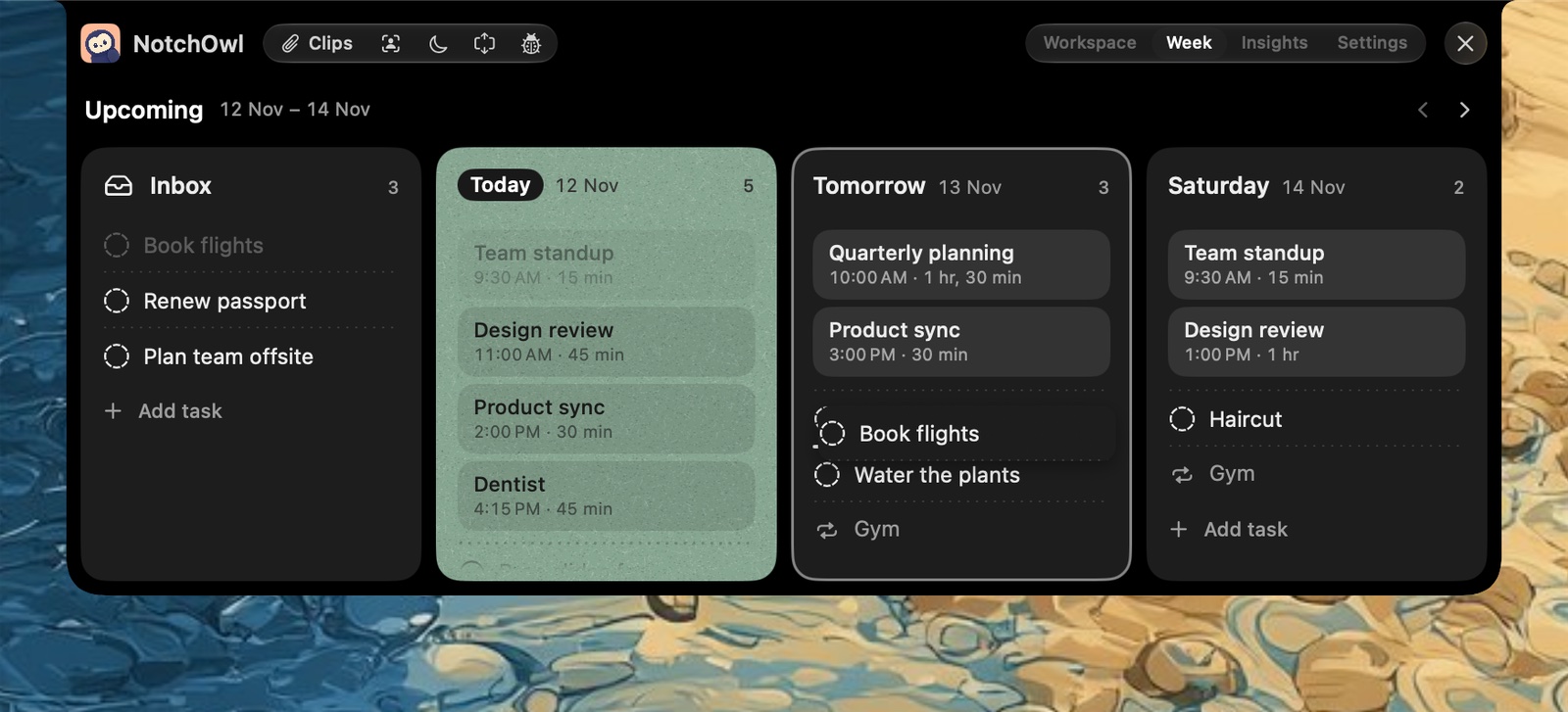
On the Week page, drag a task from the Inbox onto the day you’ll do it.
In NotchOwl, steps 2, 3 and 6 are the Week page, Plan your day and Wrap up; in Sunsama they are the daily planning and shutdown rituals. For more ways to put tasks on a calendar, see the best time blocking apps for Mac.
When to stay with Motion
- You want the computer to decide. If you’re happy giving every task a duration and deadline and letting the calendar rearrange itself, nothing here does as much of it as Motion, though Reclaim comes close.
- You run team projects. Business AI adds capacity planning, dashboards, timeline and Gantt charts, time tracking and permissions, which no planner on this list matches.
- You use its AI every day. If AI docs, meeting notes and workflows replace other subscriptions for you, Motion’s price covers more than a planner.
- You need Windows or an Intel Mac. Motion supports both; NotchOwl needs Apple silicon.
When NotchOwl is the wrong choice
- You want blocks on your calendar. NotchOwl reads your calendar but can’t add or move events. Reclaim, Morgen, Sunsama, Akiflow or Motion itself do.
- You want scheduling to happen by itself. Plan your day runs when you open it and changes nothing until you press Apply.
- You plan with a team or on your phone. NotchOwl has no shared lists and no iPhone, Windows or web app; it reaches iPhone only through Apple Reminders.
- You want to try before paying. There’s no trial, only a 7-day refund. Reclaim, TickTick, Todoist and Structured are free to start.
Before you cancel Motion
Copy your open tasks and active projects into the new app, run both for a week, and recreate repeating tasks and deadlines by hand. Motion’s cancellation guide says individuals cancel from Settings, then Manage Plan, then Cancel Plan, that App Store subscriptions are cancelled in your Apple ID settings, and that cancelling doesn’t automatically trigger a refund. If you mainly want a cheaper planner rather than an AI one, the best daily planner apps for Mac and Mac productivity apps with no subscription have more options.
Frequently asked questions
What is the best Motion alternative?
Reclaim.ai is the closest match to Motion’s auto-scheduling and has a free plan, while NotchOwl ($12 once) is the pick for planning your own day on a Mac without a subscription. Morgen ($15 a month billed yearly) suggests time blocks you approve, and Sunsama ($17 a month billed yearly) guides a daily plan you make yourself.
How much does Motion cost in 2026?
For one person, Motion Pro AI costs $29 a month billed yearly or $49 monthly, and Business AI costs $39 or $69, as of November 2026. Teams pay per seat: Pro AI $19 billed yearly or $29 monthly, Business AI $29 or $49. Pro AI includes 7,500 AI credits per seat a month, and there is no free plan.
Is there a free alternative to Motion?
Yes. Reclaim.ai’s Lite plan is free and auto-schedules up to one week ahead on Google or Outlook calendars. Structured’s core app, TickTick’s and Todoist’s free plans, and Apple Calendar with Reminders also cost nothing, though none of them schedules tasks for you.
Which Motion alternative schedules tasks automatically?
Reclaim.ai is the closest: it schedules tasks from Todoist, Asana, ClickUp, Jira, Linear or Google Tasks onto your calendar by priority and defends focus time. Morgen’s AI Planner suggests time blocks you accept or adjust, and Sunsama auto-schedules one task at a time when you press X.
Is there a Motion alternative you pay for once?
Yes. NotchOwl costs $12 once for up to 3 Macs, and Structured sells a lifetime Pro purchase ($99.99 on the US App Store in November 2026). Things 3 ($49.99 once for the Mac) is a one-time purchase too, but it doesn’t plan your day around meetings.
Does Motion have a Mac app?
Yes. Motion’s desktop app runs on Apple silicon and Intel Macs with macOS 11 Big Sur or later, and on Windows; there are also web, iPhone and Android apps. Motion’s help center says onboarding must be finished in a desktop browser before the desktop and mobile apps work, and it calls the mobile app an accompaniment to the desktop and web apps.