How to Prioritize Tasks: 6 Methods and When to Use Each
How to prioritize tasks with six methods: the Eisenhower matrix, MITs and 1-3-5, eat the frog, ABCDE, impact vs effort and deadlines, and when each fits.
By Aditya Jaiswal, founder of NotchOwl · Updated · 14 min read
How to prioritize tasks comes down to three steps: write everything down, choose one simple rule for what matters most, and do the top task before you look at anything else. The six methods below are those rules: the Eisenhower matrix, most important tasks (and the 1-3-5 rule), eat the frog, ABCDE, impact versus effort, and deadline first. Each one takes a few minutes a day, works on paper, and maps onto the priority, due date and ordering tools in any to-do app. If you plan on a Mac, NotchOwl, a notch planner I make, keeps today’s priorities one hover away and can order the day for you; it leads the apps section further down.
Because NotchOwl is mine, its section lists what it doesn’t do as well. The methods themselves come from their original authors, linked where each is described, and details about other apps come from their help centers, pricing pages and App Store listings in November 2026.
How to prioritize tasks: the 6 methods at a glance
Six ways to prioritize tasks compared by their rule, when each works best and how to set it up in a to-do app
Method
The rule
Best when
In a to-do app
Eisenhower matrix
Sort by urgent and important into four boxes: do, schedule, delegate, drop
Everything feels urgent
Priority for importance, due date for urgency, or TickTick’s matrix view
MITs and 1-3-5
Pick 1 to 3 most important tasks, or 1 big, 3 medium and 5 small
The list is long and you don’t know where to start
Mark the big task high priority and move it to the top
Eat the frog
Do the hardest important task first
You keep putting one task off
Move it to the top and start a timer on it
ABCDE
Label tasks A to E by consequences; never do a B while an A is left
Many tasks have real consequences
A, B and C as high, medium and low priority
Impact vs effort
Do quick wins first, plan big bets, drop time sinks
Projects or ideas compete for limited time
Tags or labels, plus a time estimate
Deadline first
Earliest due date first
Work is driven by hard dates
Sort by deadline
To prioritize tasks, list everything, drop what doesn’t matter, then order the rest with one rule, such as urgent versus important or one big task first, and finish the top task before starting the next.
1. The Eisenhower matrix: urgent vs important
The Eisenhower matrix takes its name from a line Dwight D. Eisenhower quoted in a 1954 address in Evanston, Illinois, crediting a former college president: “I have two kinds of problems, the urgent and the important.” Stephen Covey turned the idea into the four-quadrant Time Management Matrix in The 7 Habits of Highly Effective People.
Draw a 2-by-2 grid and put each task in one box:
Urgent and important: do it now. Real deadlines, problems, things that break if you wait.
Important, not urgent: schedule it. Planning, learning, health, the project that moves your year forward. Covey’s point was that this box is the one to protect, because nothing forces it onto your day.
Urgent, not important: delegate or batch it. Most interruptions, many messages, other people’s requests.
Neither: drop it. Busywork and things you do to avoid the real task.
The matrix works best on a full, noisy list, because it forces you to say out loud which “urgent” things don’t matter. Its weak spot is that it doesn’t order tasks inside a box, so pair it with deadline first or MITs.
In a to-do app: TickTick has a dedicated Eisenhower Matrix view. In other apps, use the priority for importance and the due date or reminder time for urgency: a high-priority task due today is box 1, a high-priority task with no date is box 2 and needs a date.
2. Most important tasks (MITs) and the 1-3-5 rule
An MIT is, in Leo Babauta’s words on Zen Habits, “the task you most want or need to get done today.” In his MIT method he picks three each day, makes at least one of them a step toward a bigger goal, and does them first thing in the morning before the day fills up.
The 1-3-5 rule gives the rest of the day a shape. Developed by Alexandra Cavoulacos, co-founder of The Muse, it assumes you can finish one big task, three medium tasks and five small tasks in a day. As Todoist’s write-up of the 1-3-5 method puts it, you choose those nine priorities the evening before, finish the big one early, and at the end of the day decide whether unfinished tasks move to tomorrow, go back to the main list or get deleted.
Both methods fix the most common prioritization mistake: a list of 25 equal-looking items where the important one hides at number 14. Capping the day at one to nine items makes the cut explicit.
In a to-do app: keep your full list wherever it lives, but plan today’s list separately. Mark the one big task as high priority and move it to the top, add the three medium tasks below it, and leave the small ones for the gaps between meetings.
3. Eat the frog: do the hardest task first
“Eat the frog” means doing your biggest, most important task, the one you are most likely to put off, before anything else. Brian Tracy popularized it in his book Eat That Frog!, and his own summary adds two rules: if you have several important tasks, start with the biggest and hardest, and finish it before moving on. The line about eating a live frog first thing in the morning is usually credited to Mark Twain.
The method works because the hardest task is the one that grows when you postpone it, and finishing it early changes how the rest of the day feels. It fits people whose energy is highest in the morning. If yours peaks later, eat the frog at your best hour instead, and protect that hour from meetings.
In a to-do app: move the frog to the top of today’s list, mark it high priority, and start a focus timer on it the moment you sit down. Opening email first is how the frog survives until 4 p.m.
4. The ABCDE method
The ABCDE method, also from Brian Tracy, is a stricter way to rank a list by consequences. As he describes it in The ABCDE list technique, you write a letter next to every task:
A: must do. Serious consequences if it isn’t done. Number them A-1, A-2, A-3 in order.
B: should do. Mild consequences. Never do a B task while an A task is left.
C: nice to do. No consequences either way. Never do a C while a B or an A is left.
D: delegate. Anything someone else can do, so you have more time for A tasks.
E: eliminate. Tasks you can drop entirely.
Then start on A-1 and stay with it until it’s finished. ABCDE takes only a few minutes, and the D and E letters do half the work: every task you hand off or delete is one you don’t have to rank.
In a to-do app: most apps have three or four priority levels, which map neatly onto A, B and C. In Todoist, type p1, p2 or p3 in the task name; in Apple Reminders, choose high, medium or low; in NotchOwl, type !high, !medium or !low. Delegate D tasks by assigning them in a shared app or sending them by message, and delete the E tasks.
5. Impact vs effort
The impact-versus-effort matrix is a second 2-by-2 grid, better suited to projects, ideas and backlogs than to a single day. Score each task on how much difference it makes and how much time it takes:
High impact, low effort: quick wins. Do these first.
High impact, high effort: big bets. Break them into steps and schedule them.
Low impact, low effort: fillers. Do them in the gaps, or batch them.
Low impact, high effort: time sinks. Drop or postpone them.
The method is only as good as your effort estimates, so write a rough time next to each task (“20 min”, “2 days”). It also ignores deadlines, so check that nothing urgent is sitting in the filler box.
In a to-do app: tags or labels carry the scores. Cultured Code’s guide to prioritizing in Things suggests starting with one tag, such as “Important”, and growing into tags like “Quick Wins” and “High Impact”. A time estimate on each task, where the app has one, carries the effort.
6. Deadline first, and when to break the rule
Ordering by due date is the default in most to-do apps and the right rule when your work is driven by hard dates: invoices, school assignments, client deliveries, travel. Sort by deadline, start with the earliest, and work down.
It goes wrong in two ways. Tasks without a date, often the important ones from box 2 of the Eisenhower matrix, never reach the top. And everything with a date starts to look urgent, even when a missed date costs nothing. The fix is to use deadlines as the tie-breaker, not the whole rule: order by priority first, then by the soonest deadline within each level. That combination is also how NotchOwl’s Plan your day orders a day, below.
A 10-minute routine that combines the methods
You don’t need to pick one method forever. A short daily routine borrows the best part of each:
Capture everything. Empty your head into one list, including the vague worries. Unwritten tasks can’t be prioritized.
Cut first. Cross out the E tasks and hand off the D tasks. Every task you remove makes the rest easier to rank.
Choose the frog. Pick the one task that would make today a good day if it were the only thing you finished.
Mark priorities. Give the frog and two or three other tasks a high or medium priority. Leave most tasks without one.
Order the rest by deadline. Within each priority level, the soonest due date goes first.
Put times or a timer on the top tasks. A task with a slot in the day, or a countdown running, gets started.
Close the day. Tick off what’s done, move the rest to tomorrow or back to the list, and write tomorrow’s 1-3-5 if you use it.
Best for keeping today’s priorities in view on a Mac: NotchOwl, $12 once
Best Eisenhower matrix view: TickTick, free or $49.99 a year
Best for typing priorities as you add tasks across every platform: Todoist, free or $5 a month billed yearly
Best for a calm Today list without priority levels: Things 3, $49.99 once for the Mac
Best free option on Apple devices: Apple Reminders
To-do apps compared by priority levels, prioritization tools, platforms and price (US prices, November 2026)
App
Priority levels
Prioritization tools
Platforms
Price
NotchOwl
None, Low, Medium, High
Sort by priority or deadline, Move to top, Plan your day orders by priority then deadline
Mac (Apple silicon, macOS 14+)
$12 once, up to 3 Macs
TickTick
High, medium, low, none
Eisenhower Matrix view (basic free, full on Premium)
Mac, Windows, web, iPhone, Android
Free; Premium $49.99/year
Todoist
P1 to P4
Type p1–p3 in the task name, sort any project by priority
Mac, Windows, web, iPhone, Android
Free; Pro $5/month billed yearly
Things 3
None built in
Today list, drag to order, tags such as Important
Mac, iPhone, iPad, Apple Watch
$49.99 once for the Mac
Apple Reminders
Low, medium, high
Flags, sort by priority
Mac, iPhone, iPad, Apple Watch
Free, built in
NotchOwl: best for keeping today’s priorities in view on a Mac
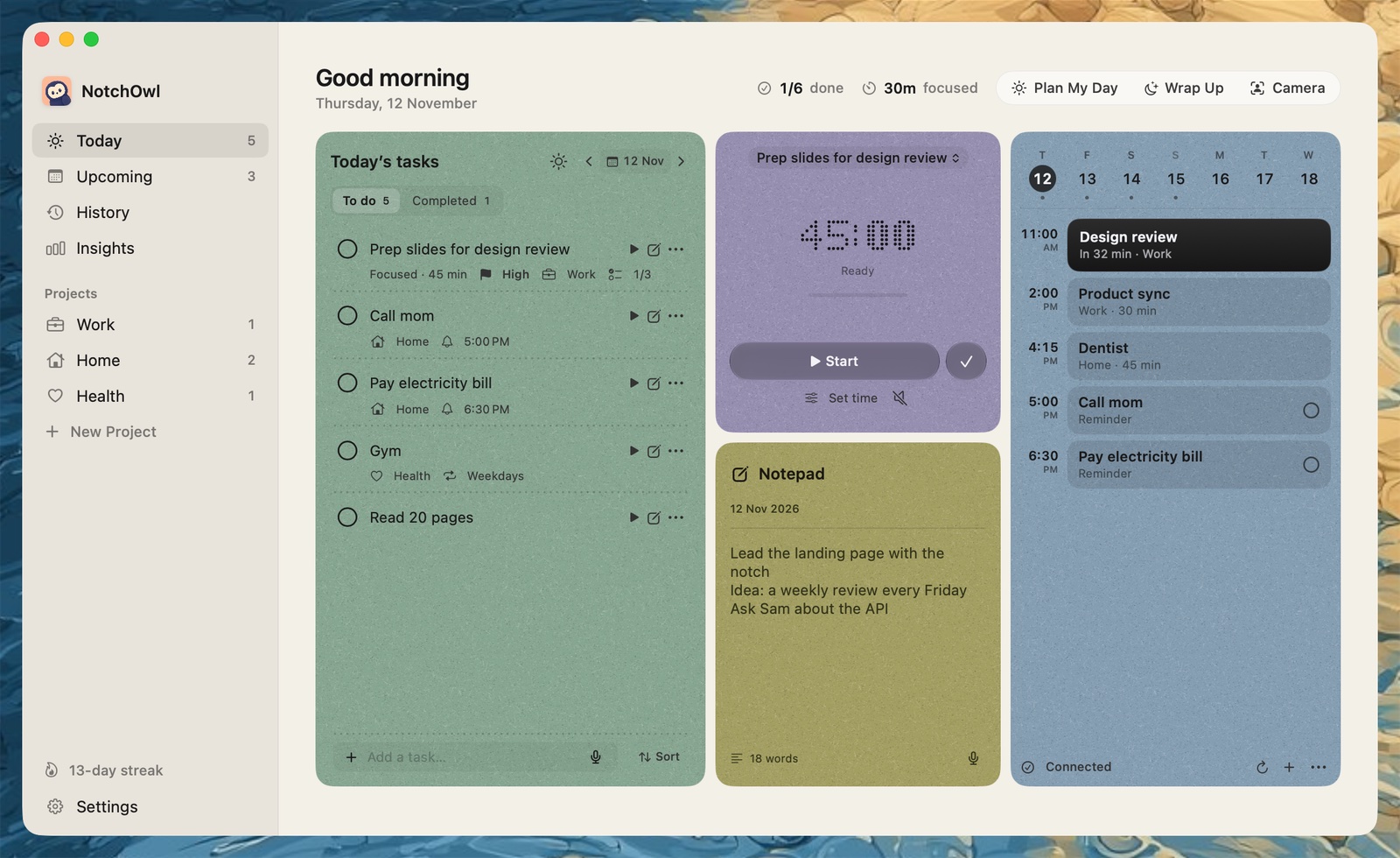
NotchOwl turns the MacBook notch into a daily planner: hover over the notch or press Option–N, and today’s tasks, a focus timer, a daily notepad and your calendar events open over whatever app you’re using. That matters for prioritizing, because a list you can’t see stops guiding your day the moment another window covers it.
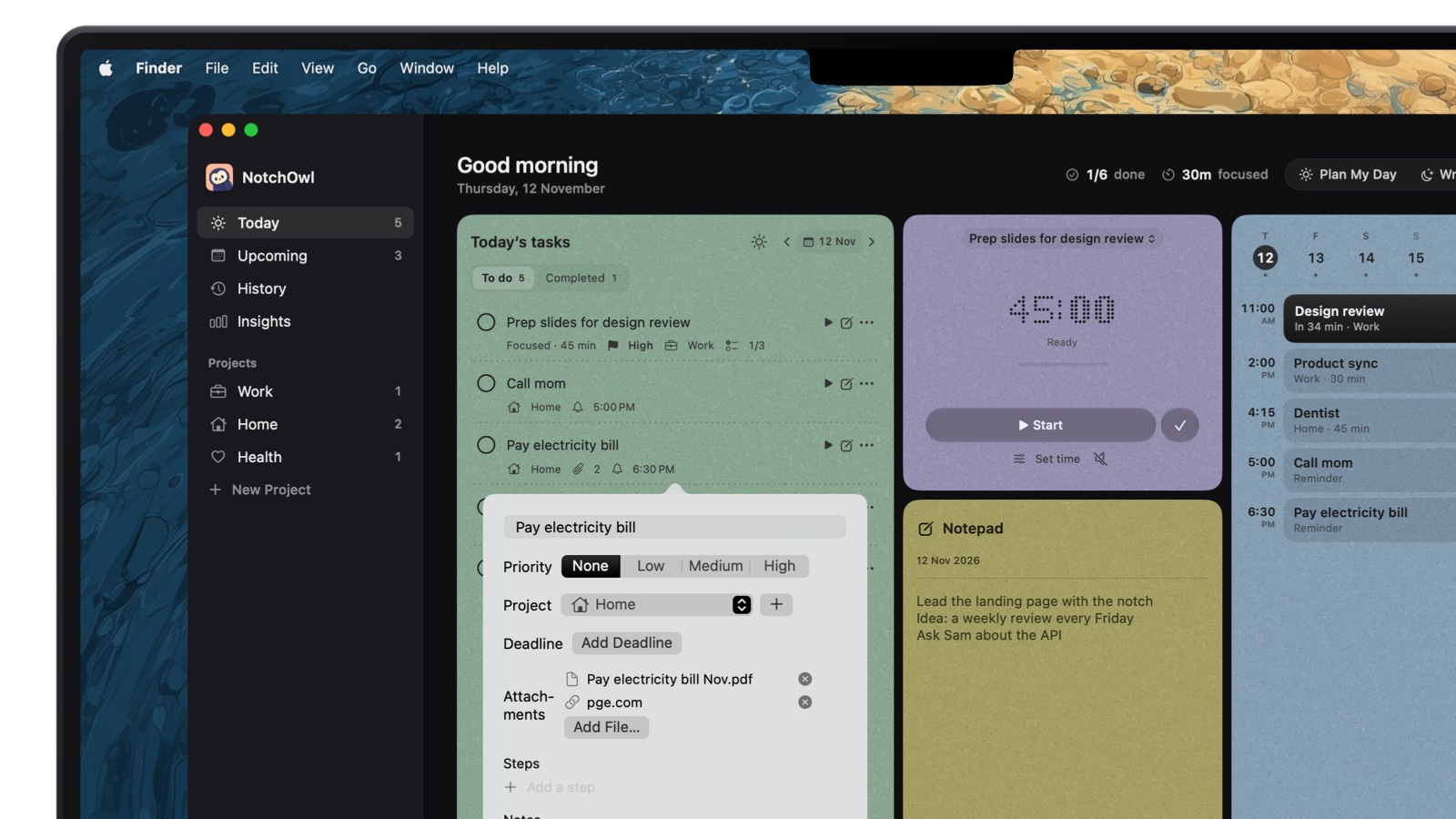
Each task has a priority (None, Low, Medium or High), a project and an optional deadline, plus files and links.
Every task can carry a priority, a project, a deadline, steps and notes. You can set the priority while typing: “send the invoice friday !high” plans the task for Friday at high priority, and !medium, !low and p1 to p3 work too. Sort today’s list by priority, reminder time, deadline, project or name, or use Move to top to put the frog first.
Plan your day turns those labels into an order. Once a day, from 9 a.m. when today has two or more open tasks, the notch offers to plan; you can also start it from the app window. It takes today’s untimed tasks with high priority first, then medium, then tasks with no priority, then low, and within each level the soonest deadline first. It fits each task, for its time limit or 30 minutes, into the free time around your calendar events before your day ends, with a reminder as it starts. Drag a task to reorder and the times follow, choose a length from 15 minutes to 2 hours, or switch to Order only to get the order without times. Nothing changes until you click Apply.
Today in the app window: the high-priority task sits first, with Plan My Day and Wrap Up at the top.
At the end of the day, Wrap up shows what you finished and sends what’s left to tomorrow or the Inbox, and the Week page lets you drag tasks to a later day, which is where B and C tasks go when an A task takes longer than planned. Overdue tasks get their own tab with Reschedule.
One early user described what drew them to it on X:
I was looking for something to brain dump thoughts, track tasks, and focus on one thing at a time, without digging through windows.
What it doesn’t do: there is no Eisenhower matrix view, so urgency comes from deadlines and reminder times and importance from the priority. There are no shared lists, so delegating happens in another app. Plan your day gives tasks reminder times but doesn’t put time blocks on your calendar, which NotchOwl only reads.
Price: $12 once for up to 3 Macs (an early-bird price, normally $39), with lifetime updates and a 7-day money-back guarantee. There is no free tier or trial.
Requirements: an Apple silicon Mac with macOS 14 Sonoma or later. A notch is optional: external monitors get a drawn notch, and other Macs open NotchOwl at the top center of the screen. There is no iPhone app; optional two-way Apple Reminders sync carries tasks to iPhone and Apple Watch.
TickTick has the Eisenhower matrix built in. Turn it on in Settings › Feature, and the matrix shows your tasks in four quadrants (Urgent & Important, Not Urgent & Important, Urgent & Unimportant, Not Urgent & Unimportant), placed automatically by priority level (High, Medium, Low or No Priority). A second built-in rule uses priority for importance and the task’s date for urgency. TickTick’s matrix guide explains how to edit the rules for each quadrant and make several matrix views, such as one for work and one for home, and tasks stay in their own lists while they appear in the matrix.
According to TickTick’s Premium page, the free plan includes a basic matrix with 9 lists of 99 tasks each, and Premium costs $49.99 a year for the full matrix and 299 lists. For how it compares with Todoist, see Todoist vs TickTick.
Todoist: best for typing priorities as you add tasks
Todoist has four priority levels, numbered 1 to 4, with priority 4 as the default. Todoist’s priorities guide shows the fast way to set one: type p1, p2 or p3 in the task name as you add it. To work through a project by priority, open its Display menu, choose Sorting and select Priority, or press P while viewing the project. Todoist’s free Beginner plan allows 5 personal projects; Pro costs $5 a month billed yearly or $7 monthly, according to Todoist’s pricing page.
Things 3: best for a calm Today list without priority levels
Things 3 deliberately has no priority field. Its approach is to put the tasks that matter into Today, drag them into the order you’ll do them, and add a tag such as “Important” if you need one. Things 3 costs $49.99 once for the Mac, needs macOS 13.3 or later, and has separate iPhone and iPad apps (Things 3 on the Mac App Store).
Apple Reminders: best free option on Apple devices
Apple Reminders, built into every Mac, iPhone and iPad, has three priority levels. On a Mac, open a reminder’s details and choose low, medium or high in the Priority field under Organization; the list shows one, two or three exclamation marks. You can flag a reminder as well and sort a list by priority (Apple’s Reminders guide). It’s free and syncs through iCloud, though it has no matrix view or planning tools.
Write every task down, cross out what doesn’t need doing, then pick one rule to order the rest: urgent versus important (the Eisenhower matrix), one big task first (MITs or eat the frog), or A to E by consequences (ABCDE). Do the top task before checking anything else, and review the list once at the end of the day.
What is the 1-3-5 rule for to-do lists?
The 1-3-5 rule, from Alexandra Cavoulacos of The Muse, limits a day’s list to one big task, three medium tasks and five small ones. You write the list the evening before, so the next morning starts with a plan instead of a decision.
What does “eat the frog” mean?
Eat the frog means doing your biggest, most important task, the one you are most likely to put off, first thing, before email or small jobs. Brian Tracy popularized it in his book Eat That Frog!, built on a line usually credited to Mark Twain.
How do you prioritize when everything feels urgent?
Sort each task by two questions: does it have a real deadline soon, and does it matter to your goals? Do what is both, give a date to what matters but can wait, hand off or batch what is only urgent, and drop the rest. That is the Eisenhower matrix.
What is the ABCDE method of prioritizing?
Brian Tracy’s ABCDE method labels each task: A for must do with serious consequences, B for should do, C for nice to do, D for delegate and E for eliminate. You number the A tasks (A-1, A-2) and never do a B task while an A task is left.
Which to-do apps have an Eisenhower matrix?
TickTick has a built-in Eisenhower Matrix view that sorts tasks into four quadrants by priority, with a basic version on its free plan and the full view on Premium at $49.99 a year. In apps without one, such as NotchOwl, Todoist or Apple Reminders, use the priority for importance and the due date for urgency.