The best ADHD apps for adults in 2026 for planning, reminders, focus and body doubling: NotchOwl on a Mac, Tiimo, Todoist, Due, Focusmate and Goblin Tools.
By Aditya Jaiswal, founder of NotchOwl · Updated · 13 min read
The best ADHD apps for adults cover four jobs: planning the day, remembering things at the right moment, starting and staying on a task, and having someone work alongside you. The top picks are NotchOwl ($12 once) for keeping today’s plan in view on a Mac, and Tiimo, Todoist, Due, Focusmate and Goblin Tools across phones and computers. Tiimo is the best visual planner, Todoist the best place to capture everything, Due the most persistent reminders on iPhone, Focusmate the best body doubling app and Goblin Tools the best free help for breaking big tasks into small steps.
A note before the list: I make NotchOwl, which is why it’s first, and it only runs on a Mac; every other app here works on a phone, and several on Windows too. Prices are US prices from each app’s own site or App Store page as of November 2026. Apps are tools, not treatment: NIMH’s guide for adults names medication and psychotherapy as “the most common treatments for ADHD in adults”, says some adults get support from “a life coach or ADHD coach” or try lifestyle changes such as more exercise, and notes that people whose ADHD symptoms “cause impairment at work” may qualify for reasonable accommodations under the Americans with Disabilities Act. If you work mostly on a Mac, the best ADHD apps for Mac goes deeper on Mac planners, and the best ADHD planner apps compares planners alone, paper included.
What to look for in ADHD apps for adults
NIMH says that in adults, ADHD symptoms can lead to “disorganization and procrastination”, “trouble remembering daily tasks” and difficulty paying attention while “often getting distracted”. In grown-up life, those land in two places at once. At work: meetings, deadlines, email and long stretches of focus. At home: bills, appointments, chores, and other people who depend on you remembering. A useful app takes one of those problems off your mind, and the best ones share a few traits:
Capture takes seconds. A thought you don’t write down in the moment is often gone; one shortcut, your voice or a plain sentence should be enough.
Reminders interrupt you. A reminder that waits quietly inside a list doesn’t help. It should appear where you are, with snooze and done.
Time is visible. A timeline or a countdown shows time passing, which helps if hours tend to disappear (see time blindness and ADHD).
Starting is easier. Small steps, a timer or another person make the first five minutes less of a wall.
It lives where you already are. On your phone, in the menu bar or notch, or in the browser you already have open.
It’s cheap to try. Free plans and trials matter, because the first app you try may not stick.
Best apps for ADHD adults: quick picks
Best for keeping today’s plan in view on a Mac: NotchOwl
Best visual planner on phone and computer: Tiimo
Best free visual timeline: Structured
Best for capturing tasks anywhere: Todoist
Best free all-in-one with a timer and habits: TickTick
Best reminders that won’t let go: Due
Best free reminders and shared household lists: Apple Reminders
Best for staying off your phone: Forest
Best blocker across every device: Freedom
Best body doubling app: Focusmate
Best free help breaking tasks down: Goblin Tools
ADHD apps for adults compared by job, price and platforms (US prices, November 2026)
App
Job
Price
Platforms
NotchOwl
Today’s plan, reminders and a focus timer in the notch
$12 once, up to 3 Macs
Mac (Apple silicon, macOS 14+)
Tiimo
Visual day planner
Free tier on iOS and Android; Pro varies by location
iPhone, iPad, Watch, Android, Mac, web
Structured
Visual timeline
Free; Pro monthly, yearly or $99.99 lifetime
iPhone, iPad, Watch, Mac, Vision Pro, Android, web
Todoist
Capture and lists
Free; Pro $5/mo billed yearly or $7 monthly
iPhone, iPad, Android, Mac, Windows, Linux, web
TickTick
Lists, Pomodoro and habits
Free; Premium $49.99/yr
iPhone, iPad, Android, Mac, Windows, Linux, web
Due
Reminders that repeat until done
$7.99; Mac app sold separately
iPhone, iPad, Apple Watch
Apple Reminders
Reminders and shared lists
Free, built in
iPhone, iPad, Mac, Watch, Vision Pro
Forest
Phone-free focus timer
Free with ads; Plus varies by region
iPhone, iPad, Android, Chrome, Firefox
Freedom
Blocks sites and apps
Free; Premium $8.99/mo or $3.33/mo billed yearly
Mac, Windows, iPhone, Android, Chromebook
Focusmate
Body doubling by video
3 free sessions/week; Plus $8/mo annually or $12 monthly
Web browser
Goblin Tools
Breaks tasks into steps
Website free; iPhone app $0.99; Pro $3.99/mo
Web, iPhone, iPad, Android
The best ADHD apps for adults split the work by job: NotchOwl ($12 once) keeps today’s plan and a focus timer in view on a Mac, Tiimo and Structured show the day as a timeline, Todoist and Due handle capture and reminders, Freedom and Forest guard focus, Focusmate provides a body double, and Goblin Tools breaks tasks down for free.
Apps for planning the day
NotchOwl: best for keeping today’s plan in view on a Mac
If your workday happens on a Mac, the easiest plan to follow is one you can’t lose behind a window. Hover over the MacBook notch or press Option–N, and NotchOwl drops down today’s tasks, a focus timer, a daily notepad and your calendar events for the next two weeks, over whatever app you’re in. Type or dictate tasks the way you’d say them (“pay the electricity bill tomorrow at 9am”), and NotchOwl sets the day and the reminder; speech is recognized on the Mac. Plan your day fits today’s untimed tasks, most important first, into the free time around your meetings and gives each a reminder, and Wrap up sends what’s left to tomorrow or the Inbox at the end of the day.
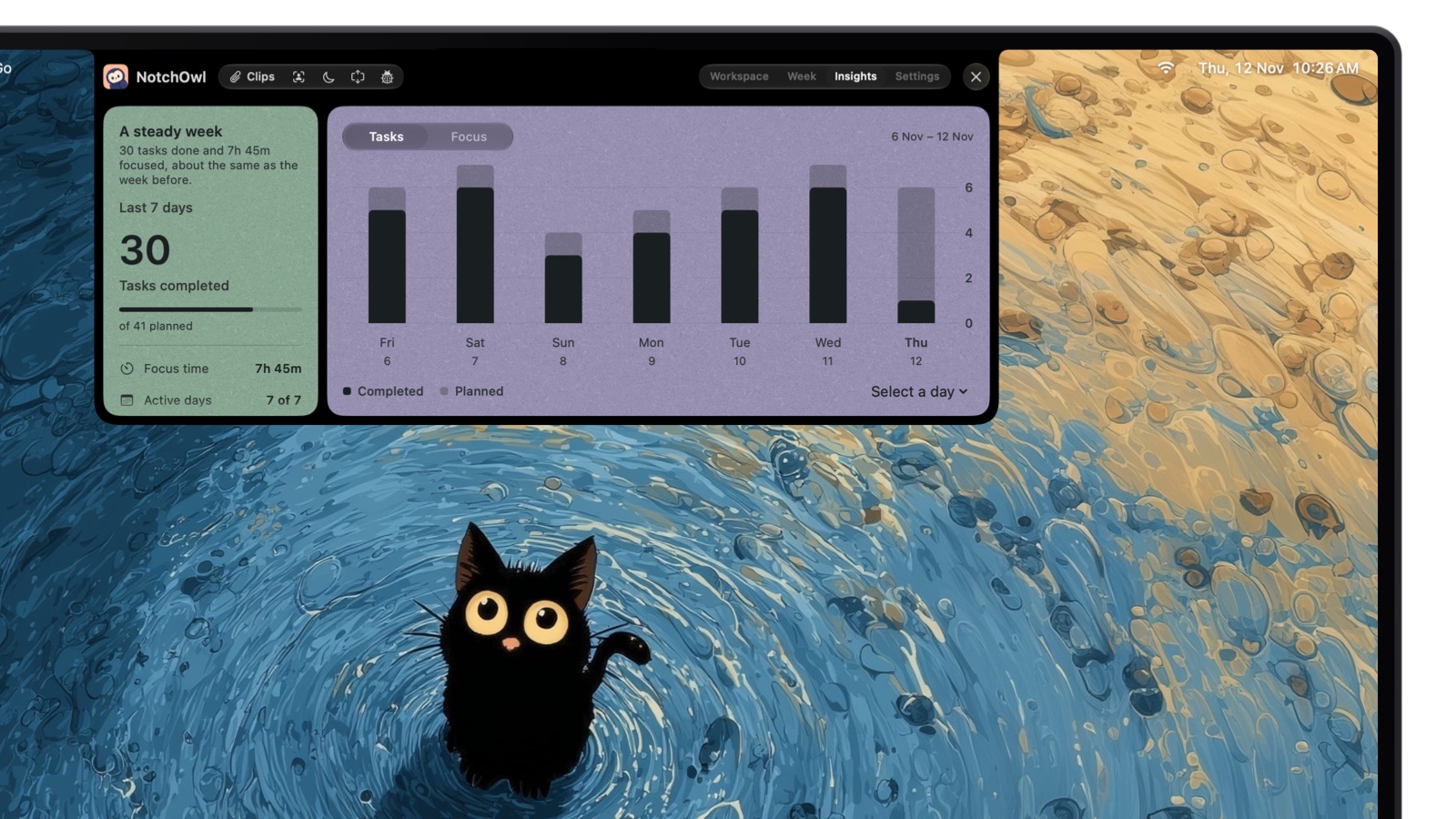
Insights: tasks done and focus time this week against the last, day by day.
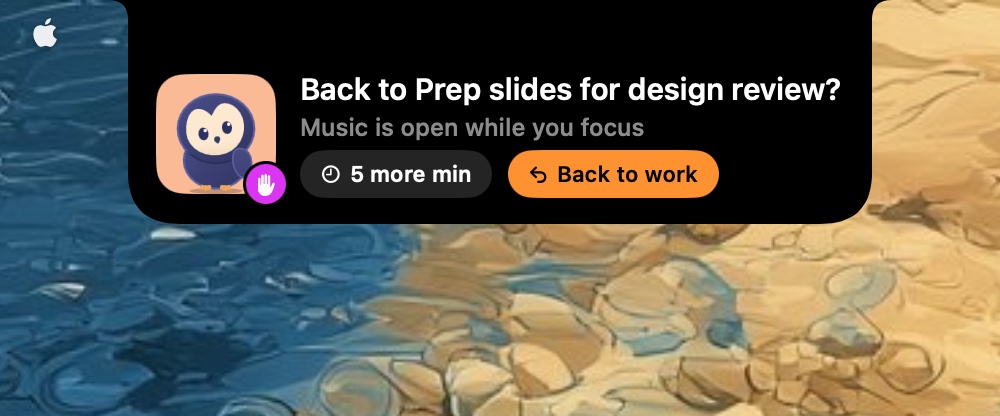
When a reminder comes due, the notch opens with a chime and Snooze and Done buttons. A focus countdown or stopwatch stays beside the closed notch while you work, and if you open an app you listed as a distraction, the owl comes out with your task and a Back to work button. It nudges; it doesn’t block.
Open a distracting app mid-focus and the owl asks you back, with 5 more min or Back to work.
For home, NotchOwl reaches your phone through Apple Reminders: turn on two-way sync and a NotchOwl list carries your tasks to iPhone and Apple Watch, where timed reminders ring too.
Two-way Reminders sync puts NotchOwl’s tasks on iPhone and Apple Watch.
Cost: a one-time $12 license (early-bird; the regular price is $39) covers 3 Macs, with updates for life. There’s no free tier or trial, only a 7-day money-back guarantee.
Platforms: Apple silicon Macs with macOS 14 Sonoma or later; external monitors get a notch drawn at the top of the screen.
Drawbacks: Mac only, with no iPhone, Android or Windows app. It reads your calendar but doesn’t create events or time blocks, it doesn’t block apps or websites, and it has no shared or family lists.
Tiimo is a visual daily planner built with ADHD and autism in mind. The day appears as a color-coded timeline, a focus timer counts down the current task, and the AI Co-Planner helps create, prioritize and plan tasks. It syncs with Apple Calendar and Reminders, and Apple named it iPhone App of the Year in its 2025 App Store Awards.
Price: a free tier with a selection of planning tools on iOS and Android. Tiimo Pro unlocks everything on every platform, monthly or yearly, at prices that vary by location, with a 7-day trial on yearly plans.
Platforms: iPhone, iPad, Apple Watch, Android, Mac (macOS 15 or later, M1 or newer) and the web.
Best for: adults who need to see the whole day as a picture, at work and at home.
Drawbacks: no published price, and the web and Mac apps need Pro.
Structured: best free visual timeline
Structured lays tasks on one drag-and-drop timeline, so an overbooked afternoon is obvious before it happens, and it is the place to start if you want a visual day without paying. The free app includes the timeline, an inbox, a Pomodoro focus timer, widgets and Live Activities, per its US App Store listing. Pro, sold monthly, yearly or for $99.99 lifetime on the US App Store, adds recurring tasks and routines, calendar connections, AI planning and Replan for missed tasks. Structured runs on iPhone, iPad, Apple Watch, Mac (macOS 15 or later), Vision Pro, Android and the web, though its help center says Replan and Reminders import are iOS-only.
Apps for capturing tasks and remembering them
Todoist: best for capturing tasks anywhere
Todoist is a fast, cross-platform to-do list known for Quick Add: type “call the landlord every Monday at 10am” and it sets the date and the repeat. Ramble lets you speak several tasks at once, which suits a brain dump on the commute.
Price: the free Beginner plan allows 5 personal projects and limited Ramble sessions; Pro costs $5 a month billed yearly or $7 monthly and adds custom reminders, the calendar layout, task durations and deadlines.
Platforms: iPhone, iPad, Android, Mac, Windows, Linux and the web.
Best for: one inbox for everything, whatever device you’re holding.
Drawbacks: no focus timer among its listed features, and custom reminders need Pro.
TickTick: best free all-in-one with a timer and habits
TickTick puts a to-do list, a Pomodoro timer, a habit tracker and calendar views in one app, which means fewer apps to keep track of. It runs on iPhone, iPad, Android, Mac, Windows, Linux and the web.
Free plan: 9 lists, 99 tasks per list, 5 habits and 2 reminders per task, per TickTick’s plan comparison.
Premium: $49.99 a year, adding more lists, multiple calendar views and task durations.
Watch out for: so many features that setup can turn into a project of its own.
Due: best reminders that won’t let go
Due is an iPhone reminders app built around auto snooze: a reminder you miss repeats every 1, 5, 10, 15, 30 or 60 minutes until you mark it done or reschedule it. For the bill, the form or the call you keep meaning to make, that persistence is the point. Due costs $7.99 on the US App Store, with an optional Annual Upgrade Pass, and runs on iPhone, iPad and Apple Watch; Due for Mac is sold separately. It does reminders and nothing else, and only on Apple devices.
Apple Reminders: best free reminders and shared household lists
Apple Reminders is free, built in and synced through iCloud. It covers more than most people use: date, time and location reminders, repeats, subtasks, Smart Lists, and shared lists where you can assign a task to someone, which makes it a good household list for groceries and chores.
Price: free.
Platforms: iPhone, iPad, Mac, Apple Watch and Vision Pro.
Best for: reminders on your phone and watch at no cost, and lists shared with a partner or family.
Forest turns a focus session into a tree: pick a length, and a tree grows while you stay off other apps, or dies if you leave. Deep Focus blocks other apps during a session, Plant Together lets friends focus at the same time, and coins you earn can fund real trees through Trees for the Future.
Forest is free on iPhone, iPad and Android, with occasional ads that don’t appear during sessions, and has a browser extension for Chrome and Firefox. The optional Plus subscription, priced by region and platform, removes ads and adds Focus Analytics. It suits adults whose phone is the main distraction; just remember it’s a timer and a game, not a task list.
Freedom: best blocker across every device
Freedom blocks websites, apps or the whole internet, and one session can cover your computer and phone together. Premium adds scheduled and recurring sessions and Locked Mode, which stops you ending a session early.
Runs on: Mac, Windows, iPhone, Android and Chromebook.
Good for: protecting work hours from the same few sites. Schedules and Locked Mode need Premium.
Body doubling apps
Focusmate: best body doubling app
Body doubling means working while someone else works too, and Focusmate does it by video: book a 25, 50 or 75-minute session, get matched with another member, say what you’ll work on, and both of you work with cameras on. The fixed start and end, and the person on the other side, can make it easier to begin the task you’ve been avoiding.
Price: the free plan includes 3 sessions a week; Plus, with unlimited sessions, costs $8 a month billed annually or $12 billed monthly.
Platforms: a web browser on a computer or phone; nothing to install.
Best for: tax forms, reports and anything else that only happens when someone is watching.
Drawbacks: you need a camera and a booked slot, and 3 free sessions a week runs out fast.
Apps for breaking big tasks down
Goblin Tools: best free help breaking tasks down
Goblin Tools is a set of small AI tools that its maker, Bram De Buyser, says are mostly for neurodivergent people facing tasks they find overwhelming, per the Goblin Tools about page. Magic ToDo breaks a task like “clean the kitchen” into steps, Estimator guesses how long something will take, and Compiler turns a brain dump into a list of actions.
The website is free with no ads, and there are apps for iPhone, iPad and Android. On the US App Store, the iPhone app costs $0.99 and Goblin Tools Pro is an in-app subscription at $3.99 a month or $39.99 a year. Reach for it the moment a task feels too big to start, at work or at home. It has no calendar or reminders, and its AI steps are a starting point to edit, not a plan to follow blindly.
ADHD apps at work and at home: two simple setups
You don’t need eleven apps. Pick one per problem you actually have, and give each two weeks before judging it.
At work. One planner that stays visible: NotchOwl in the notch on a Mac, or Tiimo or Structured on a second screen or phone. Add Freedom for the hours you need to stay off the same few sites, and book a Focusmate session for the task you keep pushing to tomorrow. For the macOS side (a Work Focus, Screen Time limits, a hidden Dock), see how to focus with ADHD on a Mac.
At home. A shared Apple Reminders list for groceries and chores, with tasks assigned to whoever does them. Due, or a second reminder, for bills and appointments that can’t slip. Goblin Tools for the chore that feels too big to start, and Forest for the evening you want to spend off your phone.
You plan on your phone. NotchOwl has no iPhone or Android app; it reaches iPhone and Apple Watch only through Apple Reminders. Tiimo, Structured, Todoist and TickTick have full phone apps.
You use Windows or an Intel Mac. NotchOwl needs an Apple silicon Mac with macOS 14 or later.
You share lists with a partner or team. NotchOwl has no shared lists; Apple Reminders and Todoist do.
You want a timeline or calendar blocks. NotchOwl reads your calendar without editing it; Tiimo and Structured draw the day as blocks.
You want to try before paying. NotchOwl has no free tier or trial, only a 7-day refund.
Frequently asked questions
What is the best ADHD app for adults?
No single app covers everything, so most adults do best with one app per job. On a Mac, NotchOwl ($12 once) keeps today’s plan, a focus timer and reminders in the MacBook notch; on a phone, Tiimo is the best visual planner, Todoist the best place to capture tasks, and Focusmate the best body doubling app.
Are there free ADHD apps for adults?
Yes. Structured’s core app, the free plans of TickTick and Todoist, Apple Reminders, Forest’s free version, Freedom’s free plan, Focusmate’s 3 free sessions a week and the Goblin Tools website all cost nothing, as of November 2026. Paid upgrades add things like recurring tasks, schedules or unlimited sessions.
What is a body doubling app?
A body doubling app pairs you with another person who works alongside you, usually on a video call, so a work session has a fixed start, a fixed end and someone else present. Focusmate is the best known: it books 25, 50 or 75-minute sessions in a web browser, with 3 free sessions a week.
Which ADHD apps work on both iPhone and Android?
Tiimo, Structured, Todoist, TickTick, Forest, Freedom and Goblin Tools have both iPhone and Android apps, and Focusmate runs in a phone’s web browser. Due and Apple Reminders are Apple-only, and NotchOwl runs only on a Mac.
Can apps help adults with ADHD at work?
Apps can make the day-to-day parts easier: a plan you can see, reminders that interrupt you at the right moment, a visible timer, a blocker for distracting sites and a body double for tasks you avoid. NIMH notes that people whose ADHD symptoms cause impairment at work may qualify for reasonable accommodations under the Americans with Disabilities Act, which no app replaces.
Do ADHD apps replace treatment?
No. NIMH names medication and psychotherapy as the most common treatments for ADHD in adults, and says some adults also work with a life coach or ADHD coach or try lifestyle changes such as more exercise. Apps are practical tools for planning, remembering and focusing, not a treatment for ADHD.